
Coinbase's fees are a common reason people hesitate to use the platform. Although the standard app is straightforward, it becomes noticeably more expensive than most competitors once the spread built into each quote is included.
The pricing structure varies across retail trading, Coinbase Advanced and Coinbase One, as well as card funding, withdrawals and staking. Charges range from variable retail fees to maker rates as low as zero on high-volume Advanced tiers.
Using Coinbase's own disclosures, this guide explains each fee, compares costs with Kraken and Bybit, and identifies where the main savings are available.
Coinbase Trading Fees Breakdown
Several fee systems operate across Coinbase. The one you pay depends on the product, payment method and whether your quoted price includes a spread.
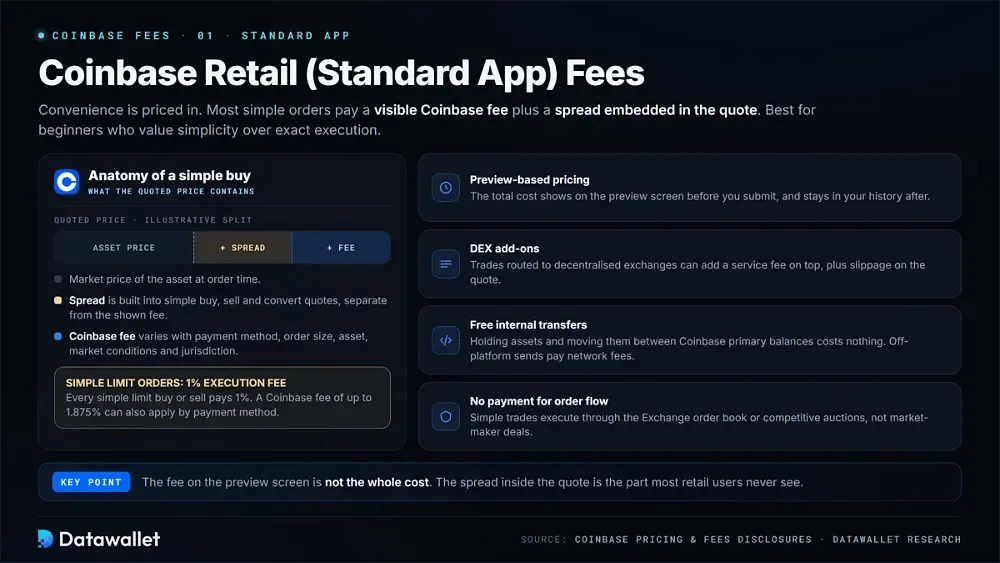
1. Coinbase Retail (Standard App) Fees
Convenience is built into the standard app's pricing. In most cases, you pay a visible Coinbase fee alongside a spread embedded in the quoted price.
Best for: Beginners who value simplicity over exact execution:
- Preview-based pricing: Coinbase calculates the fee when the order is placed. Payment method, order size and market conditions affect the total, as do the asset and your jurisdiction.
- Spread included: Simple buy, sell, and convert orders include a spread within the quoted price. This is separate from any Coinbase fee shown on the preview screen.
- Limit order fee: Each simple limit buy and limit sell carries a 1% execution fee. A Coinbase fee of up to 1.875% can also apply, depending on the payment method.
- Fee visibility: Before submission, the preview screen displays the total cost. Once a transaction is complete, its spread and fee details remain available in your history.
- DEX add-ons: Trades routed to decentralised exchanges may incur the standard Coinbase fee plus an additional service fee. Quoted prices can also be affected by slippage.
- Free internal transfers: There is no charge for holding assets or transferring them between Coinbase primary balances. Sending assets off-platform incurs estimated network fees.
- No PFOF: Coinbase says it has no payment-for-order arrangements with market makers. Simple trades instead execute through the Exchange order book or competitive auctions.
2. Coinbase Card
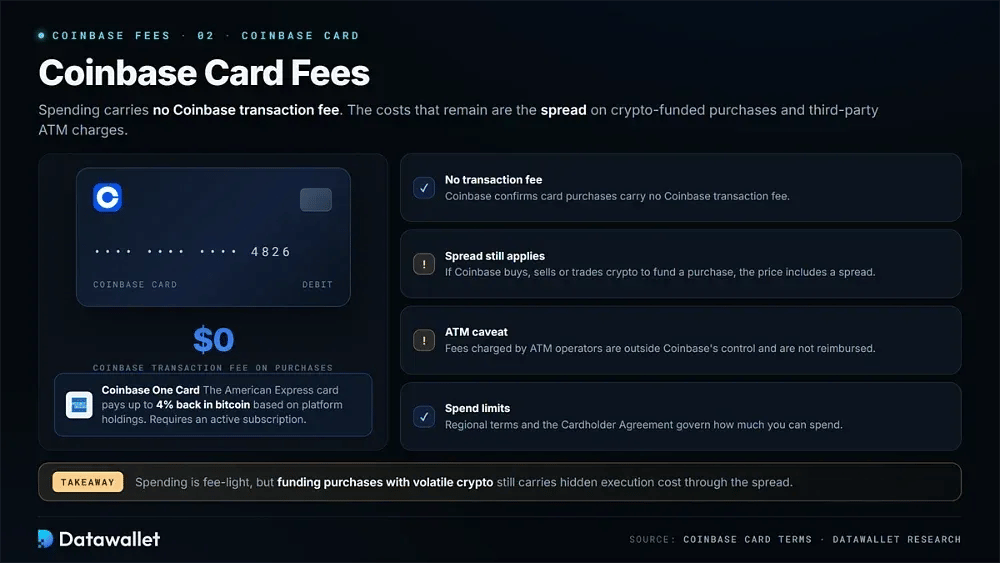
Spending with the Coinbase Card carries no Coinbase transaction fee. Crypto-funded purchases can still incur a spread, however, and third-party ATM fees may apply.
Best for: Spending crypto without a separate card transaction fee:
- No transaction fee: Coinbase confirms that purchases made with the card do not carry a Coinbase transaction fee.
- Spread still applies: If Coinbase performs a buy, sell, or trade to fund card usage, the price includes a spread.
- ATM caveat: Fees charged by ATM operators are outside Coinbase's control and are not reimbursed.
- Coinbase One Card: Launched for members, the American Express card pays up to 4% back in bitcoin based on how much you hold on the platform. An active subscription is required.
- Spend limits apply: Regional terms and the limits in the Cardholder Agreement govern card spending.
- Practical takeaway: Spending itself is relatively fee-light, but funding purchases with volatile crypto can still introduce hidden execution cost through the spread.
3. Coinbase Advanced (Formerly Coinbase Pro) Fees
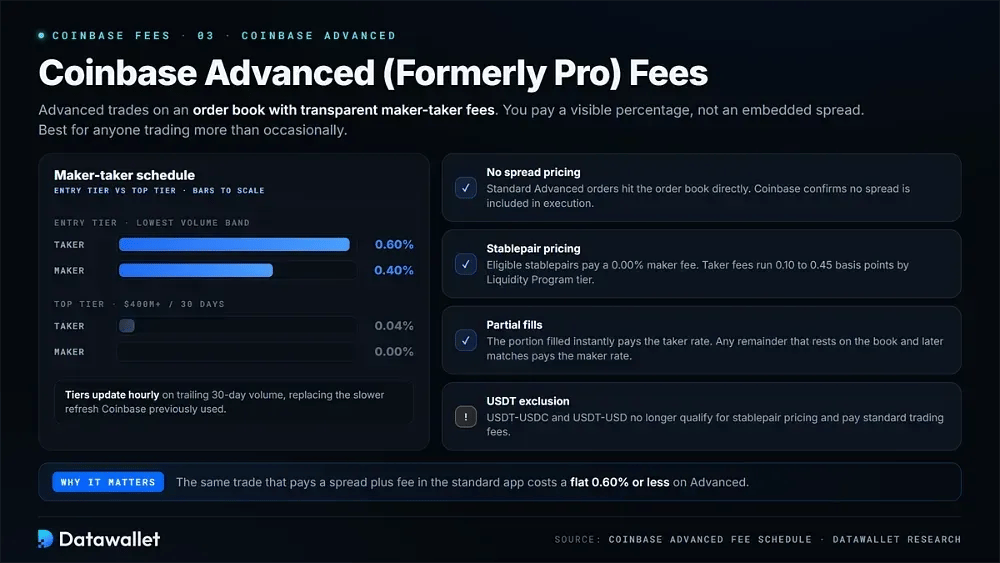
Coinbase Advanced uses an order book and transparent maker-taker fees. Instead of paying through an embedded spread, you pay a visible percentage.
Best for: Anyone trading more than occasionally:
- Maker-taker schedule: At the entry tier, fees are 0.60% for takers and 0.40% for makers. They fall as low as 0.04% taker and 0.00% maker above $400 million in 30-day volume.
- Hourly tier updates: Fee tiers are now updated hourly using trailing volume, replacing the slower refresh Coinbase previously used.
- Stablepair pricing: Eligible stablepairs have a 0.00% maker fee. Taker fees range from 0.10 to 0.45 basis points according to Liquidity Program tier.
- No spread pricing: Standard Advanced orders interact directly with the order book, and Coinbase confirms that no spread is included in execution.
- Partial fills: Any portion filled immediately is charged the taker fee. If the remainder rests on the book and later matches, that portion pays the maker rate.
- USDT stablepair exclusion: USDT-USDC and USDT-USD are no longer eligible for stablepair pricing and instead incur standard trading fees.
4. Coinbase One
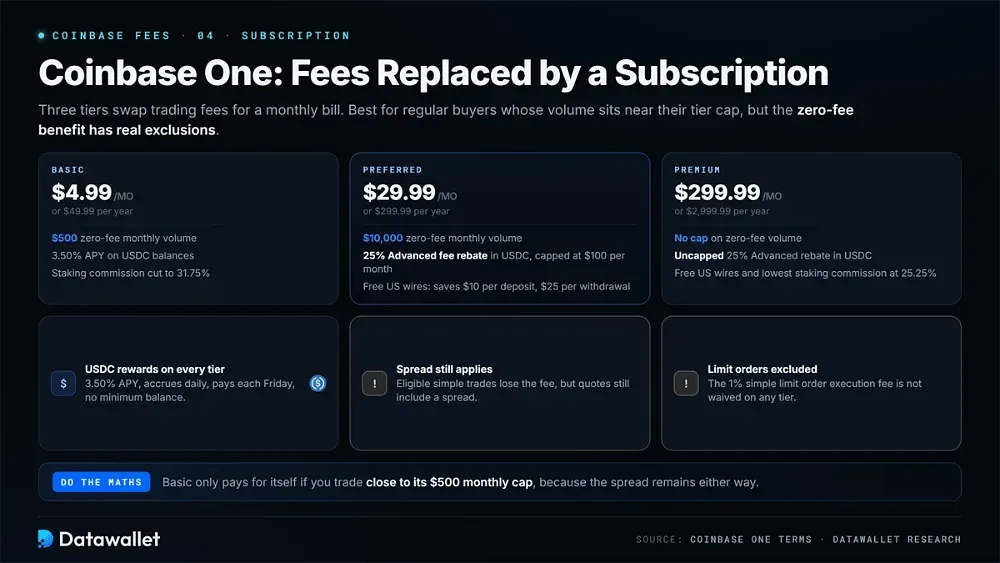
Coinbase One replaces trading fees with a monthly subscription across three tiers. Its zero-fee benefit, however, has important exclusions.
Best for: Regular buyers whose monthly volume sits near their tier cap:
- Subscription pricing: Basic costs $4.99 per month or $49.99 per year. Preferred is $29.99 monthly or $299.99 yearly, while Premium costs $299.99 or $2,999.99.
- Zero-fee limits: Basic waives trading fees on up to $500 of monthly volume and Preferred on up to $10,000. Premium has no cap.
- Spread still applies: Eligible simple trades lose the trading fee under the subscription, but their quoted prices continue to include a spread.
- Limit orders excluded: Coinbase One does not waive the 1% limit order execution fee. Members therefore pay the same limit order charge as non-members.
- Advanced rebate: Preferred members receive 25% of Advanced spot fees back in USDC, capped at $100 per month. Premium members receive the same rebate without a cap.
- USDC rewards: Every tier earns 3.50% APY on USDC balances. Rewards accrue daily, are paid each Friday, and have no minimum balance requirement.
- Free US wires: Coinbase fees on domestic US wire transfers are waived for Preferred and Premium members, saving $10 per deposit and $25 per withdrawal.
5. Other Coinbase Fees to Watch
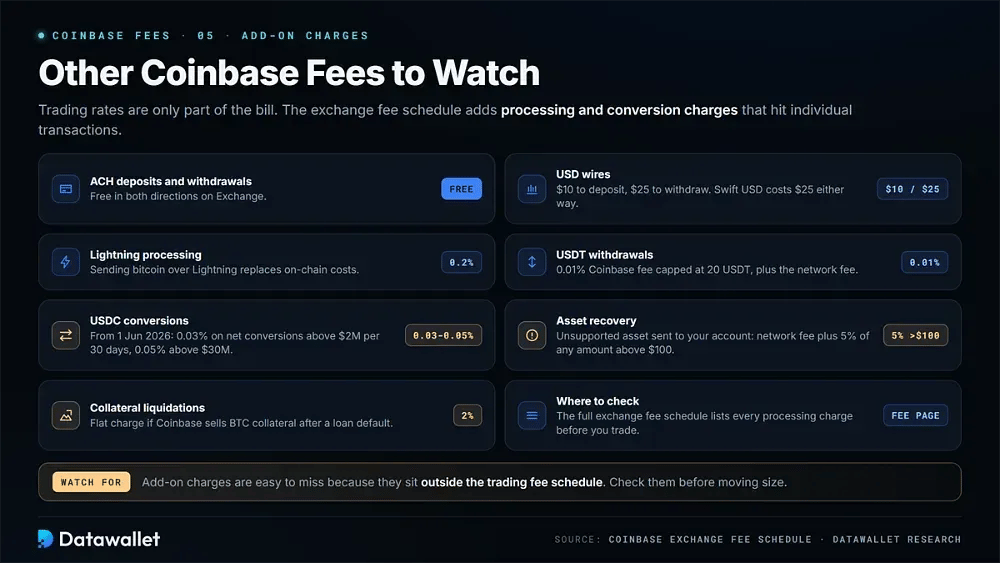
Trading rates are only part of the total cost. Coinbase's exchange fee schedule also lists processing and conversion charges that can affect individual transactions.
Watch these add-on charges before placing trades:
- Funding and withdrawals: Exchange ACH deposits and withdrawals are free. USD wires cost $10 to deposit and $25 to withdraw, while Swift USD costs $25 in either direction.
- Lightning processing: Sending bitcoin through the Lightning Network incurs a 0.2% processing fee instead of standard on-chain transaction costs.
- USDT withdrawals: USDT withdrawals carry a 0.01% Coinbase fee capped at 20 USDT, in addition to a separate network transaction fee.
- USDC conversions: From 1 June 2026, Exchange charges 0.03% on net USDC conversions above $2 million over a rolling 30-day period. The rate rises to 0.05% above $30 million.
- Asset recovery: Recovering an unsupported asset sent to your account costs the network fee plus 5% of any amount above $100.
- Collateral liquidations: Coinbase charges a flat 2% of the transaction if it sells BTC collateral following a loan default.
Coinbase Staking Fees
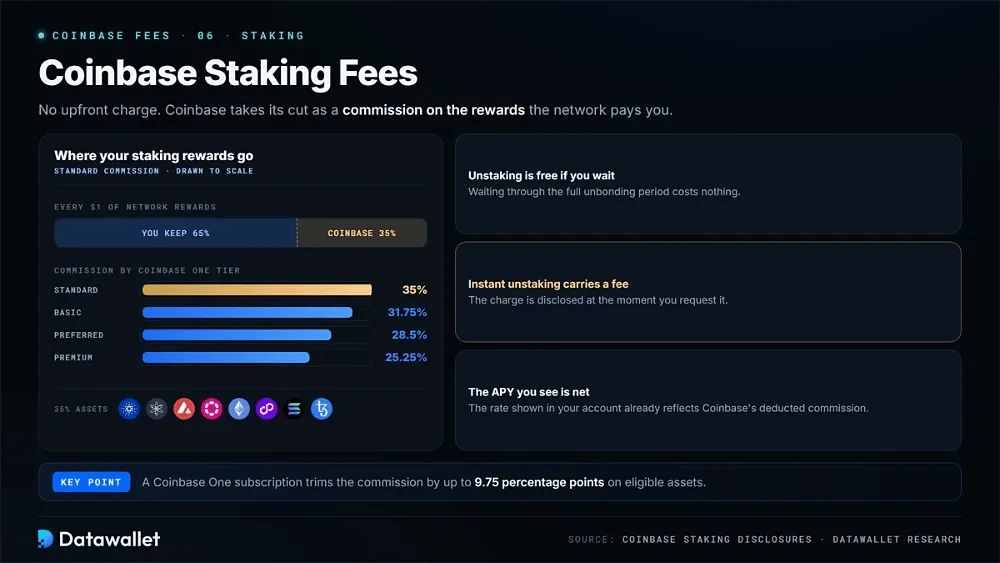
There is no upfront staking charge. Instead, Coinbase takes its fee as a commission from the rewards paid by the network.
For ADA, ATOM, AVAX, DOT, ETH, MATIC, SOL, and XTZ, the standard commission is 35%. Eligible assets receive lower rates for Coinbase One members: 31.75% on Basic, 28.5% on Preferred, and 25.25% on Premium.
There are two other costs to understand. Unstaking is free when you wait through the full unbonding period; instant unstaking carries a fee that is disclosed when requested. The APY shown in your account already reflects Coinbase's deducted commission.
Coinbase Fees Comparison Table
The table below compares Coinbase, Kraken, and Bybit across the costs that matter most:
A notable result appears at the entry level. Kraken rebuilt its fee tiers on 9 July, leaving its Pro entry tier at 0.40% maker and 0.80% taker. Coinbase Advanced is therefore cheaper on taker orders for anyone trading under $2,500 per month.
Coinbase Advanced Fee Tiers in Full
Advanced fees decline through nine volume bands. Where those thresholds sit can determine whether consolidating your trading volume on one platform is worthwhile.
All order books count toward volume, and non-USD trades are converted using the most recent fill price. Stablepair volume does not count, so trading USDC pairs will not move you into a lower-fee tier.
Coinbase Deposit and Withdrawal Fees
Funding charges depend on both the method and region. Local bank transfers remain the cheapest option for moving money onto or off the platform.
In the United States, ACH is free in both directions. Coinbase Exchange charges €0.15 for SEPA deposits and nothing for SEPA withdrawals, while Swift GBP deposits are free and withdrawals cost £1. USD wires are the most expensive fiat option.
Card funding and instant cashouts offer faster settlement at a higher cost. They are therefore best suited to cases where speed is worth the additional expense.
Tips for Reducing Coinbase Fees
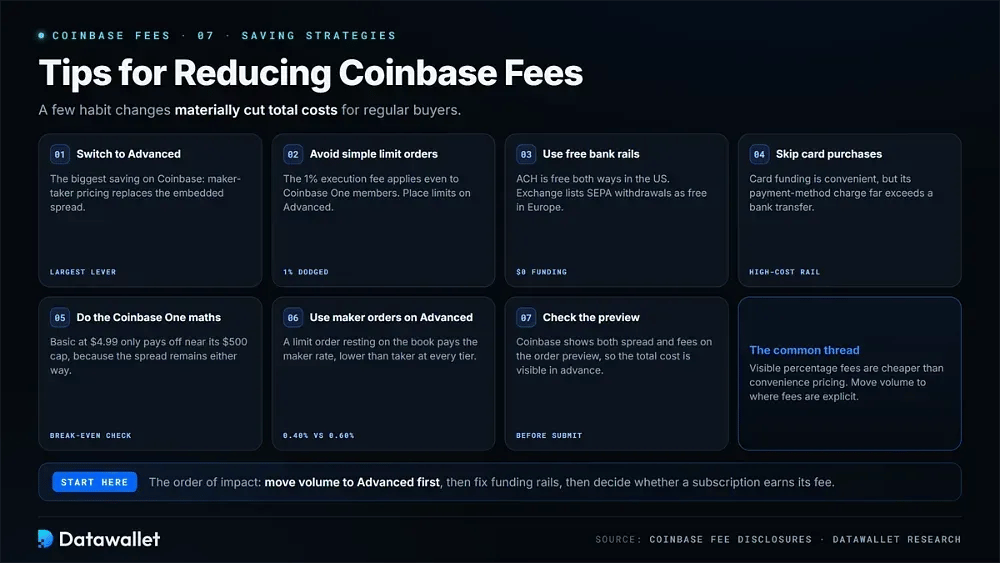
Regular buyers can materially reduce their total Coinbase costs by changing a few habits.
Use these strategies to keep trading costs down:
- Switch to Advanced: The biggest potential saving on Coinbase comes from using Advanced, where maker-taker pricing replaces the embedded spread.
- Avoid simple limit orders: Standard-app limit orders carry the 1% execution fee even for Coinbase One members. Use Advanced instead when placing limit orders.
- Use free bank rails: ACH deposits and withdrawals are free in the United States. For European users, Exchange also lists SEPA withdrawals as free.
- Skip card purchases: Although card funding is convenient, its payment-method charge is much higher than the cost of a bank transfer.
- Do the Coinbase One maths: Basic costs $4.99 per month and only pays for itself if you regularly trade close to its $500 cap, because the spread remains in either case.
- Use maker orders on Advanced: A limit order that rests on the Advanced book pays the maker rate, which is lower than the taker rate at every tier.
- Check the preview: Before committing, review the order preview. Coinbase displays both the spread and fees there, making the total cost visible in advance.
Why Are Coinbase's Fees So High?
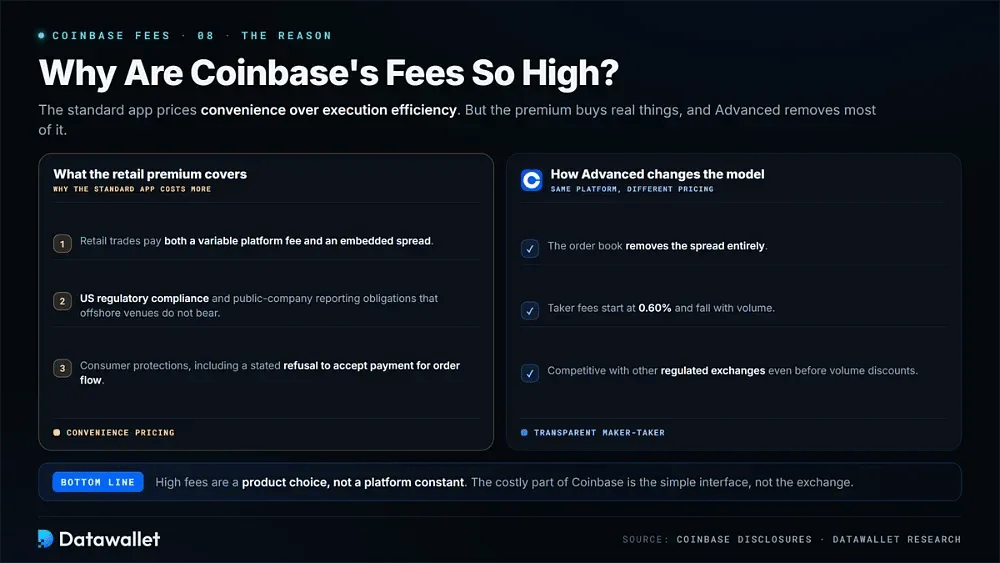
The standard Coinbase app prioritises convenience over execution efficiency, which is why its costs exceed those of most competitors. Retail trades are charged both a variable platform fee and an embedded spread.
Coinbase also bears costs that offshore venues do not. These include US regulatory compliance and the reporting obligations of a public company, along with consumer protections such as its stated refusal to accept PFOF payments.
Coinbase Advanced changes the pricing model. Its order book removes the spread entirely, and taker fees start at 0.60%, making it competitive with other regulated exchanges even before volume discounts.
Best Alternative to Coinbase for Lower Fees
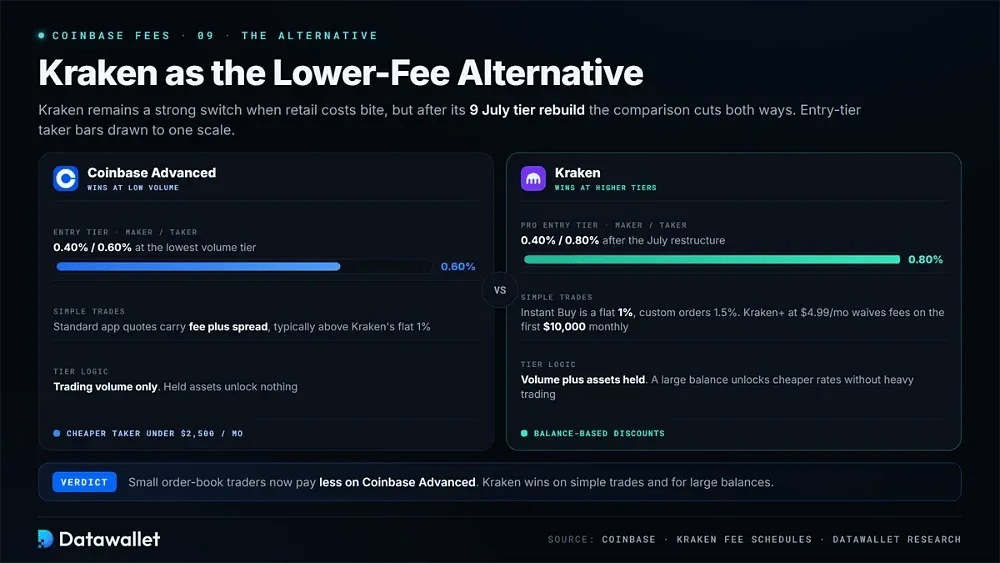
Kraken remains a strong alternative when Coinbase's retail costs are reducing returns, although the comparison is less straightforward than it was a year ago.
Instant Buy on Kraken costs a flat 1% for instant and recurring trades, with custom orders charged at 1.5%. Both are below the typical cost of Coinbase's standard app once its spread is included. A $4.99 monthly Kraken+ subscription waives those fees on the first $10,000 of monthly volume.
At low volume, however, Coinbase now has the advantage on the order book. Kraken's July restructure moved its Pro entry tier to 0.40% maker and 0.80% taker, compared with 0.40% and 0.60% on Coinbase Advanced. Smaller traders therefore pay more on Kraken Pro than on Advanced.
Higher tiers shift the advantage back toward Kraken. Its pricing considers assets held on the platform as well as trading volume, allowing a large balance to unlock cheaper rates without heavy trading. Coinbase offers no equivalent. Our full Kraken review examines the broader trade-offs.
Final Thoughts
Coinbase is still among the easiest exchanges to use, but the convenience of its standard app comes at a meaningful premium once the platform fee and spread are combined.
For almost everyone, Coinbase Advanced is the better option within the platform. Following Kraken's July repricing, it also beats Kraken Pro at the entry tier. The simple-trade 1% limit order fee remains the charge most guides miss, and Coinbase One does not waive it.
Before placing an order, compare the spread and explicit fee on the preview screen alongside your funding cost rather than relying on headline rates. If you are deciding between the two platforms, our Coinbase versus Kraken breakdown covers the comparison in more detail.