What is Wrapped Solana (WSOL)?
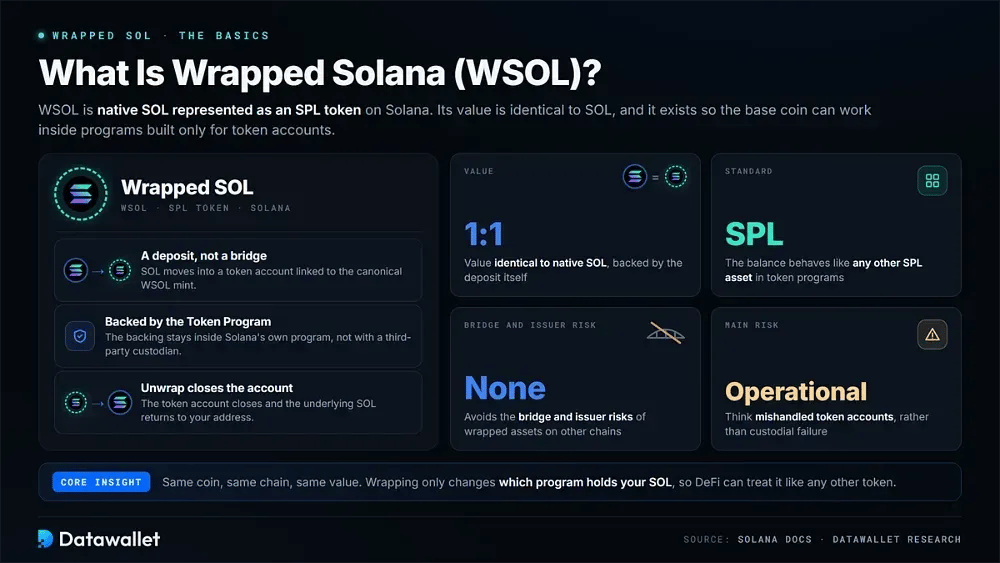
Wrapped Solana, written as WSOL or wSOL, represents native SOL as an SPL token on the Solana blockchain. Its value is identical to SOL. The token exists so Solana's base coin can function inside programs designed exclusively around token accounts.
Wrapping is a deposit process, not a bridge transaction. Your SOL moves into a token account linked to the canonical WSOL mint, after which the balance behaves like any other SPL asset. When you unwrap it, that account closes and the underlying SOL returns to your address.
The backing remains inside Solana's own Token Program rather than with a third-party custodian. As a result, WSOL avoids the bridge and issuer risks associated with wrapped assets on other chains. Its main risks are operational, including mishandled token accounts, rather than custodial.
How to Convert SOL to WSOL
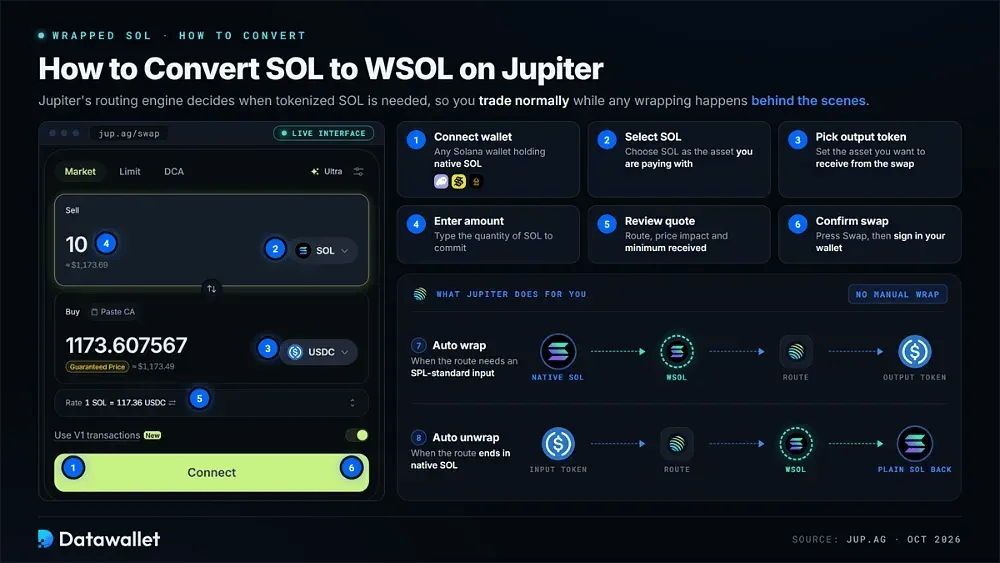
Jupiter removes most of the manual work for anyone holding native SOL. Its routing engine determines whether tokenized SOL is needed, so you can trade normally while any required wrapping takes place behind the scenes.
Follow these steps to use native SOL on Jupiter:
- Connect wallet: Open Jupiter and link Phantom, Solflare, Backpack, or another Solana wallet that holds native SOL.
- Select SOL: Choose SOL as the asset you are paying with from your available wallet balance.
- Pick output token: Set the destination asset you want to receive from the swap.
- Enter amount: Type the quantity of SOL you want to commit to this transaction.
- Review quote: Inspect the route, price impact, and minimum received before you approve anything.
- Confirm swap: Press Swap, then sign the transaction prompt inside your connected wallet.
- Automatic wrapping: Jupiter converts SOL into WSOL internally whenever the chosen route needs an SPL-standard input.
- Automatic unwrapping: Routes ending in native SOL trigger an unwrap, so plain SOL lands back in your wallet.
WSOL Contract Addresses
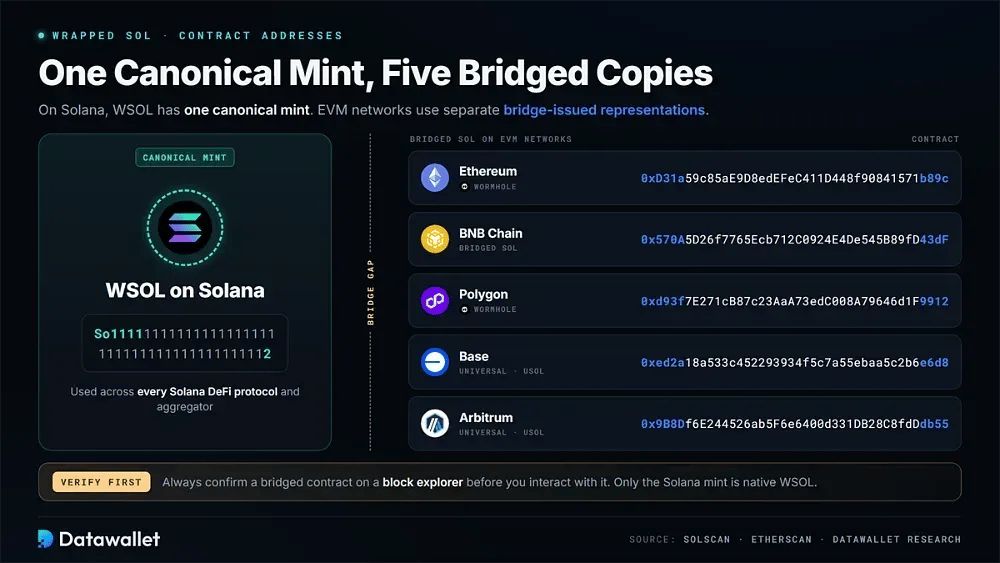
On Solana, WSOL has one canonical mint. EVM networks use separate bridge-issued representations, so those contracts should always be verified on a block explorer before you interact with them.
Verified WSOL and bridged SOL contract addresses:
- Solana: "So11111111111111111111111111111111111111112" - the canonical wrapped SOL mint used across every Solana DeFi protocol and aggregator.
- Ethereum (Wormhole): "0xD31a59c85aE9D8edEFeC411D448f90841571b89c" - Wormhole-issued Wrapped SOL circulating on Ethereum mainnet through the Portal bridge system.
- BNB Chain: "0x570A5D26f7765Ecb712C0924E4De545B89fD43dF" - bridged SOL representation deployed on BNB Chain, distinct from the native Solana mint.
- Polygon (Wormhole): "0xd93f7E271cB87c23AaA73edC008A79646d1F9912" - Wormhole SOL token on Polygon, backed by SOL locked in bridge contracts.
- Base: "0xed2a18a533c452293934f5c7a55ebaa5c2b6e6d8" - Solana (Universal) uSOL, a wrapped representation for Base users seeking SOL exposure.
- Arbitrum: "0x9B8Df6E244526ab5F6e6400d331DB28C8fdDdb55" - Solana (Universal) uSOL on Arbitrum, following the same universal wrapper design as Base.
Wrapped SOL vs SOL Differences
SOL and WSOL maintain the same value, but they sit at different layers of the protocol. Native SOL serves as Solana's gas currency, whereas WSOL follows the SPL token standard and can move through standardized token-program flows.
Do I Need to Wrap SOL Tokens?
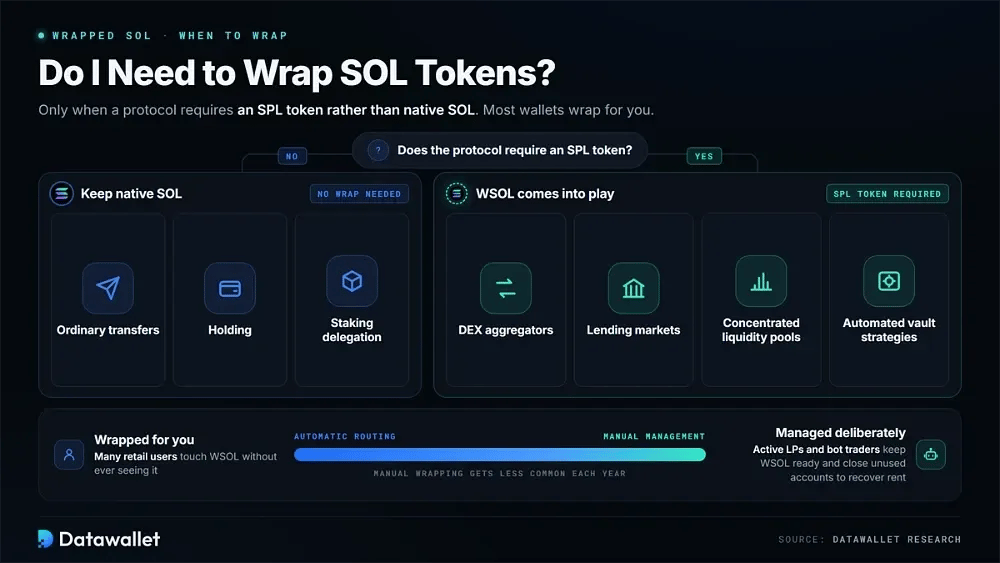
WSOL is only necessary when a protocol requires an SPL token rather than native SOL. That most often occurs on DEX aggregators, lending markets, concentrated liquidity pools, or automated vault strategies. Ordinary transfers and holding do not require wrapping, nor does delegation to staking platforms.
Manual wrapping has become less common each year. Modern wallets and aggregators typically wrap and unwrap during execution without exposing the step to the user. Many retail users therefore interact with WSOL without seeing it, while active liquidity providers and bot traders are still more likely to manage WSOL accounts deliberately.
When Manual WSOL Management Still Matters
Automatic routing covers most retail activity, but deliberate WSOL management still matters for active liquidity providers and bot traders. Keeping tokenized SOL available can support repeated DeFi interactions, while manually closing unused accounts also recovers the refundable rent deposit that would otherwise remain locked.
Are There Any Fees For Wrapping Solana?
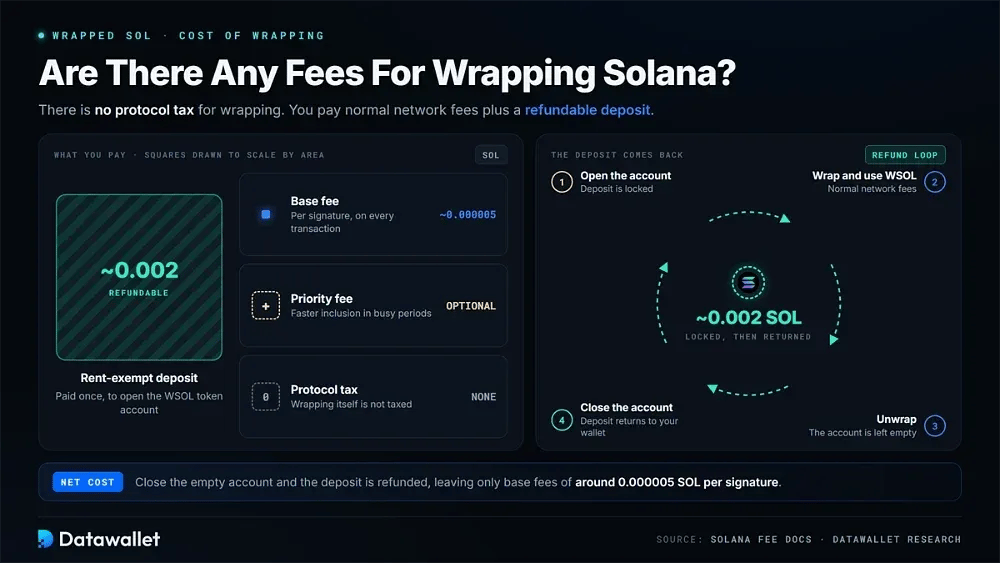
There is no protocol tax for wrapping. Each wrap, sync, transfer, or account closure is still a standard transaction, however, and therefore pays normal Solana network costs. Solana's fee documentation states that transactions include a small base fee, with optional prioritization fees during periods of congestion.
The base fee is around 0.000005 SOL per signature, remaining negligible even during volatile sessions. Users can add a priority fee when faster inclusion is useful in busy periods, though wrapping is still among the cheapest actions available on the network.
Opening the WSOL token account creates the larger cost: a rent-exempt deposit of roughly 0.002 SOL. That amount is refundable. Once the account is empty after unwrapping, closing it returns the deposit directly to your wallet balance.
How Solana's 2026 Upgrades Change WSOL
Solana is shipping its largest infrastructure overhaul since launch. The WSOL mechanism itself does not change, but the surrounding environment for wrapping is becoming substantially faster and more reliable.
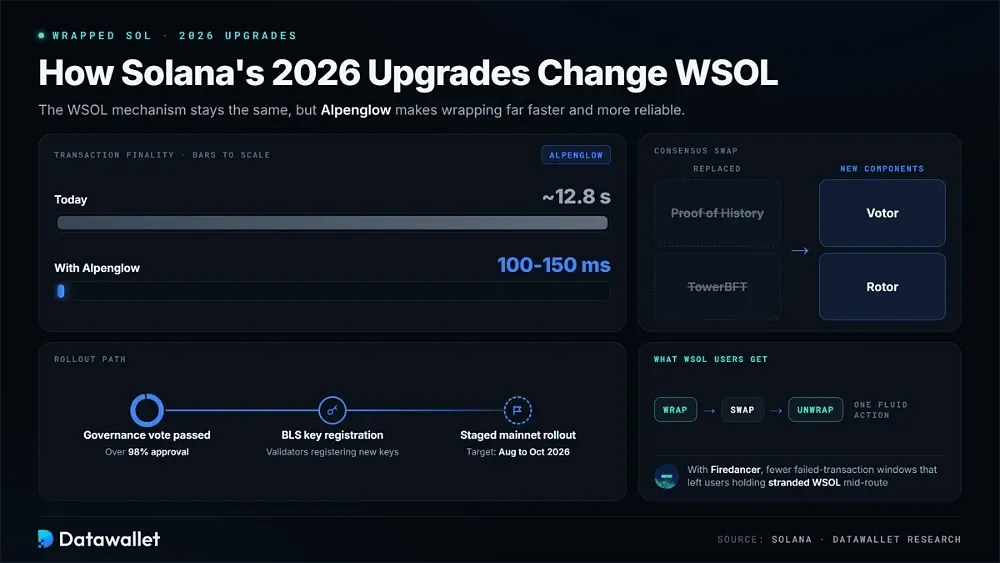
Alpenglow is the headline upgrade. It replaces Proof of History and TowerBFT with new Votor and Rotor components designed to reduce transaction finality from roughly 12.8 seconds to 100-150 milliseconds. Validators are registering new BLS keys ahead of a staged mainnet rollout targeted between August and October 2026, after a governance vote passed with over 98% approval.
For WSOL users, near-instant finality allows wrap, swap, and unwrap sequences to confirm as one fluid action, narrowing the gap between DeFi execution and centralized exchange speed. Combined with the Firedancer validator client, these upgrades also reduce the failed-transaction windows that previously left users holding stranded WSOL mid-route.
WSOL in the Token-2022 Era
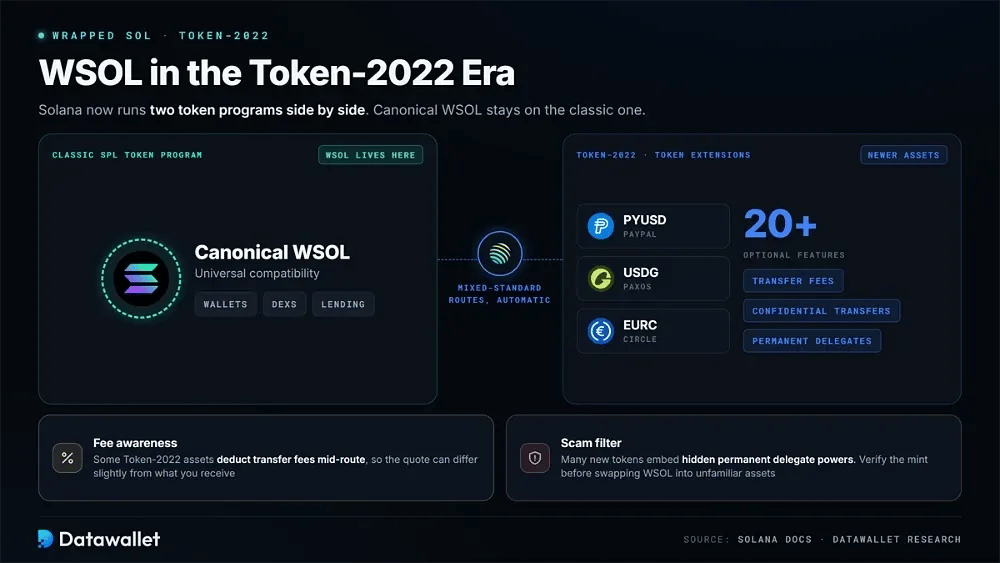
Solana now operates two token programs side by side. Knowing where WSOL sits between them can help prevent compatibility surprises when newer assets appear in trading routes.
Key facts about WSOL and the Token-2022 standard:
- Classic standard: Canonical WSOL remains a classic SPL Token Program asset, keeping universal compatibility with every wallet, DEX, and lending protocol on Solana.
- Token-2022: The newer Token Extensions program supports over twenty optional features like transfer fees, confidential transfers, and permanent delegates, mostly used by regulated stablecoins.
- Stablecoin shift: Institutional issuers including PayPal, Paxos, and Circle build stablecoins such as PYUSD, USDG, and EURC on Token-2022, so WSOL increasingly trades against them.
- Routing behavior: Aggregators handle mixed-standard routes automatically, wrapping SOL into classic WSOL even when the opposite side of the pair uses Token Extensions.
- Fee awareness: Some Token-2022 assets deduct transfer fees mid-route, so quotes involving WSOL pairs against them can differ slightly from final received amounts.
- Scam filter: A large share of new Solana tokens now embed hidden permanent delegate powers, making mint verification essential before swapping WSOL into unfamiliar assets.
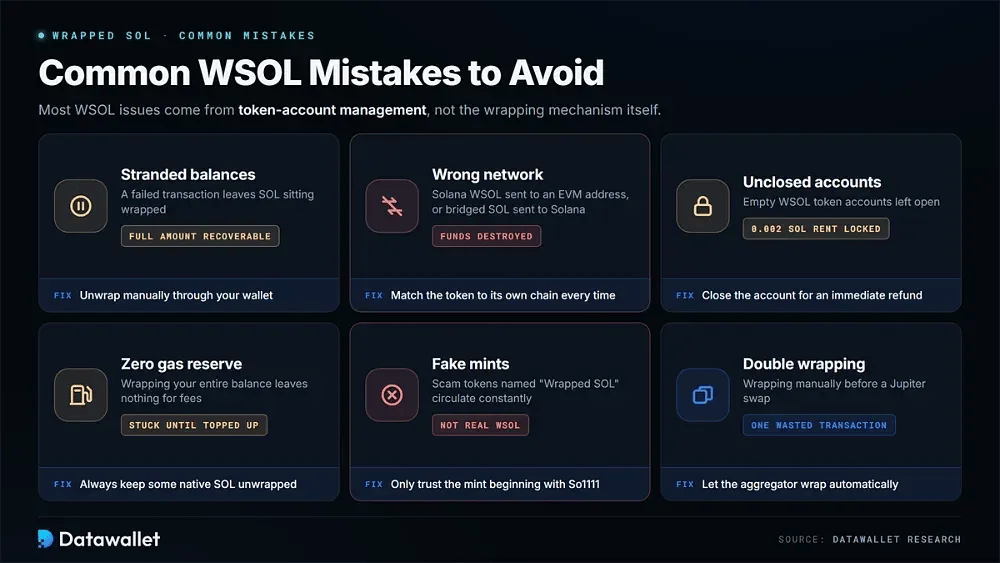
Common WSOL Mistakes to Avoid
Most WSOL issues stem from token-account management rather than the wrapping mechanism. Once the on-chain cause is clear, each of these problems is inexpensive to fix.
Frequent errors Solana users make when handling WSOL:
- Stranded balances: Interrupted or failed transactions can leave SOL sitting wrapped; unwrapping manually through your wallet recovers the full amount instantly.
- Wrong network: Sending Solana-native WSOL to an EVM address, or bridged SOL to Solana, destroys funds because the contracts are entirely incompatible.
- Unclosed accounts: Leaving empty WSOL token accounts open locks the 0.002 SOL rent deposit that closing the account would immediately refund.
- Zero gas reserve: Wrapping your entire balance leaves nothing for fees, trapping you until someone sends additional native SOL for transactions.
- Fake mints: Scam tokens named "Wrapped SOL" circulate constantly; only the canonical mint beginning with So1111 represents genuine wrapped Solana.
- Double wrapping: Manually wrapping before using Jupiter wastes a transaction, since the aggregator already wraps automatically whenever a route requires it.
Pros and Cons of Wrapped SOL
WSOL gives the native coin access to Solana's full DeFi surface. In exchange, users take on token-account overhead, cross-chain naming confusion, and small recurring costs that are worth considering.
Final Thoughts
WSOL is SOL expressed through Solana's token standard, allowing the native coin to enter pools, vaults, lending markets, and other contract-driven applications. As institutional ETF demand grows and Alpenglow compresses finality, the underlying process continues to become faster and less visible to users.
For most users, Jupiter remains the easiest route. It trades native SOL directly while handling the required wrapping and unwrapping automatically in the background.