Can I Deposit from PayPal to Binance?
In most cases, you cannot deposit directly from PayPal to Binance as a standard fiat funding method. Binance’s available deposit options depend on your country, currency, and account verification status, and typically include bank transfers, cards, fiat balance, or selected local payment channels.
The practical workaround is to move money from PayPal to a linked bank account or debit card first, then deposit those funds into Binance using an available fiat method. This adds an extra step, but it is usually more reliable than looking for a direct PayPal-to-Binance deposit route.
Another option is crypto transfer, where eligible PayPal users send supported crypto or PYUSD to an external wallet address. However, Binance must support the exact coin and network you choose. Always match the network carefully, because sending crypto to an incompatible address can permanently lose funds.
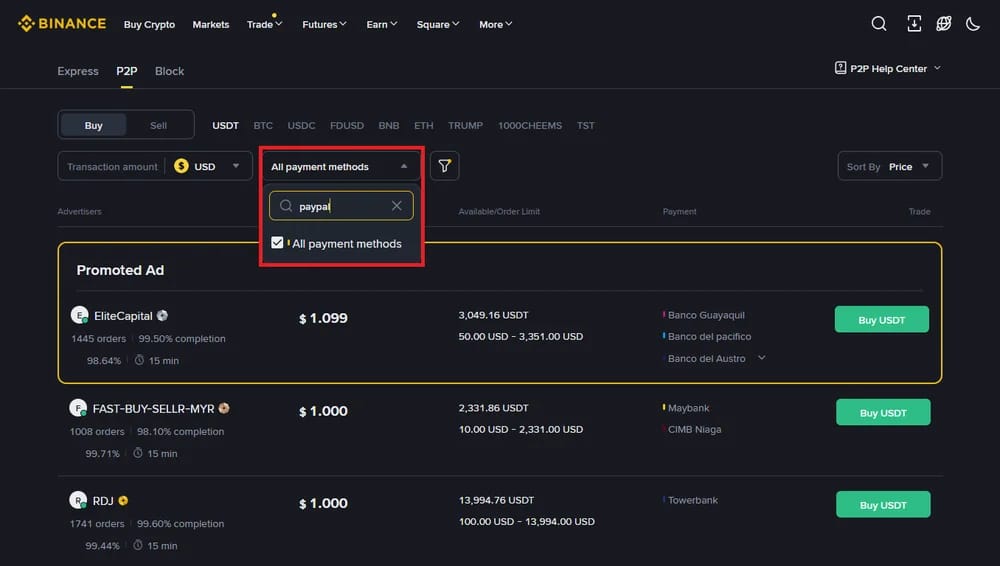
How to Use PayPal with a Binance Alternative
A better alternative is using Bybit P2P, where you can buy crypto from verified sellers who accept PayPal as their payment method. Bybit says P2P lets users choose advertisers by currency and payment method.
Follow These Steps To Buy Crypto Through Bybit P2P:
- Register, Verify: Create a Bybit account, confirm your email or phone, then complete identity verification so you can access fiat and P2P trading features.
- Open P2P: From the Bybit homepage, click Buy Crypto, then choose P2P Trading to enter the peer-to-peer marketplace.
- Choose Buy: Select the Buy tab, choose the crypto you want, usually USDT, then set your fiat currency and purchase amount.
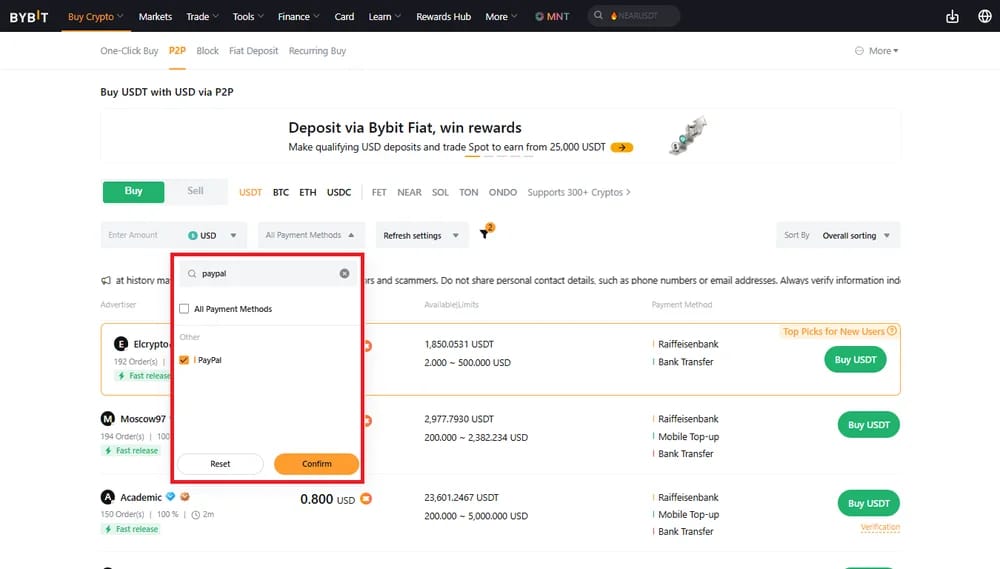
- Filter PayPal: Open the payment method filter, select PayPal if available, then review sellers by price, order limits, completion rate, and trading terms.
- Select Seller: Click Buy USDT beside your preferred advertiser, enter the amount you want to pay, and carefully read their PayPal instructions.
- Confirm Order: Click Buy, check the order details, and copy the seller’s PayPal payment information exactly as shown on the Bybit order page.
- Send PayPal Payment: Open PayPal separately, send the exact amount to the seller, avoid crypto-related notes, then return to Bybit after paying.
- Mark Paid: Click Payment Completed on the Bybit order page, then wait for the seller to confirm receipt and release the crypto.
- Check Assets: Once released, click View My Asset or open your Funding Account to confirm the crypto has arrived before making another trade.
Bybit P2P can also be cheaper than using external payment gateways or brokers, which may add steep card or processing fees. Bybit promotes P2P with zero trading fees, 600+ supported payment methods, secure escrow, 24/7 multilingual support, and a stated 99.9% anti-fraud record.
What are the Fees?
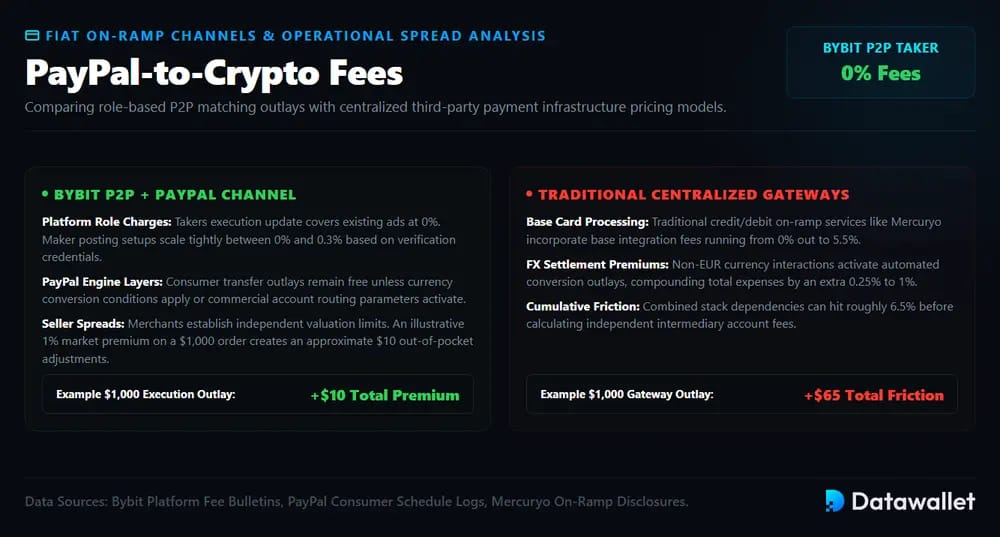
Bybit P2P fees can be cheaper than PayPal-based third-party crypto gateways, but the final cost depends on Bybit’s role-based fees, PayPal charges, currency conversion, and seller pricing.
Breakdown of Potential Fees:
- Bybit P2P Taker Fees: Bybit says takers place orders through existing P2P ads, and its 2026 update confirms takers continue paying zero transaction fees.
- Bybit P2P Maker Fees: Bybit says makers post P2P ads, with some official maker fees ranging from 0% to 0.3%, depending on ad and advertiser type.
- PayPal Purchase Fees: PayPal’s consumer fee page says purchases are generally free when no currency conversion applies, but this may vary by payment setup.
- PayPal Commercial Fees: If PayPal treats the transfer as a commercial payment, seller-side fees may apply, so check PayPal’s local fee page before sending funds.
- Currency Conversion: PayPal says purchases remain free unless currency conversion is involved, meaning cross-currency PayPal payments can increase the real purchase cost.
- Seller Margin: P2P sellers set their own exchange rates, so a 1% margin on a $1,000 PayPal-funded crypto order adds roughly $10.
- Third-Party Gateway Fees: Mercuryo lists crypto on-ramp fees from 0% to 5.5%, plus 0.25% to 1% for non-EUR currency transactions.
- Example Cost: A $1,000 P2P order with a 1% seller margin costs around $10 extra, while 6.5% gateway fees equal $65.
Overall, Bybit P2P can reduce platform-side costs because takers pay 0%, while third-party gateways can reach about 6.5% before other charges. Still, PayPal fees, conversion rates, and seller spreads can change the final amount, so compare the quoted P2P price with the live market rate before paying.
Cryptocurrency Deposit Limits with PayPal
PayPal does not offer unlimited crypto buying or transfers. In the US, PayPal lists a $100,000 weekly cryptocurrency purchase limit, a $25,000 weekly transfer limit, and no annual purchase limit for eligible users. Limits may still vary by account status and region.
Outside the US, PayPal crypto limits can be lower. In the UK, PayPal lists a £15,000 weekly purchase limit and a £35,000 annual purchase limit, while its terms say transaction, weekly, or annual limits may apply.
Will Binance Add PayPal as a Deposit Method?
Binance has not announced a broad PayPal deposit rollout. Its deposit page shows available methods only after login and lists options such as bank transfer, Visa, Mastercard, Apple Pay, Google Pay, and regional gateways instead of universal PayPal support.
That could change if Binance adds new regional partners, but users should not rely on PayPal becoming a standard deposit method. For now, PayPal is more relevant for external-wallet crypto purchases or crypto transfers, where PayPal warns unsupported networks can cause permanent loss.
Is PayPal P2P Safe for Buying Crypto?
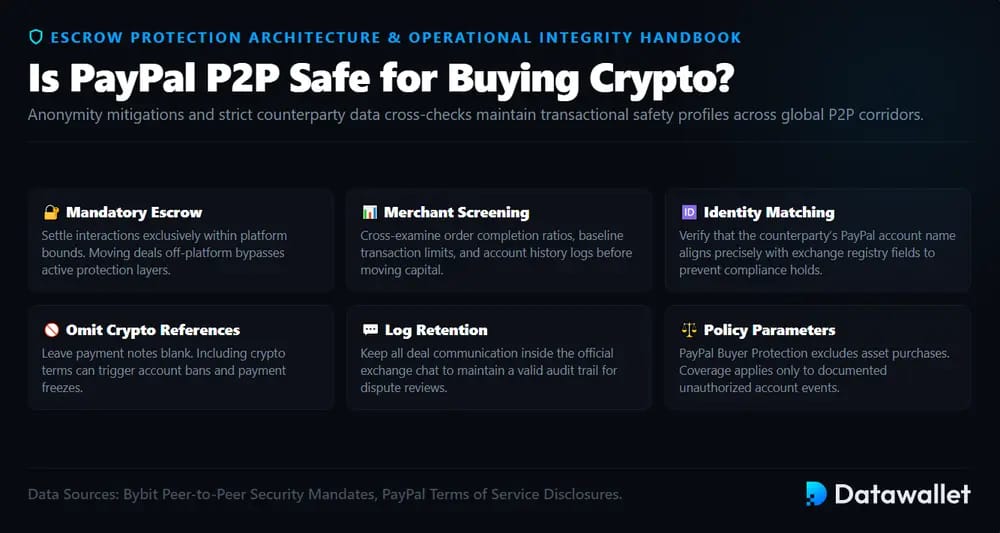
PayPal P2P can be safe for buying crypto only when it is used through a trusted marketplace, with escrow, identity checks, verified payment details, and clear dispute rules. Safety depends less on PayPal itself and more on how carefully the buyer follows the platform’s P2P process.
- Use Escrow: Trade only inside the official P2P platform, because Bybit warns users not to bypass escrow or move deals off-platform.
- Check Seller: Review the seller’s completion rate, order limits, payment terms, and profile history before sending PayPal funds for any crypto purchase.
- Match Details: Confirm the seller’s PayPal name, Bybit name, payment amount, and order reference before paying, because mismatched details can trigger disputes.
- Avoid Notes: Do not add crypto-related notes in PayPal payments, because sellers may reject payments that increase chargeback, account, or compliance risk.
- Keep Chat: Keep all communication inside Bybit’s P2P chat, since Bybit specifically advises users not to agree to off-platform trades.
- Know Protection: PayPal Buyer Protection generally does not apply to cryptocurrency purchases, although PayPal may protect users from qualifying unauthorized activity.
Common Mistakes When Using PayPal for Crypto Deposits
Many PayPal crypto mistakes happen because users treat P2P payments, crypto transfers, and exchange deposits as the same process. In reality, each step has different fees, protections, limits, and reversal rules.
1. Sending Crypto to the Wrong Network
PayPal warns that crypto transfers cannot be cancelled or reversed once complete, so users must check the recipient wallet address before sending funds outside PayPal. A wrong address or unsupported network can permanently lose the crypto.
This matters when moving PayPal-bought crypto toward Binance or another exchange. Always confirm the exact coin, network, and deposit address inside the receiving platform before copying anything into PayPal’s external transfer screen.
2. Assuming Buyer Protection Applies
A common mistake is assuming PayPal Buyer Protection covers every crypto-related payment. PayPal’s crypto FAQ says Buyer Protection does not apply to cryptocurrency purchases, even though unauthorized activity may still have separate protection.
That makes P2P discipline important. Use escrow, follow the marketplace instructions, keep the chat on-platform, and avoid releasing or confirming anything until the seller’s payment terms are fully satisfied.
3. Ignoring PayPal and Seller Fees
Users often focus only on Bybit’s P2P platform fee and forget PayPal charges, currency conversion, or seller margins. PayPal says purchases are generally free only when no currency conversion is involved.
Before paying, compare the seller’s USDT rate with the live market price and check whether PayPal will convert currencies. A small spread or conversion fee can make a “cheap” P2P offer more expensive.
Final Thoughts
Transferring from PayPal to Binance is usually not a direct deposit process. Most users need to withdraw PayPal funds to a bank, buy crypto inside PayPal, or use a P2P alternative.
The safest route depends on fees, supported coins, transfer limits, regional availability, and network compatibility. PayPal warns crypto transfers cannot be reversed, so verify addresses, networks, and platform rules before sending funds.