







Can I Add Tempo to MetaMask?
Yes, you can add Tempo to MetaMask by entering its custom network details, because Tempo is an EVM-compatible Layer 1, not an Ethereum Layer 2.
The safest method is to add Tempo manually in MetaMask using the official RPC URL, Chain ID, currency symbol, and explorer URL from Tempo’s docs or a trusted RPC provider. This is more reliable than copying chain data from random chain directories, especially when mainnet and testnet settings differ.
Common mistakes include using the wrong details for Tempo Mainnet vs Tempo Testnet, pasting an outdated RPC endpoint, or entering the wrong Chain ID. Only approve an "Add network" prompt if the values match official Tempo documentation exactly.
How to Add Tempo to MetaMask
Adding Tempo takes about a minute if you use ChainList, which is the most trusted chain aggregator for verified EVM network info.
It can autofill the correct RPC URL, Chain ID, and explorer in MetaMask, but I still recommend checking the values against Tempo’s official docs before approving the request.
Follow these steps to add Tempo to MetaMask:
- Open ChainList: go to ChainList, verify the domain, then connect MetaMask with the top-right Connect Wallet button.
- Search Tempo: enter Tempo in the search bar, then choose the correct network such as Tempo Testnet. If you are adding a testnet, make sure testnets are enabled in ChainList and MetaMask.
- Add chain: click Add to Wallet, then review the MetaMask prompt carefully. Check that the chain details match the Tempo wallet docs before you approve.
- Switch networks: open MetaMask’s network dropdown, select Tempo, and confirm you added the right environment before using a dApp. This matters because mainnet and testnet use different settings.
After you add Tempo once, MetaMask may detect it again when a dApp prompts a network switch, but I still check every parameter before approving.
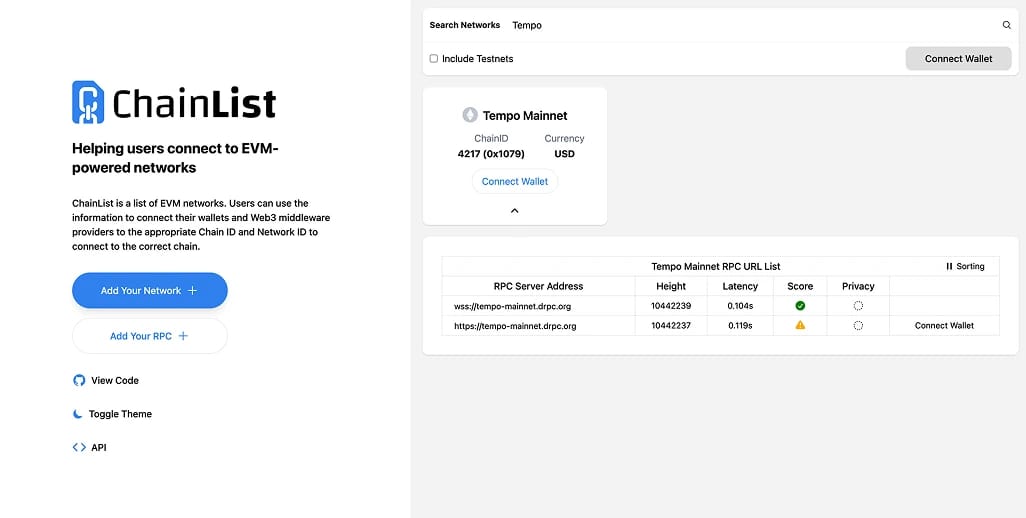
Tempo Mainnet RPC Details
Use these official Tempo Mainnet settings in MetaMask.
- Network Name: Tempo Mainnet
- RPC URL: https://rpc.tempo.xyz
- Chain ID: 4217
- Currency Symbol: USD
- Block Explorer: https://explore.tempo.xyz
Before adding the network, I would still verify the latest mainnet RPC details in Tempo’s official docs.
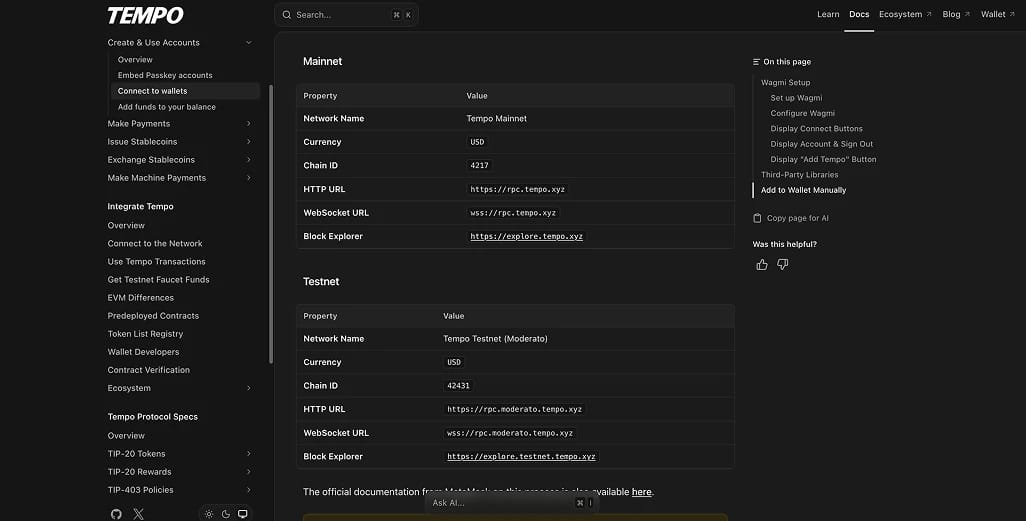
Tempo Testnet (Moderato) RPC Details
Use these official Tempo Testnet (Moderato) settings in MetaMask.
- Network Name: Tempo Testnet (Moderato)
- RPC URL: https://rpc.moderato.tempo.xyz
- Chain ID: 42431
- Currency Symbol: USD
- Block Explorer: https://explore.testnet.tempo.xyz
If you are adding testnet, make sure you do not mix it with mainnet values. The network name is similar, but the RPC URL, Chain ID, and explorer are different.
About Tempo
Tempo is an EVM-compatible Layer 1 optimized for payments, not a general-purpose chain. From a developer angle, it feels more like payment infrastructure that happens to be EVM-compatible than a standard smart contract network.
It is built around stablecoin use cases, with protocol-level features such as fees paid in supported USD stablecoins, batched payments, fee sponsorship, scheduled payments, and payment metadata. That changes the normal EVM cost model by removing the need for a volatile native gas token.
Tempo’s architecture docs also point to protocol-level batching, passkey auth, reserved payment lanes for TIP-20 stablecoins, and sub-second finality. Put together, it is a payments-first stack built for remittances, payroll, payouts, subscriptions, and commerce rather than speculative on-chain activity.
Final Thoughts
Tempo is easy to add to MetaMask, but it is still worth slowing down for 20 seconds and checking the RPC, Chain ID, and explorer before you hit approve.
That is the difference between adding the right network once and wasting time fixing a bad setup later.
If you are using Tempo for what it was built for, stablecoin payments, getting the network details right at the start matters more than the actual setup time.
.webp)