
Can You Add MegaETH to MetaMask?
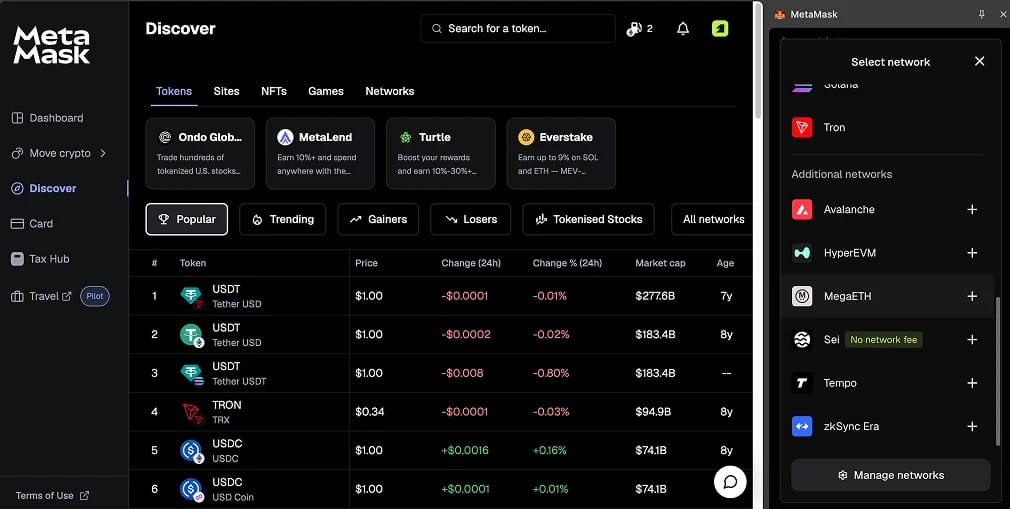
MegaETH is included in MetaMask's supported network list alongside Monad, HyperEVM and Robinhood Chain. Current versions of the extension and mobile app let you add it from "Additional networks" without entering the settings yourself. Older installs support it as a custom network.
Its execution environment, MegaEVM, runs standard Ethereum bytecode, so MetaMask handles MegaETH like any other EVM-compatible chain. You keep your existing 0x address, but the MegaETH balance remains zero until you bridge funds. ETH pays the fees, so there is no separate gas token to buy.
MegaETH's own wallet, MOSS, launched in June with passkeys and sponsored gas for ecosystem apps. For users holding assets across several chains, MetaMask remains the more flexible choice. This guide covers both its browser extension and mobile app.
How to Add MegaETH to MetaMask
Each method saves the same network settings. The difference is how much of the configuration you need to verify yourself.
Method 1: MetaMask's Built-In Network List
The built-in list is the fastest and safest option because the network parameters ship with MetaMask.
- Open the network menu: In the extension, click the menu in the top right and select "Networks". On mobile, tap the network dropdown at the top of the Tokens tab.
- Find MegaETH: Scroll to "Additional networks" or enter MegaETH in the search bar.
- Add the entry: Click "Add" in the extension or the "+" icon on mobile, then confirm the prompt.
- Select it: Choose MegaETH from your enabled networks dropdown.
Update MetaMask if MegaETH is missing before trying another method. Network additions do not sync between devices, so repeat the process on your phone if you use both.
Method 2: Add MegaETH with ChainList
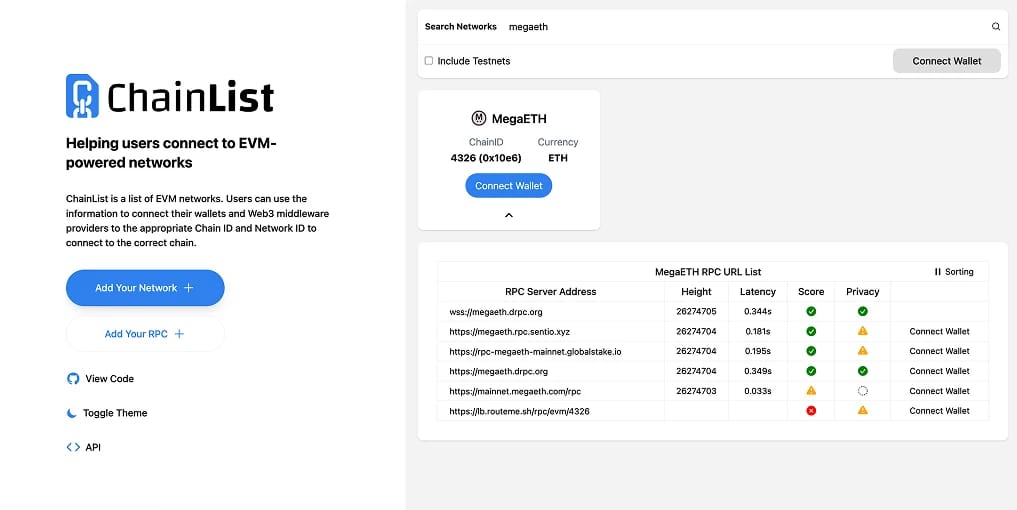
ChainList uses the community-maintained ethereum-lists registry. We prefer it to settings shared in Telegram groups or X threads, though you should still compare its values with MegaETH's documentation before approving.
- Load the listing: Open the MegaETH page on ChainList. Check that the address bar reads chainlist.org before clicking "Connect Wallet".
- Check the details: Look for Chain ID 4326 and ETH as the currency. Enabling the testnet toggle also brings up Chain ID 6343 and the retired testnet 6342, so read the number carefully.
- Approve in MetaMask: Click "Add to MetaMask", then compare the pop-up's RPC URL, Chain ID and explorer with the settings in the next section.
- Switch over: Select MegaETH from the network dropdown. ETH already bridged to the chain appears immediately.
Method 3: Manual Entry
To choose the endpoint MetaMask queries, such as a dedicated Alchemy or QuickNode provider, add the network manually. Open "Add a custom network" from the Networks menu and enter the mainnet settings below. Our general MetaMask network guide explains each field.
MegaETH Mainnet RPC and Chain ID
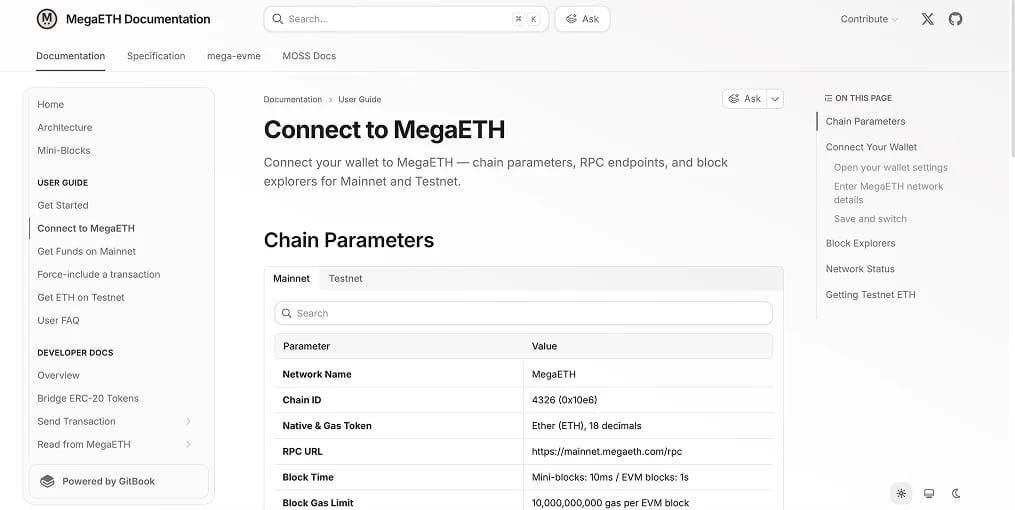
The following settings match the official MegaETH connection documentation. Enter them exactly as shown.
- Network Name: MegaETH
- RPC URL: https://mainnet.megaeth.com/rpc
- Chain ID: 4326
- Currency Symbol: ETH
- Block Explorer URL: https://mega.etherscan.io
MegaETH's public RPC is rate limited. It is suitable for everyday wallet use, but bots and indexers should use a managed provider. The team also warns that endpoints may change or go offline during upgrades.
A second explorer is available at megaeth.blockscout.com. For live block height, block time and transactions per second, check uptime.megaeth.com.
MegaETH Testnet RPC and Chain ID
Developers can deploy contracts on the testnet, while newcomers can practise bridging and swapping without risking real money. Use these settings:
- Network Name: MegaETH Testnet
- RPC URL: https://carrot.megaeth.com/rpc
- Chain ID: 6343
- Currency Symbol: ETH
- Block Explorer URL: https://testnet-mega.etherscan.io
Both networks use ETH as the gas symbol, leaving the Chain ID as your only cue for the environment you are signing on. The original testnet used Chain ID 6342, which is now deprecated. MetaMask's own libraries replaced that entry with the current version in late 2025.
At the time of writing, the official faucet distributes 1 testnet ETH, 100 testnet USDm and 1,000 testnet MEGA per wallet every 24 hours after verification. Our MegaETH testnet tokens guide explains how to claim them and lists third-party faucets to use when the official supply runs dry. These tokens have no value and cannot transfer to mainnet.
How to Get ETH on MegaETH
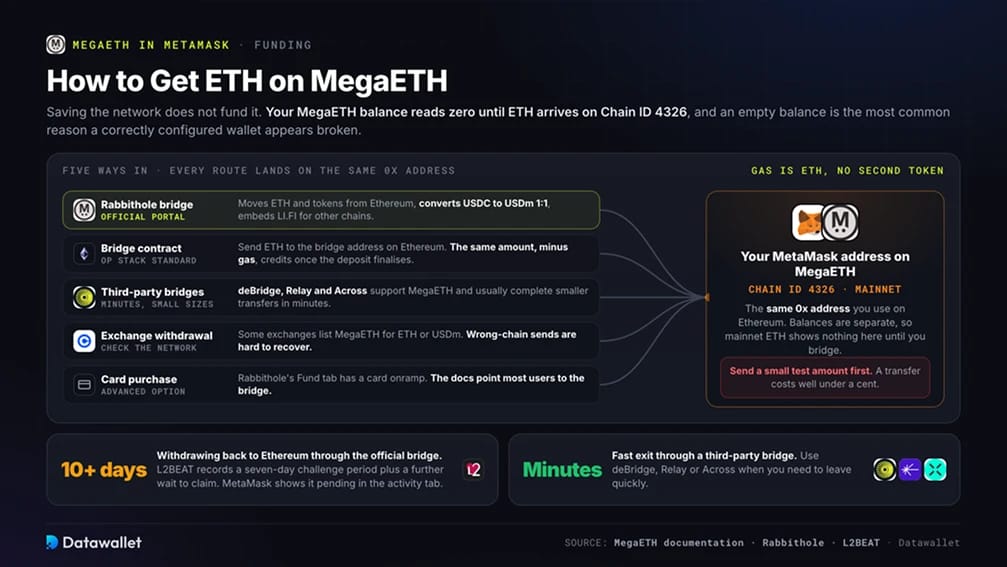
Adding the network does not fund your wallet. The MegaETH balance stays at zero until ETH reaches your address on Chain ID 4326. An empty balance is the most common reason a correctly configured wallet appears broken.
These are the main ways to fund the wallet:
- Rabbithole bridge: MegaETH's official portal at rabbithole.megaeth.com/bridge transfers ETH and tokens from Ethereum. It also converts USDC to USDm at a 1:1 rate and embeds LI.FI for transfers from other chains.
- Official bridge contract: MegaETH uses an OP Stack Standard Bridge. Send ETH directly to its bridge address on Ethereum, and the same amount, minus Ethereum gas, is credited to your MegaETH address once the deposit finalises.
- Third-party bridges: deBridge, Relay and Across support MegaETH, usually completing smaller transfers within minutes. Compare fees and timings in our bridge to MegaETH guide, or see our best crypto bridges roundup for their security models.
- Exchange withdrawals: Some exchanges offer MegaETH withdrawals for ETH or USDm. Check the destination network on the withdrawal screen, as funds sent through the wrong chain are difficult to recover.
- Card purchase: The Fund tab in Rabbithole connects to a card onramp. MegaETH's documentation describes this as an advanced option and directs most users to the bridge.
Allow considerable time to withdraw to Ethereum through the official bridge. L2BEAT records a seven-day challenge period, followed by another three and a half days before funds become claimable on Ethereum. Use a third-party bridge if you need a fast exit.
How Gas Works on MegaETH in MetaMask
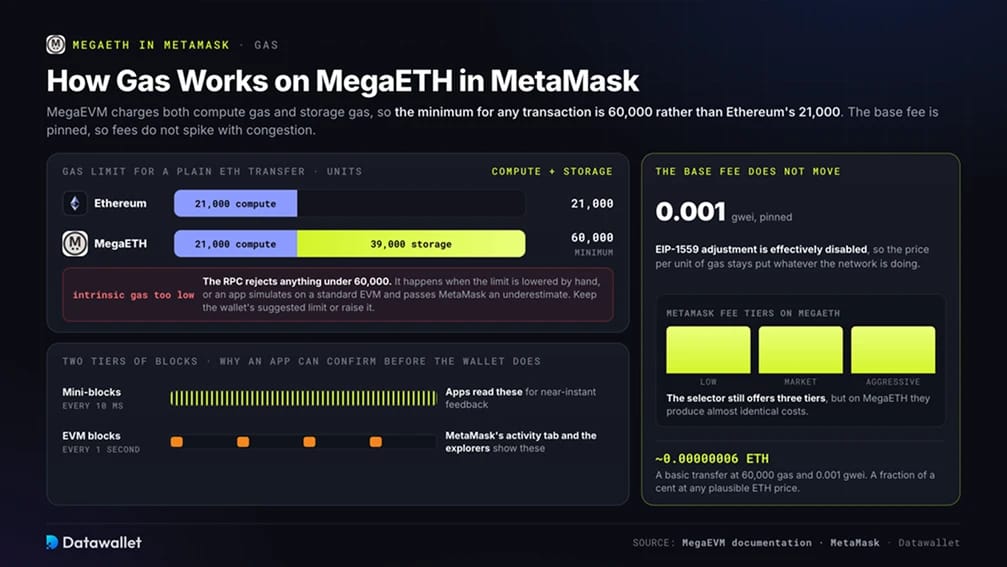
MegaEVM charges both compute gas and storage gas, which changes the gas limits you see in MetaMask. A basic ETH transfer uses 60,000 gas on MegaETH, compared with 21,000 on Ethereum. That total consists of 21,000 compute gas and 39,000 storage gas. It is also the minimum for any transaction, so the RPC rejects lower limits with an "intrinsic gas too low" error.
With the base fee pinned at 0.001 gwei and EIP-1559 adjustment effectively disabled, fees do not spike during congestion as they do on Ethereum. A basic transfer at that rate costs about 0.00000006 ETH, a fraction of a cent at any plausible ETH price.
MetaMask obtains its gas estimate from the RPC and accounts for the higher limits automatically. Errors can occur if you manually reduce the limit in advanced settings. An app may also underestimate gas by simulating a transaction with a standard EVM before passing it to MetaMask. For a transaction that fails immediately with a gas error, retain the wallet's suggested limit or raise it.
Mini-blocks stream every 10 milliseconds, giving apps near-instant feedback. A standard EVM block seals every second and appears in MetaMask's activity tab and the explorers. These two block tiers explain why an app can show a transaction as confirmed before it appears in your wallet.
Is Adding MegaETH to MetaMask Safe?
Adding MegaETH only saves network settings; it does not move funds. Use MetaMask's built-in entry or verify custom settings against docs.megaeth.com. Reject unsolicited network prompts and fake claim sites, common threats covered in our MetaMask review.
The chain carries greater risk. L2BEAT classifies MegaETH as "Other", below Stage 0. A 6-of-10 multisig can upgrade contracts without an exit window, while one sequencer orders transactions and only one whitelisted address can post state updates. Data sits on EigenDA, with no onchain verification of its data roots.
These dependencies require more trust in the operator than Stage 1 rollups such as Base or Unichain. Keep experimental balances small and consider a hardware wallet for larger holdings.
About MegaETH
MegaETH is a Layer 2 built on a modified OP Stack, using 10 millisecond mini-blocks, EigenDA for data storage and Ethereum for settlement. Public mainnet launched on February 9, 2026, with Chainlink, Aave and GMX available from day one. Our MegaETH explainer covers its architecture.
MegaLabs raised a $20 million seed round in 2024, led by Dragonfly and backed by Vitalik Buterin and Joseph Lubin. Its October 2025 $450 million public token sale drew $1.39 billion in bids.
Following a KPI-gated token launch, MEGA began trading on April 30 across 13 exchanges. By September, it had fallen more than 80% from roughly $0.22 to $0.04. About 53% of its 10 billion supply is reserved for Flux milestone distributions. TVL exceeded $580 million shortly after launch, largely from leveraged Aave incentive farming, before positions unwound as rewards thinned.
Common MegaETH Setup Mistakes
Avoidable setup errors account for most failed first transactions, rather than network faults.
Check these before concluding something is broken:
- Wrong Chain ID: Mainnet uses Chain ID 4326 and is the only network that holds real value. Chain ID 6343 is the testnet, while 6342 is retired.
- Zero balance: Adding the network leaves you with no ETH until you bridge funds. Start with a small test amount.
- Manually lowered gas: Limits below 60,000 gas fail on MegaETH. Keep MetaMask's estimate.
- Missing tokens: You may need to import bridged USDm, MEGA or wrapped assets by contract address. Use the official token list or the explorer to find addresses, rather than chat messages.
- Unsolicited network prompts: Close sites that request a network addition or switch as soon as they load.
- Stale directories: Some aggregators retain the old testnet RPC and explorer. Follow docs.megaeth.com when sources disagree.
Final Thoughts
MetaMask's built-in list now makes adding MegaETH a one-click process. Older versions can use ChainList or manual entry with Chain ID 4326. Bridge a small amount of ETH through Rabbithole or a third-party provider, then keep MetaMask's estimated gas limit. The network otherwise behaves like an EVM chain with near-instant confirmations.
Deciding how much to leave on MegaETH requires more care. Its engineering has delivered on latency, and the uptime record since launch is clean. However, security still depends on a single operator with instant upgrade powers, while most capital attracted by the token launch has departed. Use the network for experiments and size your balance accordingly. Monitor L2BEAT for progress on its stage rating and sequencer decentralisation.