Can You Revoke Token Permissions on MetaMask?
Every permission a MetaMask account has granted can be removed. The method depends on the permission type.
MetaMask's help center distinguishes between disconnecting a site and revoking an approval. Disconnecting stops a website from seeing your address and balances. Any token approval you signed there remains active onchain and can still move your tokens.
Two newer permissions can also give a dapp ongoing access to tokens. Since Ethereum's Pectra upgrade, MetaMask can use EIP-7702 to point an ordinary account at its own smart contract. This smart account status is switched on by default for new users.
ERC-7715 advanced permissions, which MetaMask has also started supporting, let a dapp spend a capped amount of a token on a schedule without requesting a signature each time. Both permission types can be turned off inside the wallet.
The Four Permission Types and What Each One Controls
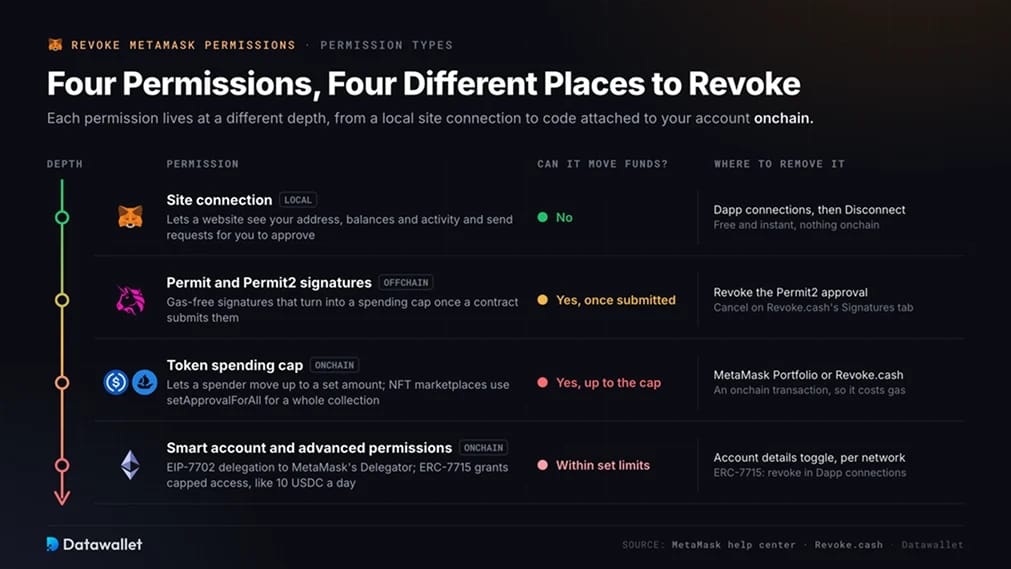
Each permission is stored differently, which determines where you remove it.
- Site connection: Lets a website see your public address, token balances and activity, and send transaction requests for approval. It cannot move funds by itself. Connections are stored locally in MetaMask and cost nothing to remove.
- Token spending cap (approval or allowance): An onchain record on a token contract authorizing a specific spender, the contract address you approved, to move up to a set amount of that token from your wallet. Dapps commonly request unlimited caps. MetaMask warns that unlimited spending caps are dangerous because a hacked or fraudulent dapp can drain your entire balance of that token. NFT marketplaces use a related permission, setApprovalForAll, covering every token in a collection.
- Permit and Permit2 signatures: Gas-free signatures that grant a spending cap when a contract later submits them. EIP-2612 Permit works on tokens with the function built in. Uniswap's Permit2 contract extends this approach to any ERC-20 token once you approve Permit2 itself. Neither signature appears onchain before submission.
- Smart account delegation and advanced permissions: An EIP-7702 delegation points your account at MetaMask's Delegator contract, enabling transaction batching and sponsored gas. ERC-7715 advanced permissions build on that smart account to grant a dapp limited, time-bound token access, such as 10 USDC per day for a subscription. Each requires separate revocation steps.
How to Revoke Token Permissions on MetaMask
Four methods cover every permission type. We use the first after each session and the second or third for anything involving funds.
1. Disconnect Sites Inside MetaMask
Disconnecting is enough if a website only connected to your wallet and never requested a token approval. It is also the first step after visiting a page you do not trust.
Remove a site's connection from the wallet:
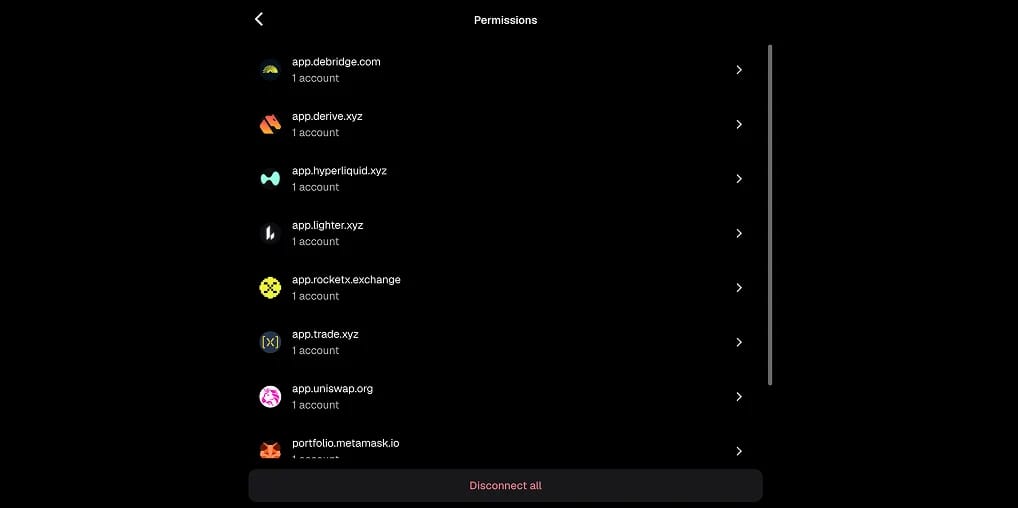
- Open Dapp connections: In MetaMask Extension, click the menu at the top right of the account view and choose Dapp connections. On mobile, open the site in the in-app browser and tap the account icon at the top right.
- Pick the site: Select the website, then press Disconnect on Extension or Disconnect all on mobile to remove your accounts from it.
- Clear everything at once: Go to Settings, then Security & Privacy, then Clear privacy data. This removes all site connections for the currently selected account in one tap.
Disconnection is free and instant because it writes nothing to the blockchain. It also revokes nothing onchain. If you signed an approval on the site, continue to the next step.
2. Revoke Spending Caps in MetaMask Portfolio
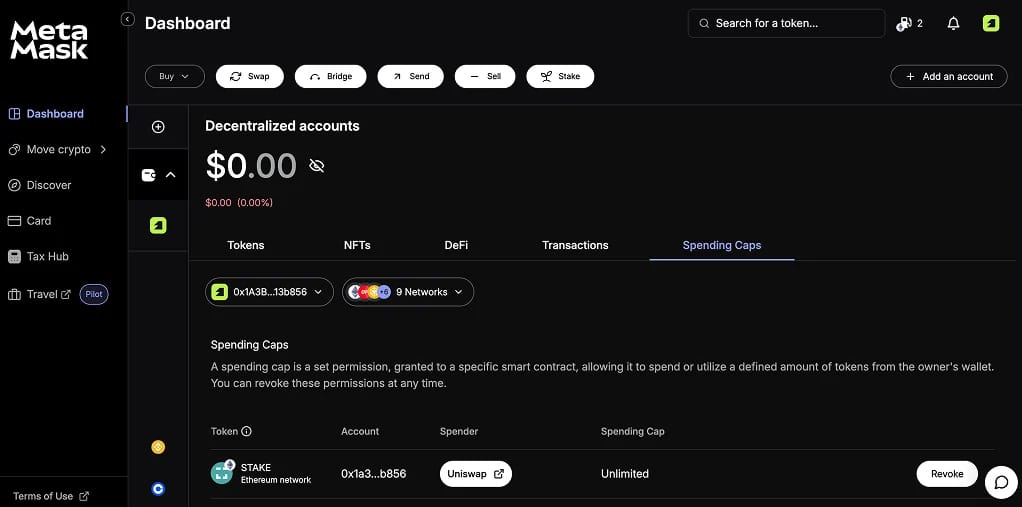
MetaMask Portfolio is a separate web dashboard containing MetaMask's approval manager. It lists and revokes spending caps on Ethereum Mainnet, Polygon, BNB Chain, Optimism and Base.
Revoke an allowance from MetaMask Portfolio:
- Open Portfolio: Go to portfolio.metamask.io, connect MetaMask and stay on the Overview tab.
- Switch to Spending Caps: Click the Spending Caps tab to view active allowances on the connected accounts, listed by token and spender.
- Revoke and confirm: Press Revoke beside the allowance, then confirm in MetaMask. Each revocation requires an onchain transaction and a network gas fee to process it.
Portfolio suits users who want to stay within MetaMask and use only its five supported networks. For Arbitrum, Avalanche, Linea or smaller chains, choose one of the next two options.
3. Revoke Approvals Using Revoke.cash
MetaMask's help center lists Revoke.cash first among third-party tools. We use it for addresses active across several chains. Alongside ERC-20 spending caps, the dashboard displays NFT approvals, Permit2 allowances and EIP-7702 delegations. An exploit checker compares your approvals against a list of hacked contracts.
Audit and revoke across 100+ networks:
- Load your address: Open Revoke.cash and connect MetaMask, or paste your address or ENS name into the search bar. An ENS name is a readable name ending in .eth. Select the network to inspect.
- Sort and filter: Sort by most recent to find a fresh malicious approval, or filter for unlimited allowances. If a security alert identifies a contract, search by spender.
- Revoke or batch revoke: Click Revoke beside an approval and confirm in MetaMask. To remove several, select them and use batch revoke. This uses an EIP-7702 smart account to combine dozens of revocations into one transaction.
The core dashboard is free, and individual revocations cost only gas. On the free tier, Revoke.cash charges $1.50 per batch. Premium costs $99 a year, removes batch fees and adds a multichain view. Ultimate, at $199 a year, continuously monitors approvals and automatically revokes risky ones, with a small gas budget included.
Its free browser extension supports every EVM network and warns before you sign a suspicious approval or Permit.
4. Use the Block Explorer's Token Approval Checker
Most major EVM explorers have an approval checker. MetaMask directs users to Etherscan, BscScan and Polygonscan, where you can verify a spender's contract on the same site you use to read transactions.
Revoke from an explorer:
- Connect to Web3: Open your network explorer's token approval checker, click Connect to Web3 and choose MetaMask.
- Review spenders: The checker lists ERC-20, ERC-721 and ERC-1155 approvals, including the spender's contract name where verified. Open the contract page for any spender you do not recognize.
- Revoke and pay gas: Press Revoke beside the entry. Check the token and spender in MetaMask's confirmation window, then confirm the transaction.
Each explorer checker covers one chain. Auditing a wallet used on six networks therefore requires six separate visits, so we default to a multichain tool for a full review.
How to Revoke Smart Account Delegations and Advanced Permissions
Smart accounts are enabled by default for new MetaMask users, so many now hold an EIP-7702 delegation without having set it up themselves. A delegation to MetaMask's audited Delegator contract is safe. However, batching lets a transaction move several assets at once, increasing what a phishing site can do with one signature.
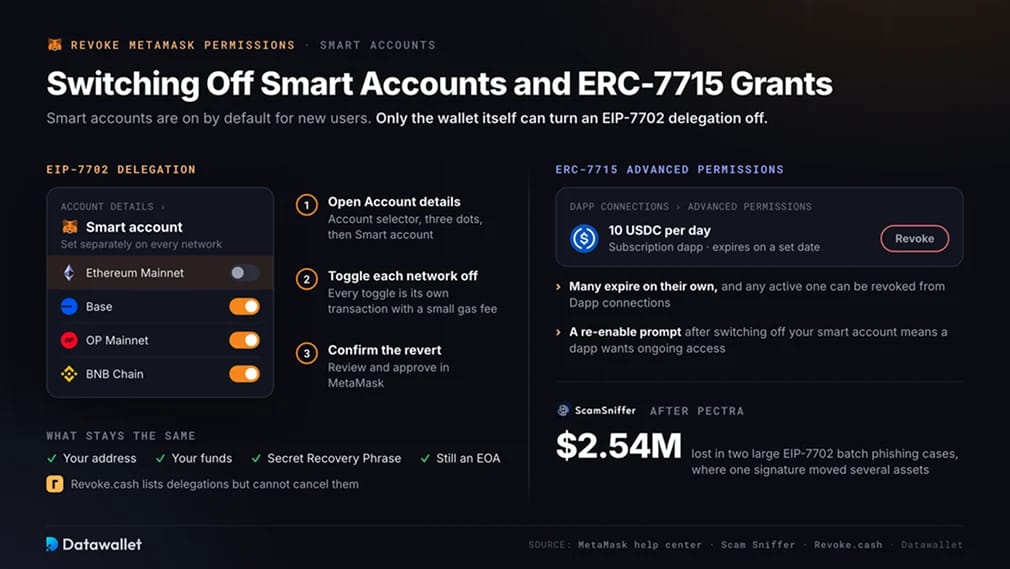
In the months after Pectra, Scam Sniffer recorded two large EIP-7702 batch phishing cases with combined losses of $2.54 million.
Switch a smart account back to a standard account:
- Open Account details: Click the account selector at the top of MetaMask, press the three dots beside the account and choose Account details, then Smart account.
- Toggle each network off: Switch off smart account status on every network you want to revert. The setting is network-specific, and each toggle requires a transaction with a small gas fee.
- Confirm the revert: Review and confirm in MetaMask. Your address, funds and Secret Recovery Phrase stay the same because the account remains an EOA, an ordinary key-controlled account, throughout.
Revoke.cash displays active delegations in its Delegations tab but cannot cancel them. MetaMask does not allow external dapps to set or revoke EIP-7702 delegations, leaving the wallet's toggle as the only removal method.
To cancel ERC-7715 advanced permissions, open Dapp connections in MetaMask and revoke the active permission. Many have an expiry date and end automatically.
If you have disabled your smart account, MetaMask asks you to re-enable it before a dapp can request an advanced permission. That prompt signals that the dapp wants ongoing access.
What to Do About Permit and Permit2 Signatures
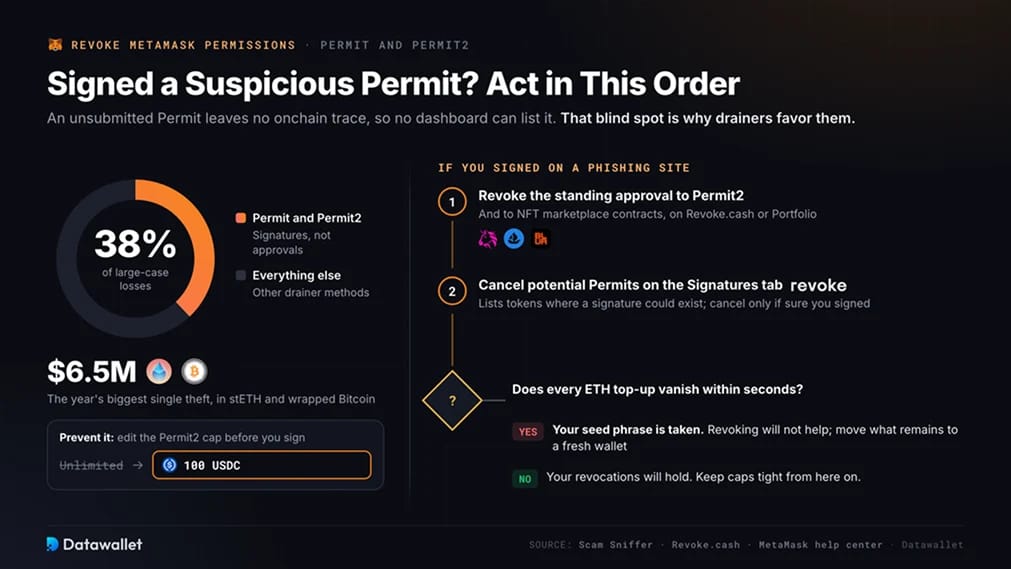
No dashboard can show which Permit signatures you have signed because they only appear onchain when the recipient submits them. Wallet drainers favor this blind spot. Scam Sniffer's most recent annual report attributed 38 percent of large-case losses to Permit and Permit2 signatures, including the year's largest theft, $6.5 million in stETH and wrapped Bitcoin.
If you suspect you signed a Permit on a phishing site, first use Revoke.cash or Portfolio to revoke your standing approval to the Permit2 contract. Revoke approvals to NFT marketplace contracts such as OpenSea or Blur as well.
Next, open the Signatures tab on your Revoke.cash account page to cancel potential Permit signatures for tokens you hold. Revoke.cash states that this page can only list tokens where a signature could exist. Only spend gas on cancellation if you are confident you signed something.
If funds are already leaving and every ETH top-up disappears within seconds, your seed phrase has been taken. Revoking will not help. Move whatever remains to a fresh wallet and abandon the old one.
When approving Permit2, replace the unlimited default with a spending cap. MetaMask lets you edit the cap on the confirmation screen before signing, limiting how much a later signature can drain.
How to Revoke Token Permissions on Solana
EVM revoke tools do not work on Solana because its permissions operate differently. Each token sits in its own token account, whose owner can appoint a single delegate to transfer up to a set amount. Only the token account owner can sign the Token Program's Revoke instruction, which clears the delegate and resets the delegated amount to zero.
Most Solana DeFi actions do not create a lasting delegate. Drainers instead use fake claim pages that quietly approve one.
MetaMask's Solana accounts lack a dedicated delegate screen, so you need to connect to a Solana revoker tool. Phantom's help center recommends the Famous Fox Federation Revoker. Sol Incinerator's revoke tool also scans SPL Token and Token-2022 accounts.
Clear Solana delegates with a revoker tool:
- Connect a Solana wallet: Open the revoker and connect Phantom, Solflare or another supported Solana wallet. Let it scan your token accounts for active delegates.
- Check the approved address: Review each token name, mint address and delegate. Keep any delegate required by an open marketplace listing or lending position.
- Revoke and sign: Select the delegates to remove and sign the transaction. Your tokens stay in your wallet, and you pay only the standard Solana network fee.
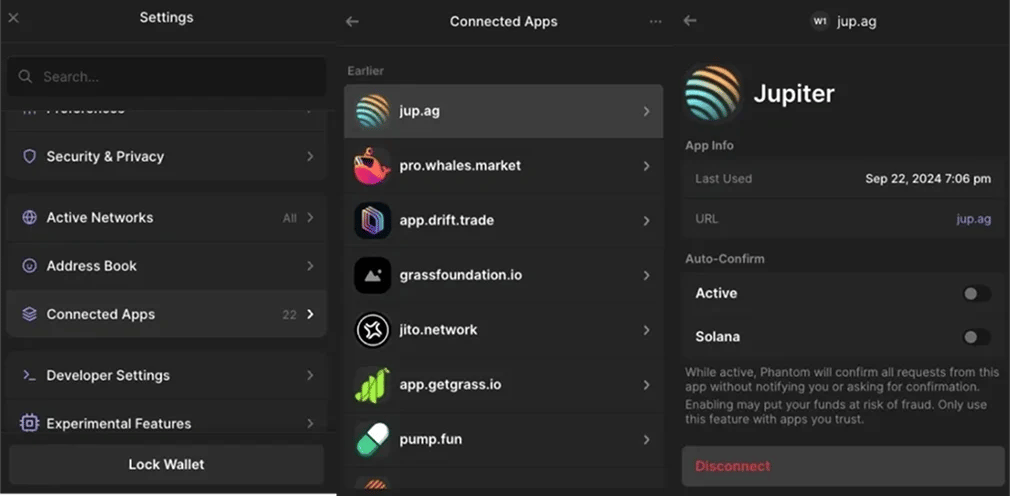
Disconnecting a Solana app in Phantom or MetaMask stops new signature requests but leaves onchain delegates intact. The same distinction applies on Ethereum. Our MetaMask vs Phantom comparison explains how both wallets handle Solana.
Why Revoking Permissions Still Matters
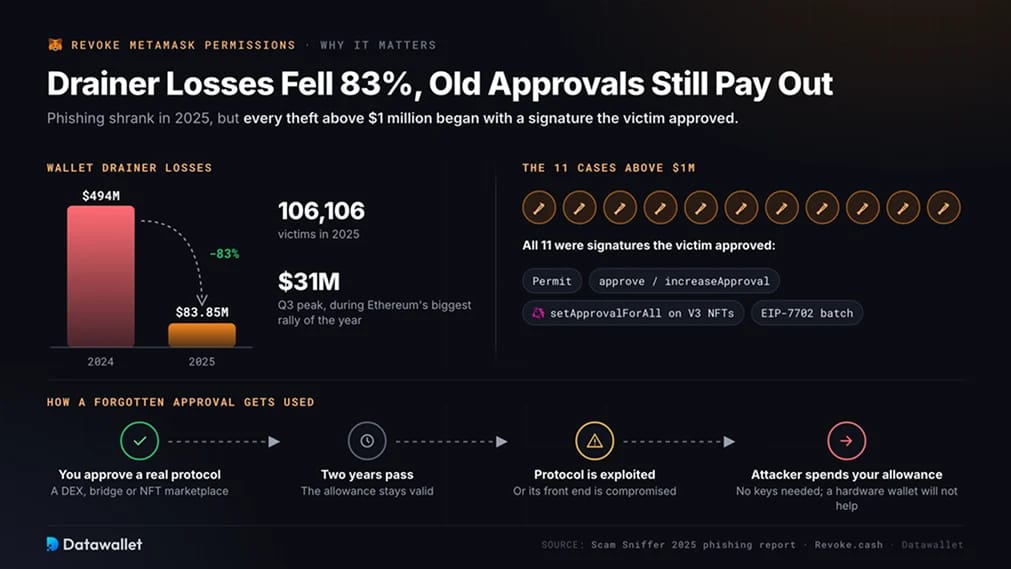
Approval and signature phishing declined sharply last year, but losses remain concentrated in the permissions covered here. Scam Sniffer tracked $83.85 million stolen from 106,106 victims through wallet drainers in 2025. That was down 83 percent from $494 million the previous year.
Losses followed market activity, reaching $31 million in the third quarter during Ethereum's biggest rally of the year. All eleven cases exceeding $1 million involved a signature approved by the victim. These included Permits, approve or increaseApproval calls, setApprovalForAll permissions on Uniswap V3 position NFTs, and EIP-7702 batches.
Approvals to legitimate protocols also carry lasting risk. An allowance granted two years ago remains valid if the protocol is later exploited or its front end compromised. An attacker can use that allowance without your keys. As Revoke.cash explains, a hardware wallet offers no protection here because the signed approval already authorizes spending. Regular revocation is the only defense that works after the fact.
We treat approvals to decentralized exchanges, bridges and NFT marketplaces as temporary. After using any of the leading decentralized exchanges or a cross-chain bridge, we revoke the allowance in the same session. The next time we need it, we approve only the exact amount.
Common MetaMask Revocation Problems and Fixes
Most failed or confusing revocations come down to three causes. Check them in order before assuming the wallet is at fault.
1. The Approval Is Not Showing Up
Check the permission type and the network first:
- Confirm what you granted: A site connection does not appear in a spending cap list. Check Dapp connections instead. If you enabled a smart account, look in the Delegations tab.
- Match the network: Approvals are recorded separately on each chain. For an approval signed on Arbitrum, switch both MetaMask and the revoke tool to Arbitrum. If the network is missing, follow our guide to adding networks to MetaMask.
- Try a second tool: Portfolio indexes only five networks, while each explorer indexes its own. If the allowance is missing from both, load your address into Revoke.cash and check the same chain.
2. The Revocation Transaction Fails
Rule out gas and pending transactions:
- Fund the native token: Onchain revocations require the network's native coin for gas, such as ETH, POL, BNB or SOL. Before starting a long batch, check the current cost on our Ethereum gas tracker.
- Clear stuck transactions: A pending transaction with a lower nonce blocks those behind it. The nonce is the sequence number MetaMask assigns to each transaction. Speed up or cancel the pending transaction in the Activity tab before retrying. If the confirmation window returns an error, see our fix for the internal JSON-RPC error in MetaMask.
- Wait out the RPC: Public RPC endpoints are the servers MetaMask uses to reach a chain. During congestion, they can drop requests on smaller networks. Retry after a few minutes or switch to another RPC for that network.
3. The Permission Still Looks Active
Separate stale data from a real problem:
- Refresh the source: Revoke tools cache results. Once the revocation confirms, reload and re-scan, then check the transaction hash on the explorer to verify success.
- Check for a re-approval: Some dapps automatically request another approval when you return. A reappearing allowance means the site requested it again and you signed it.
- Look for a sweeper bot: If ETH deposited for gas disappears immediately, your private key is compromised and revocation will not hold. Move everything you can to a new wallet without reusing the seed phrase.
Final Thoughts
Every permission on a MetaMask account can now be removed. Portfolio handles spending caps on five networks, while Revoke.cash covers the remaining permission types, including Permit2 and delegations. Smart account delegations and ERC-7715 permissions are switched off inside the wallet.
Set a monthly reminder to review Revoke.cash or Portfolio and remove unused allowances. For approvals you keep, choose a spending cap instead of unlimited access. Together, these habits remove most of the exposure wallet drainers depend on.