







Can I Buy Bitcoin with Capitec Bank?
Capitec customers can buy Bitcoin through Capitec Pay or by card, but the bank does not sell crypto or hold it for clients. Since 24 October 2024, Capitec has suspended EFTs and immediate payments to crypto wallets from its app and business web interface. The bank attributed the decision to fraud schemes that use exchange wallets to conceal stolen funds.
Capitec Pay provides the direct route. At a supported exchange, enter your cellphone, account or ID number during checkout. A payment request then appears in the Capitec app for approval. Capitec checks your ID against the exchange account holder, meaning funds can only reach an account registered in your name. Card purchases through exchange gateways remain available.
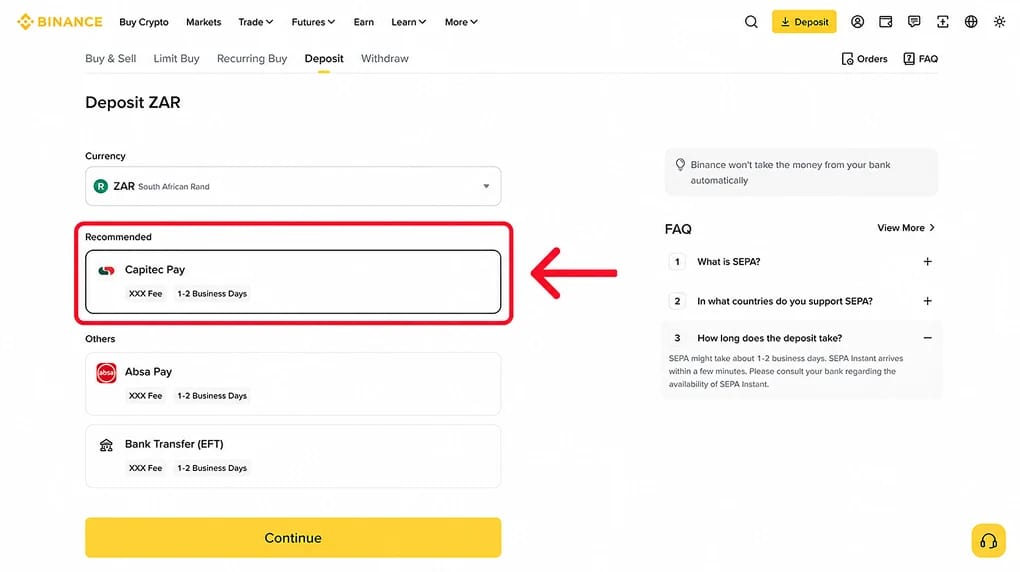
Binance offers the simplest setup. The exchange added Capitec Pay in January, and our R500 test deposit from a Global One account appeared in the Binance wallet within three minutes. Customers of FNB and Standard Bank can still fund licensed exchanges by ordinary EFT. VALR's CEO therefore described Capitec's block as an outlier at the time.
How to Buy Crypto with Capitec Bank
For Capitec customers who want withdrawable crypto, depositing into Binance through Capitec Pay is the cheapest option. The bank charges R1 and payments settle within minutes. Exchange card gateways apply percentage-based fees, which become expensive on larger purchases.
Steps to buy crypto with Capitec Bank:
- Create and verify a Binance account: Register with Binance, then complete identity verification using a smart ID card, green ID book or passport and a selfie. Your Binance profile and Capitec account must have matching names, or the deposit will be declined.
- Check your app limits: Open your card in the Capitec app and tap Update daily card limits. Capitec Pay uses your online payment limit. You can raise this permanently or apply a temporary limit of up to R1 million for three days. Set the limit above your intended deposit.
- Start the deposit in Binance: Tap Add Funds, select Deposit ZAR and choose Capitec Pay. Enter the rand amount, then tap Pay Now. Any Binance fee appears on this screen before confirmation.
- Approve in the Capitec app: Find the payment request under Transact, then Capitec Pay. Confirm the amount, select the account you want to use and approve the payment with your Remote PIN. Capitec Pay approvals cannot be reversed, so check the details before proceeding.
- Buy your asset: After the rand balance arrives, open BTC/ZAR or convert it to USDT for access to deeper order books. For purchases above a few hundred rand, we typically use a limit order on the spot market. The Buy Crypto screen includes a hidden spread in its quoted price.
If the Capitec Pay request does not appear, sign out of the app and log in again. Our request only surfaced after a fresh sign-in.
Fees, Tax and Transfer Limits for Capitec Bank Customers
Capitec's charges are minimal. Most costs arise from the exchange and any subsequent tax liability to SARS.
Capitec Bank costs and limits
- Capitec Pay: The personal fee schedule valid from 1 March charges R1 per payment. Binance displays any additional processing charge before confirmation.
- EFT and immediate payment: Transfers to other banks cost R2 by EFT or R6 by immediate payment. Neither method can reach a crypto exchange from the app following the October 2024 block.
- PayShap: Payments to another bank cost R2, but the low per-transaction caps make PayShap unsuitable for exchange funding.
- Cards: Capitec debit and credit cards work through exchange gateways, which usually charge between 1.5% and 3.9% of the purchase amount. They are best reserved for a small trial deposit.
- Daily limits: Online, scan-to-pay and phone limits are configured per card in the app. A temporary increase up to R1 million remains active for three days before reverting.
- Fraud screening: Capitec blocked more than 131,000 suspicious beneficiaries during its last financial year. Crypto merchant payments are monitored against normal thresholds, so an unusually large deposit may trigger a hold or phone call.
- No refund path: Once approved, Capitec Pay transactions are final. Payments to a fraudulent platform become merchant disputes, while the bank's chargeback rules apply only to card purchases.
Binance fees
- Capitec Pay deposit: Capitec charges R1. Any Binance fee is displayed on the deposit screen.
- Spot trading: Base-tier maker and taker fees are 0.10%. Paying fees in BNB reduces them by 25%. Our Binance review contains the complete fee schedule.
- Buy Crypto screen: This option is suitable for a small first purchase. For larger orders, its built-in spread makes it more expensive than using the order book.
- P2P: Buyers pay no fee on Binance's rand peer-to-peer market. Capitec transfers are commonly accepted by sellers, with the crypto held in escrow until payment is confirmed.
- Crypto withdrawal: Only the network fee applies. Withdrawing USDT on Tron costs less than R20.
South African tax on crypto
- Capital gains: SARS classifies crypto as an asset. Only 40% of a net gain is included in taxable income, producing a maximum effective rate of 18%. The annual exclusion rose to R50,000 for the tax year beginning 1 March.
- Income tax: Frequent trading is taxed as revenue at your marginal rate, which can reach 45%. The same treatment applies to staking rewards and airdrops.
- CARF reporting: Since 1 March, exchanges with a South African connection have collected client identity and transaction data under the Crypto-Asset Reporting Framework. Their first returns are due to SARS by 31 May 2027.
Buying R5,000 of Bitcoin through Capitec Pay incurs R1 in bank charges and approximately R5 in Binance spot fees. A R5,000 card purchase can cost R150 or more before the order is placed.
Best Exchanges for Capitec Bank Customers
The main consideration for Capitec customers is whether an exchange supports Capitec Pay. Binance and Luno accept it directly, while VALR supports Capitec cards. Bybit serves South African users through cards and P2P. Our best crypto exchanges in South Africa guide compares the broader market, including platforms that continue to rely on ordinary EFT.
Capitec Bank Cryptocurrency Policy
Capitec does not offer a crypto product and manages exchange payments as a fraud risk. Its October 2024 policy removed EFT and immediate payments to every exchange. At the time, the bank's own table showed Luno and AltCoinTrader supporting Capitec Pay, while VALR and Ovex were limited to cards. Binance was added to the Capitec Pay list in January.
The decision drew strong criticism. VALR's Farzam Ehsani said every major local exchange had been licensed under the FAIS Act by that point. In his view, restricting an entire category of regulated providers looked like an overreach. Capitec responded that its Pay service matches the payer's ID with the wallet holder and allows the bank to monitor merchant volumes. Its policy remains unchanged.
Most available exchanges now hold licences. The FSCA declared crypto assets to be financial products in October 2022. By 31 March, it had approved 310 crypto asset service provider (CASP) licences and declined 17 applications. Binance does not appear on that list. South Africans access its derivatives through the platform's role as a juristic representative of FiveWest OTC Desk (FSP 51619), while the spot business operates under foreign licences. As a result, customers have less local recourse than they would with an FSCA-licensed exchange such as VALR.
Crypto withdrawals are also subject to identity checks. Since 30 April 2025, the Financial Intelligence Centre's Directive 9 has applied the travel rule to these transfers. Exchanges must collect sender and recipient details before processing a withdrawal.
The Reserve Bank and National Treasury published a draft Crypto Asset Manual this month. Under the proposal, transfers from a local exchange to an offshore platform would be treated as cross-border transactions and counted against the R2 million single discretionary allowance. The manual remains open for comment, but the direction points towards tighter rules.
About Capitec Bank
Founded in 2001 by Michiel le Roux, Jannie Mouton and Riaan Stassen, Capitec has become South Africa's largest retail bank by client numbers. For the year to February, it reported 26 million active clients and headline earnings of R16.8 billion. Of those customers, 15.3 million use the Capitec app.
The Global One, a single low-cost account, formed the basis of Capitec's business. Its deliberately simple fee structure remains central to the bank's model. Personal banking now produces 41% of headline earnings, with the balance coming from insurance, Capitec Connect mobile services and business banking. Graham Lee replaced Gerrie Fourie as Group CEO in July 2025.
Capitec Bank Limited is licensed under the Banks Act and supervised by the Prudential Authority within the Reserve Bank. It also holds FSCA FSP licence 46669. Deposits are protected by the Corporation for Deposit Insurance up to R100,000 per depositor. This protection applies only to the bank account and does not cover assets held on an exchange.
Bottom Line
Capitec provides one direct route into an exchange, and Binance has made the process short. A R1 payment approved in the app moves rand into a wallet where it can be used to buy Bitcoin, stake through Earn or fund a withdrawal to self-custody. Capitec Pay's ID matching also removes many of the ways a deposit can be misdirected.
Binance does not hold an FSCA CASP licence, and Capitec Pay approvals are irreversible. A draft manual under consultation would also classify transfers between local and offshore platforms as exchange control events. Make sure the name on your Binance account matches your ID, adjust the app limit before depositing and retain every trade export. SARS receives the transaction data whether you declare it or not.
.webp)