Can I Buy Bitcoin with bunq?
You can buy 350+ coins through Kraken in the bunq app's Crypto tab or use your euro account to fund any EU-licensed exchange. There is no crypto-specific cap or list of blocked platforms in bunq's published payment limits. Exchange transfers are treated like other payments.
Safety Shield checks every payment. In our test, a €2,000 transfer from a bunq Pro account to a newly added exchange account appeared to leave the balance immediately, but the money did not leave the bank for a full day. bunq holds first payments to a new recipient for 24 hours. Payments made after a limit change or a login on a new device face the same hold.
For small, occasional purchases, the in-app service is suitable. Its fee schedule ranges from 1.99% on bunq Free to 0.25% on Elite. Each quote also includes a spread, the gap between the buying and selling price. You will need an exchange to hold coins in your own wallet, as bunq does not allow external crypto transfers.
bunq Crypto and What It Leaves Out
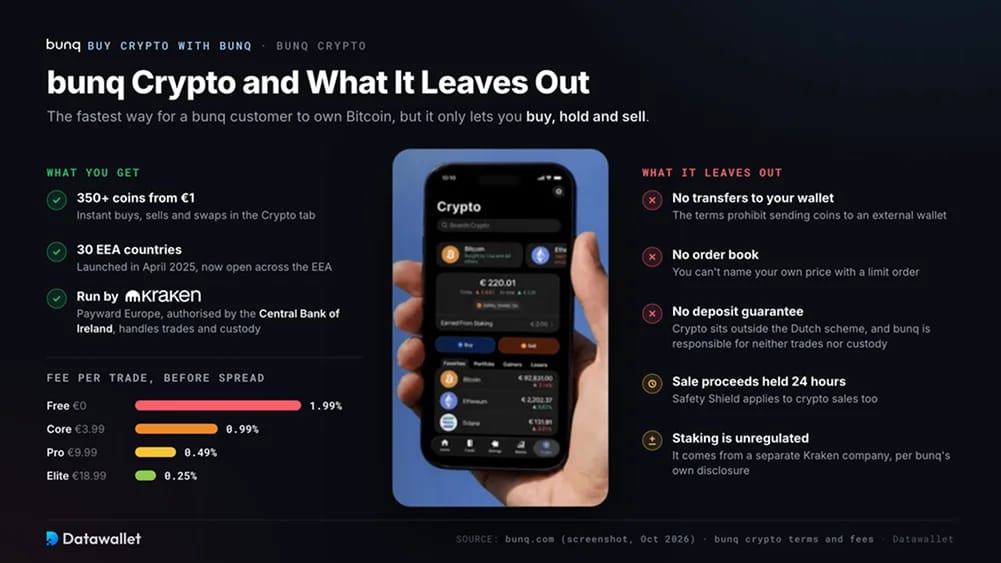
For existing customers, bunq Crypto is the fastest way to own Bitcoin. Its core service is limited to buying, holding and selling. After launching in April 2025 in six countries, the service now covers adults in 30 European Economic Area countries. Open a wallet in the Crypto tab and complete a short Kraken check. Purchases start at €1 and can be funded from any euro account.
Trade execution and custody sit with Kraken through Payward Europe Solutions Limited, which is authorised by the Central Bank of Ireland. Under bunq's account terms, the bank is responsible for neither. Crypto also falls outside the Dutch deposit guarantee.
Before the spread, trading fees are 1.99% on bunq Free, 0.99% on Core (€3.99 a month), 0.49% on Pro (€9.99) and 0.25% on Elite (€18.99). Moving from Pro to Elite solely for the lower fee only pays off when monthly trades exceed roughly €3,750.
The terms also prohibit transfers to external wallets. Although the app supports instant buys, sells and swaps, it has no order book, the live list of buy and sell offers where you name your own price. Safety Shield holds sale proceeds for 24 hours.
Staking pays rewards for committing coins to help run a blockchain. This service comes from a separate Kraken company and is unregulated, according to bunq's own disclosure.
How to Buy Crypto with bunq
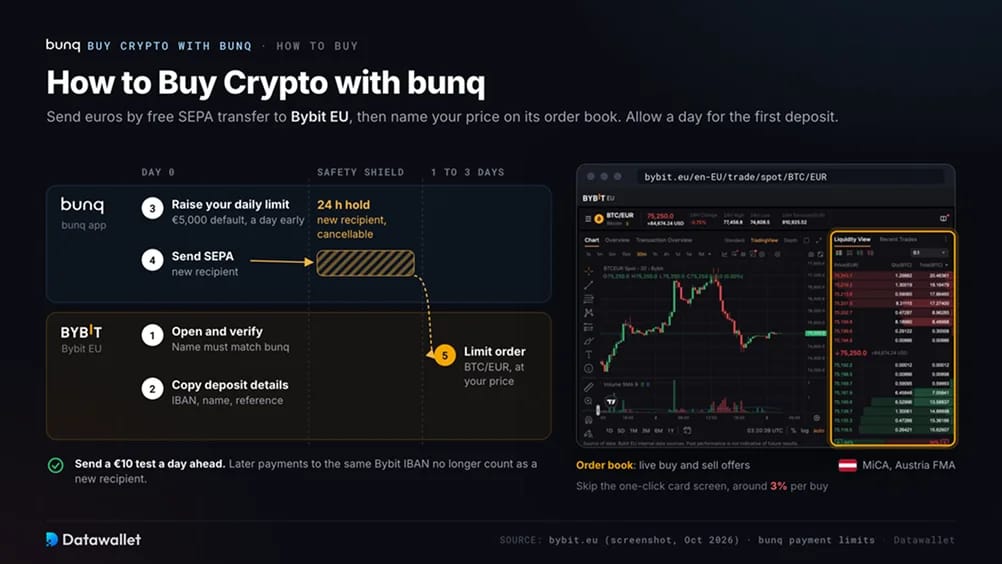
Send euros from bunq to Bybit through a free SEPA transfer, then place an order on its order book at your chosen price. Austria's Financial Market Authority granted Bybit its MiCA licence in May 2025. The licence requires minimum capital and separated client assets, with ongoing supervision. Coverage extends to bunq customers in 29 European Economic Area countries, excluding Malta.
Steps to buy crypto with bunq:
- Open and verify a Bybit account: Register on Bybit and complete its identity checks, known as KYC. You will need a passport or national ID card plus proof of address. Your name must match the bunq account, or the deposit will be rejected.
- Copy the EUR deposit details: In Bybit, go to Assets, Deposit, Fiat, EUR, then SEPA Transfer. Copy the IBAN, beneficiary name and reference exactly. Bybit assigns payment partners, so deposit details vary between customers.
- Raise your bunq daily limit a day early: From the Home tab, select the paying account, then Settings, Payment Limits and Daily Limit. Each account defaults to €5,000 per day, adjustable up to €1,000,000. Any change places subsequent payments under Safety Shield.
- Send the transfer: Add Bybit's details as a new recipient and approve the payment. If the name and IBAN do not match, bunq displays a warning. The first payment to a new recipient is held for 24 hours, during which you can cancel it in the app.
- Place a limit order: Allow one to three business days for Bybit to credit a SEPA deposit. Once the euros arrive, open BTC/EUR and place a limit order, which instructs the exchange to buy at a price you set. Buying by card through the one-click screen costs around 3%.
A €10 test transfer sent a day ahead clears the new-recipient hold for subsequent deposits. Later payments to the same Bybit IBAN should no longer be treated as payments to a new recipient.
Fees and Transfer Limits for bunq Customers
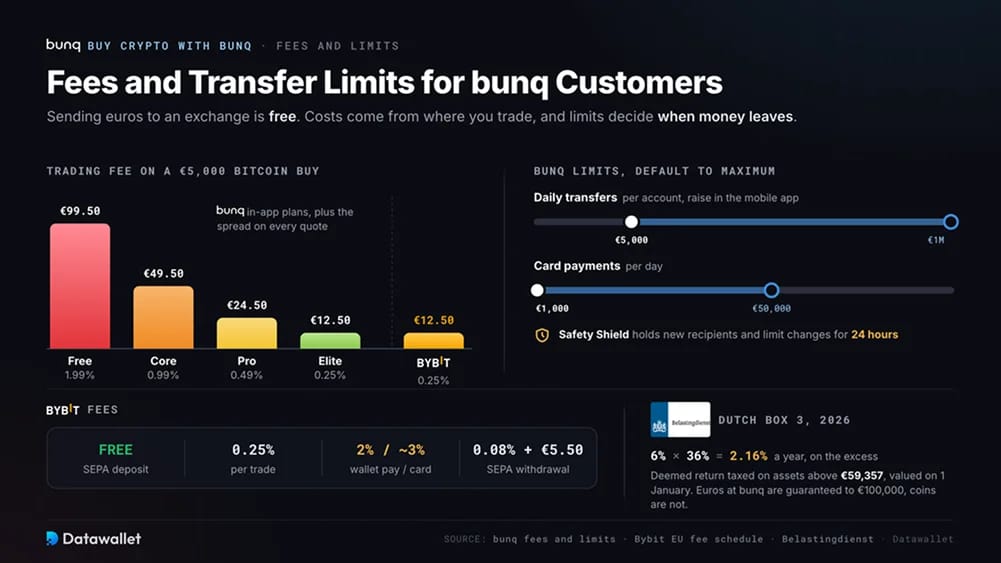
Sending euros from bunq to an exchange is free. Your costs come from the exchange, while bunq's payment limits determine when the transfer can leave.
bunq costs and limits
- Euro transfers: Personal accounts pay no fee per SEPA transfer, including instant payments. Transfers work the same way for every bunq IBAN, whether the country code is NL, DE, FR, ES or IE.
- Daily limit: Outgoing payments start at €5,000 per account per day. You can raise this to €1,000,000, but only in the mobile app.
- Safety Shield: Payments flagged as unusual wait 24 hours. Switching the feature off also takes 24 hours to apply.
- Card payments: The starting limit is €1,000 a day, adjustable up to €50,000. We use cards only to test a new account because of Bybit's charges, listed below.
- iDEAL: Dutch bunq accounts support iDEAL, the bank-app payment method now merging into Wero. Bitvavo and Kraken accept it for instant deposits. Our iDEAL guide explains how it works.
- In-app crypto: Each buy, sell or swap costs 1.99% on Free, 0.99% on Core, 0.49% on Pro or 0.25% on Elite, plus the spread.
- Deposit protection: Euros held at bunq are covered by the Dutch Deposit Guarantee up to €100,000 per person. That protection does not extend to coins bought in the app or on an exchange.
Bybit fees
- SEPA deposit: Free.
- Trading: Effective 5 October 2026, Bybit EU's unified fee schedule sets a 0.25% fee per trade for accounts with less than €100,000 in 30-day volume. Higher tiers pay less.
- Card and wallet purchases: Around 3% by card, or 2% through Apple Pay or Google Pay.
- Crypto withdrawal: A fixed network fee applies to each coin and is displayed before confirmation.
- EUR withdrawal: SEPA withdrawals cost 0.08% plus €5.50 according to Bybit's fee guide. Check the withdrawal screen for the charge that applies to your account.
Dutch tax on crypto
- Box 3: The Netherlands taxes crypto as wealth, with the Belastingdienst valuing your coins as of 1 January. In 2026, assets above €59,357 per person are assigned a deemed return of 6%, taxed at 36%.
- Counter-evidence: You can request taxation on your real return if it was below the deemed figure and your records support the claim.
- DAC8: Licensed crypto platforms have collected customer and transaction data since 1 January under this EU tax-data directive. This includes Bybit and Kraken, which operates behind the bunq app. Tax authorities receive the first reports in early 2027.
- Outside the Netherlands: Your country of residence determines your tax obligations, regardless of the country code on your IBAN. For bunq customers living in Germany, our guide to exchanges in Germany is a starting point.
On a €5,000 Bitcoin purchase, Bybit's trading fee is €12.50. Buying the same amount in bunq costs €99.50 on Free, €49.50 on Core, €24.50 on Pro or €12.50 on Elite, before the spread.
Best Exchanges for bunq Customers
With no crypto-specific cap on payments to licensed exchanges, bunq customers can compare platforms by their licence and trading costs, then consider how they accept euros. All four exchanges below hold MiCA authorisations covering Dutch residents and support SEPA transfers from bunq.
Alongside its flat trading rate, Bybit offers margin and savings products. Kraken powers bunq Crypto but lists more coins on its own platform. For customers considering a listed company, there is Coinbase, while Amsterdam-supervised Bitvavo accepts iDEAL. The full rankings are in our best crypto exchanges in the Netherlands guide.
bunq Cryptocurrency Policy
bunq sells crypto through a licensed partner, with Kraken handling trading and safekeeping. Other app-only banks, including Revolut and N26, also offer coins inside their apps. Large Dutch banks have their own rules for exchange payments, covered in our ING and ABN AMRO guides.
The bank's outgoing-payment fraud rules apply regardless of what you buy. Its 24-hour hold began in June 2024, when bunq tightened security following Dutch media reports of phishing losses running into millions of euros. Crypto buyers encounter the hold more often than most customers, since exchange funding commonly involves both a new recipient and a higher payment limit.
Keep exchange statements ready for questions about the source of funds when a large exchange payout reaches your account. In May 2025, De Nederlandsche Bank, the Dutch central bank supervising bunq, fined it €2.6 million for insufficient follow-up on money laundering alerts.
The Netherlands ended its MiCA transition on 30 June 2025, a year ahead of the EU-wide deadline of 1 July 2026. Platforms serving bunq customers must now appear in the AFM registers, maintained by the Dutch markets regulator, or the EU's central list. Our MiCA-licensed exchanges roundup tracks qualifying firms.
About bunq
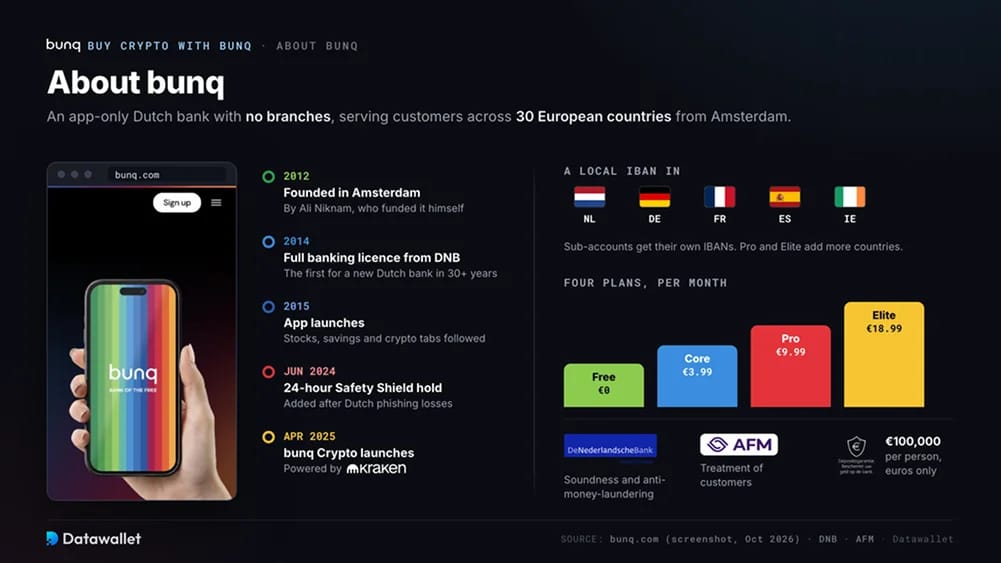
Software entrepreneur Ali Niknam founded bunq in Amsterdam in 2012 and initially funded it himself. In 2014, De Nederlandsche Bank awarded it a full banking licence, the first issued to a new Dutch bank in more than three decades. Its app launched the following year, in 2015.
Operating without branches across 30 European countries, bunq offers four personal plans from €0 to €18.99 a month: Free, Core, Pro and Elite. Each includes several sub-accounts with individual IBANs. Customers receive a local IBAN in the Netherlands, Germany, France, Spain or Ireland. Pro and Elite users can add IBANs from the other countries.
The app has separate tabs for stocks, savings and crypto. Oversight is split between De Nederlandsche Bank, which supervises financial soundness and anti-money-laundering controls, and the AFM, which oversees customer treatment. The Dutch Deposit Guarantee protects euro balances up to €100,000 per person.
Final Thoughts
For a first €50 Bitcoin purchase or regular monthly buying on Elite, bunq's Crypto tab is suitable. Elite's 0.25% fee matches exchange pricing, although Free and Core cost more. None of the plans allows you to send coins elsewhere.
We recommend Bybit for bunq customers seeking an order book and withdrawals to their own wallet, with a flat 0.25% trading fee. Read our Bybit review for a closer look at the platform.
Raise your daily limit and send a small test payment a day before your first deposit to clear Safety Shield. Enter the beneficiary details exactly as shown by Bybit. Keep a record of your 1 January balances for the Box 3 return.