Can I Buy Bitcoin with MetaTrader?
Not if you want Bitcoin that can be withdrawn. MetaQuotes, the Limassol-based company behind MT4 and MT5, licenses its software to brokers but never handles customer deposits. Each broker controls the available crypto symbols, spreads and custody arrangements. It also determines which regulator, if any, oversees the account.
Most BTCUSD and ETHUSD symbols on MetaTrader are contracts for difference (CFDs). These agreements settle price movements in cash between you and the broker. They create no wallet and transfer no coins. Our perpetual versus spot explainer examines why this distinction affects everything from fees to tax.
Bybit provided the only genuine crossover when it became the first crypto exchange to plug MT5 into its markets in August 2024. That service now operates as Bybit TradFi through Infra Capital, a Mauritius-licensed entity that excludes EEA residents. Bybit is also replacing MT5 with its own terminal. The licensed Bybit EU platform therefore has no MetaTrader integration for European users.
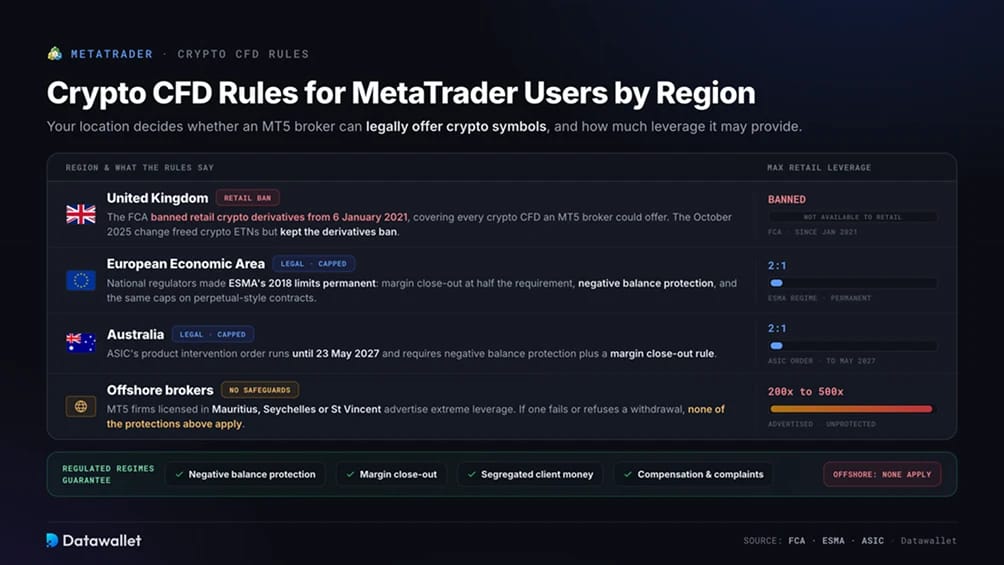
Crypto CFD Rules for MetaTrader Users by Region
Your location determines whether an MT5 broker can legally offer crypto symbols and how much leverage it may provide.
- United Kingdom: The FCA banned the sale of crypto derivatives to retail consumers from 6 January 2021. The restriction covers every crypto CFD that an MT5 broker could offer. In October 2025, the regulator lifted its separate block on exchange traded crypto notes but retained the derivatives ban. UK buyers can find FCA-registered spot platforms in our best crypto exchanges in the UK guide.
- European Economic Area: Retail crypto CFDs remain legal, although leverage is capped at 2:1 under measures national regulators made permanent following ESMA's 2018 restrictions. Brokers must close positions when margin drops below half the requirement and provide negative balance protection, preventing clients from owing more than their deposit. ESMA has reminded firms that the same limits cover perpetual-style contracts. Our best crypto exchanges in Europe guide ranks licensed spot venues for the region.
- Australia: ASIC's product intervention order caps crypto CFD leverage at 2:1 until 23 May 2027. It also requires negative balance protection and a margin close-out rule. Spot platforms are covered in our best crypto exchanges in Australia guide.
- Offshore brokers: MT5 firms licensed in Mauritius, Seychelles, or St Vincent advertise leverage of 200x to 500x on crypto pairs to customers their local rules allow them to serve. If one fails or rejects a withdrawal, clients do not receive the money segregation safeguards, compensation coverage, or complaint procedures available under the regimes above.
How to Buy Crypto with a MetaTrader Alternative
A SEPA transfer to Bybit's licensed European platform is the cheapest way to convert euros into coins you control. Deposits are free, and spot trades carry a 0.10% fee.
Steps to buy crypto as a MetaTrader user:
- Create a Bybit account: Register at Bybit and complete identity checks (KYC) using a passport or national ID. Bybit EU GmbH serves EEA residents from Vienna under its Austrian MiCA authorisation.
- Copy the EUR deposit details: Open Deposit, choose EUR and select SEPA or SEPA Instant. Record the IBAN, beneficiary name and payment reference. The reference is what links the transfer to your account.
- Send the transfer from your bank: Add Bybit EU GmbH as the payee and enter the details exactly as provided. Our SEPA Instant test deposit arrived in under a minute. Standard SEPA transfers usually take one to two business days.
- Place a limit order: Select BTC/EUR or another preferred pair, then set a price near the market. Limit orders incur the flat 0.10% order-book fee. Instant Buy includes a wider spread in its quote, so we reserve it for an initial test purchase.
- Withdraw to your own wallet: You can transfer the coins for the network fee, something no CFD position permits. Our best crypto wallets guide compares the available custody options.
Bybit EU does not list USDT because Tether has no MiCA authorisation. Stablecoin buyers must use euro pairs or compliant alternatives such as USDC. The impact of these stablecoin rules on European listings is covered in our MiCA-licensed exchanges guide.
MetaTrader Crypto Fees, Funding and Limits
Crypto CFDs seldom display a visible commission, but that does not make them cheap. Costs are embedded in spreads and overnight financing, alongside restrictions on how funds can be moved.
MT5 broker costs
- Spread: Each broker sets the spread for every symbol and builds it into the quote. Crypto spreads are several times wider than major forex pricing from the same broker. They often expand further during volatile periods and at weekends.
- Swap (overnight financing): Brokers charge financing for each day a crypto position remains open, including weekends in most cases. This makes leveraged CFDs costly for holding Bitcoin beyond a few days.
- Commission: Raw-spread accounts charge a per-lot commission in exchange for tighter pricing. Compare the total cost rather than focusing only on the advertised spread.
- Funding: Regulated brokers generally support cards and bank transfers. Many offshore MT5 firms also accept USDT deposits. Withdrawals return to the method originally used to fund the account.
- Leverage: Retail leverage is limited to 2:1 in the EEA and Australia and unavailable for UK retail traders. Offshore brokers may offer as much as 500x without those protections.
- No coin withdrawals: A profitable BTCUSD CFD settles in cash when closed. No cryptocurrency can be transferred to a wallet.
Bybit fees
- SEPA deposit: Free, including SEPA Instant.
- Spot trading: 0.10% maker and taker at the standard tier.
- Instant Buy: The quoted price includes a wider spread. It is suitable for an initial purchase but uncompetitive for larger orders.
- Crypto withdrawal: The network fee charged for the asset being transferred.
- EUR withdrawal: SEPA withdrawals return funds to your bank and are either free or subject to a small flat fee, depending on the amount.
Since 1 January, every MiCA-licensed exchange has reported user balances and transactions to national tax authorities under DAC8. Keep complete trade records for your tax return regardless of which platform you use.
Best Exchanges for MetaTrader Users
Each exchange below is authorised under MiCA, supports euro deposits through SEPA and allows users to withdraw their coins. We ranked them by licensing, the total cost of a funded trade and the quality of their professional interfaces as alternatives to an MT5 terminal.
MetaTrader Cryptocurrency Policy
MetaQuotes develops and licenses software, which defines the extent of its involvement in crypto. It holds no financial licence, provides no crypto symbols and delegates every decision on listings, pricing and custody to the broker operating the server. This neutral position allowed crypto CFDs to spread across thousands of MT4 and MT5 brokers without MetaQuotes handling any coins.
That model also created an opening for abuse. Fraud rings purchased rebranded white-label versions of the platform and used plugins to display fabricated prices. In so-called pig butchering scams, victims would see invented profits accumulate before being denied when they attempted to withdraw. Apple removed MT4 and MT5 from the App Store in September 2022 because of this abuse. The apps were reinstated in March 2023 after MetaQuotes strengthened its checks on platform operators.
MetaQuotes has since stopped issuing white-label licences. A legitimate MT5 broker must now operate a full server licence under its own name.
Before depositing, check the broker against its regulator's public register. Access to a genuine MT5 terminal says nothing about the reliability of the firm operating it. Treat any account manager who contacts you through social media as a fraud attempt.
About MetaTrader
MetaQuotes was founded in 2000 and operates from Limassol, Cyprus. MT4 launched in 2005 and became the standard terminal for retail forex trading. MT5 followed in 2010 with multi-asset support, and the two platforms still power thousands of brokerages worldwide.
The MQL5 programming language and its marketplace of Expert Advisors remain central to the ecosystem. These automated strategies can trade without manual supervision and are a major reason users continue working within MetaTrader.
Brokers, banks and proprietary trading firms license the server software, then offer the terminal to customers under their own brands. Our guides to Trading 212 and Interactive Brokers examine the same broker-behind-the-app structure on regulated multi-asset platforms. Both provide crypto exposure through a familiar account, but neither delivers coins to the user. Every MT5 crypto symbol carries the same trade-off.
Final Thoughts
MetaTrader remains an exceptional trading platform but a poor place to buy Bitcoin. Its crypto symbols provide leveraged price exposure through broker-controlled spreads and daily financing charges, with no coins delivered after the trade. UK brokers cannot legally offer these products to retail traders.
Bybit covers both sides of the process. Active traders receive professional charts, order types and automation alongside a spot order book charging a flat 0.10%. Buyers focused on ownership get free SEPA deposits, access to more than 600 assets and withdrawals to a personal wallet under an Austrian MiCA licence.
Enter the payment reference exactly as provided when making a transfer, use limit orders and move long-term holdings into self-custody. Our Bybit review provides a complete assessment of the platform before you commit larger amounts.