Can I Buy Bitcoin with PayPal?
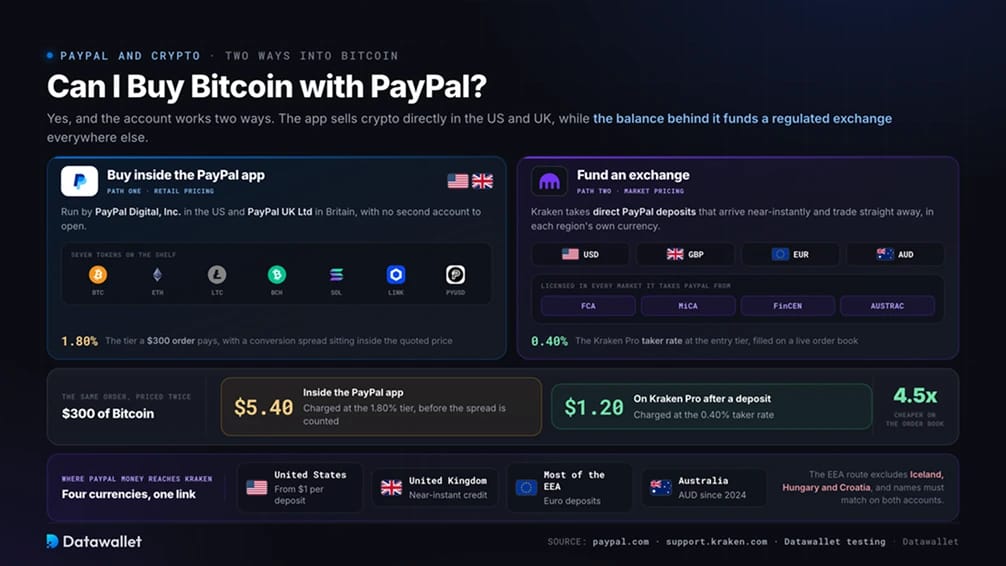
Yes, and the account works two ways. Americans and Britons can buy Bitcoin and a shortlist of other tokens without leaving the PayPal app, since crypto services run through PayPal Digital, Inc. in the US and PayPal UK Ltd in Britain. Everyone else, and anyone who wants real market pricing, can use a PayPal balance to fund a regulated exchange instead.
The exchange path reaches far more people. Kraken accepts PayPal deposits from residents of the US, UK, Australia, and the EEA excluding Iceland, Hungary, and Croatia, in each region's local currency. Money arrives near-instantly and trades straight away.
Price is where the two paths separate. Buying $300 of Bitcoin inside the PayPal app costs $5.40 at the 1.80% fee tier, plus a spread hidden inside the quoted price. The same $300 order on Kraken Pro after a PayPal deposit cost us $1.20 at the 0.40% taker rate, and the deposit landed before we had finished typing the limit price.
How to Buy Crypto with PayPal
Sending a PayPal balance to Kraken keeps the convenience while swapping retail pricing for an order book, and the whole setup takes minutes because no bank details change hands.
Steps to buy crypto with PayPal:
- Create and verify a Kraken account: Register at Kraken and pass identity checks with a passport or driving licence. The name on your Kraken profile must match your PayPal account exactly, because mismatched names are the one reason these deposits fail.
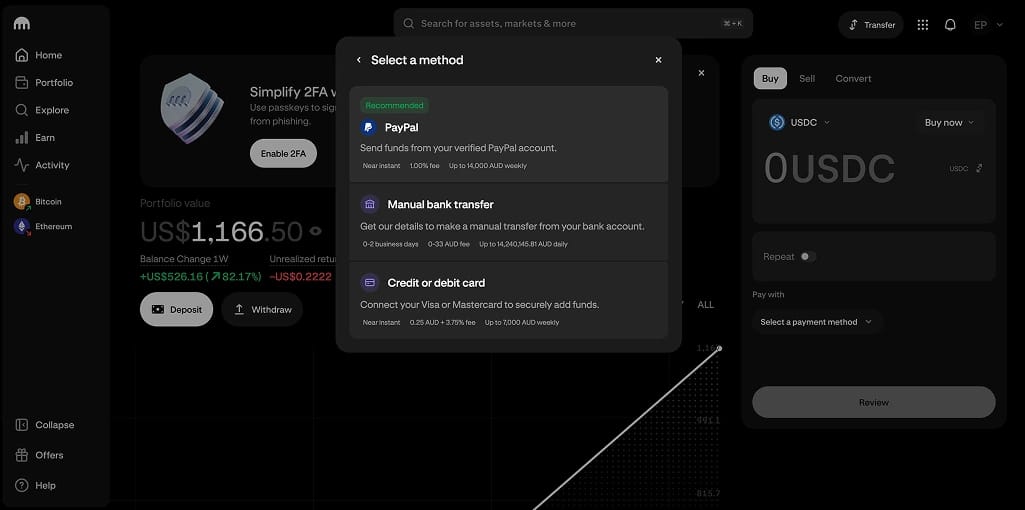
- Connect PayPal as a funding method: Open Transfer, choose Deposit, pick your currency, and select PayPal. You will be redirected to sign in to PayPal once, after which the link persists for future deposits.
- Send the deposit: Enter an amount and confirm. Deposits start from $1 in the US with a $7,000 weekly rolling limit, and the exact fee for your region appears on the confirmation screen before you commit. Our test deposits in USD and AUD both credited in under a minute.
- Place a limit order on Kraken Pro: Open the pair you want and set a price near the live market. Pro charges 0.25% maker and 0.40% taker at the entry tier, several times cheaper than any in-app quote.
- Wait out the hold before withdrawing: PayPal-funded balances carry a 72-hour withdrawal hold covering the deposited amount, applied to cash and crypto alike. Trading is unaffected. Once it lapses, move long-term holdings to self-custody, which our crypto wallet guide compares in detail.
Buying Crypto Directly in the PayPal App
The in-app purchase suits small, quick buys where nobody wants a second account. US customers can buy, hold, and sell Bitcoin, Ethereum, Litecoin, Bitcoin Cash, Solana, Chainlink, and PayPal's own dollar stablecoin PYUSD.
- Open the Crypto or Finances tab: Accept the risk disclosures and complete any identity checks PayPal has not already run on your account.
- Pick a token and an amount: PayPal quotes a single price with the spread inside it, and the transaction fee appears before you confirm.
- Confirm the purchase: The buy settles instantly from your balance, linked bank account, or debit card. Selling back works the same way at the same fee.
- Transfer out if you want self-custody: US customers can send coins to external wallets for the network fee alone. Buying and transferring in one step costs an extra 1% of the transferred value, so buy first and transfer separately.
UK customers got the product back in November 2025, when PayPal reintroduced crypto for British users with the same seven tokens. The relaunch covers buying, holding, and selling only, so British holders who want coins in their own wallet still need the exchange path above.
PYUSD deserves a separate mention. Buying and selling it against US dollars is free at a fixed 1:1 rate, and it is issued by Paxos Trust Company under New York state supervision, which puts it among the most tightly regulated stablecoins available. Our GENIUS Act explainer covers the federal law now governing dollar stablecoins like it.
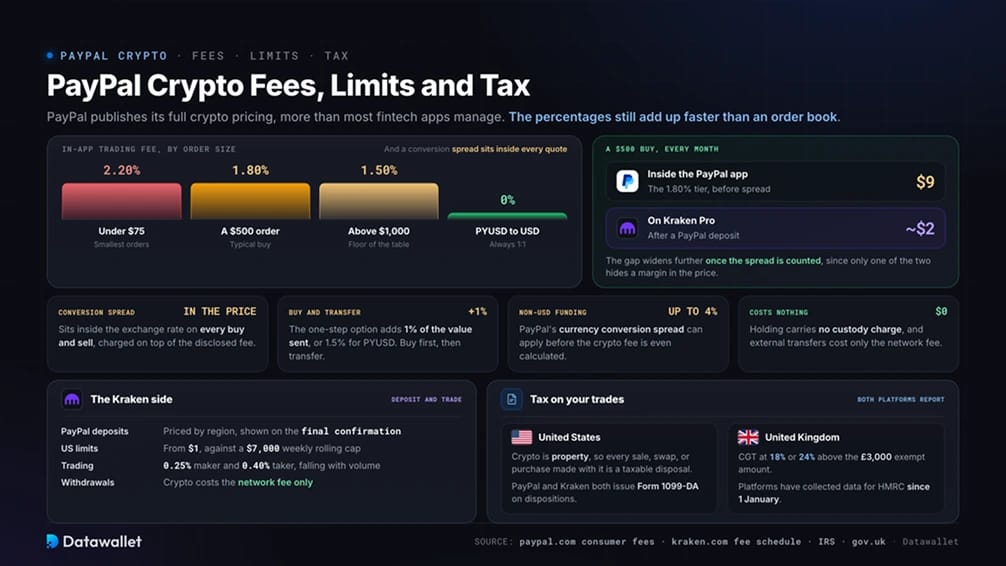
PayPal Crypto Fees, Limits and Tax
PayPal publishes its full crypto pricing, which is more transparency than most fintech apps manage. The percentages still add up faster than an order book.
PayPal in-app costs
- Trading fees: Tiered by order size, from 2.20% on orders under $75 down to 1.50% above $1,000. The same tiers apply to converting between PYUSD and other tokens.
- Spread: A cryptocurrency conversion spread sits inside the exchange rate on every buy and sell, on top of the disclosed fee.
- PYUSD exception: Buying or selling PYUSD with US dollars is free and always 1:1.
- Holding: Free, with no custody or account charge.
- External transfers: The network fee for the asset, paid in the crypto you send. The one-step buy-and-transfer option adds 1% of the transferred value, or 1.5% for PYUSD.
- Currency conversion: Non-USD funding can pick up PayPal's conversion spread of up to 4% before the crypto fee applies, which matters for anyone paying from a non-dollar balance.
Kraken costs
- PayPal deposits: Fees vary by region and are displayed on the final confirmation page before you send. US deposits run from a $1 minimum against a $7,000 weekly rolling limit.
- Trading: Kraken Pro charges 0.25% maker and 0.40% taker at the entry tier, falling with 30-day volume.
- Withdrawals: Crypto withdrawals cost the network fee, and fiat withdrawal pricing depends on the currency and method.
Tax on your trades
- United States: The IRS treats crypto as property, so every sale, swap, or purchase with crypto is a taxable disposal. PayPal and Kraken both issue Form 1099-DA on dispositions, giving the IRS transaction-level visibility.
- United Kingdom: Disposals fall under Capital Gains Tax at 18% or 24% above the £3,000 annual exempt amount, and platforms have collected user data for HMRC under the Cryptoasset Reporting Framework since 1 January.
A monthly $500 buyer pays $9 per order in-app before the spread. The same order on Kraken Pro costs about $2 after a PayPal deposit, and the gap widens once spreads are counted.
Best Exchanges That Accept PayPal
Direct PayPal support remains rare because PayPal only integrates with heavily licensed platforms. We ranked the genuine options on regulation, the cost of a funded trade, and how cleanly PayPal money moves in and out.
Coinbase has taken PayPal deposits and fiat withdrawals since 2021, and its expanded partnership with PayPal made all PYUSD conversions free in April 2025. Kraken still wins on funded trading cost and the breadth of currencies its PayPal integration covers.
PayPal Cryptocurrency Policy
PayPal treats crypto as a product line rather than a payment category to police, and the entity serving your country decides what you can do.
- United States: Crypto runs through PayPal Digital, Inc., which was the first company to convert a conditional New York virtual currency licence into a full NYDFS BitLicense in June 2022, alongside money transmitter licences across the states. The full product is available, from in-app buying to external wallet transfers and merchant checkout in crypto. Our best crypto exchanges in the USA guide compares the licensed venues that PayPal money can fund.
- United Kingdom: PayPal UK Ltd is FCA-authorised as an electronic money institution and registered with the FCA as a cryptoasset business under firm reference 1000741. British users were the first outside the US able to buy PYUSD directly. The FCA's new authorisation regime opens for applications from 30 September, and platforms without full permission by October 2027 must stop serving UK customers, a bar our best crypto exchanges in the UK guide tracks.
- European Economic Area: PayPal offers no in-app crypto purchases to EEA residents, so the exchange path is the only one. PayPal deposits reach Kraken in euros across the region apart from Iceland, Hungary, and Croatia, and Kraken's MiCA licence from the Central Bank of Ireland keeps the destination fully authorised. Note that USDT no longer trades on MiCA-licensed venues, so stablecoin buyers land on USDC, which our MiCA-licensed exchanges guide explains.
- Australia: No in-app crypto here either, but Kraken switched on AUD PayPal deposits in 2024 and operates as an AUSTRAC-registered digital currency exchange. Our best crypto exchanges in Australia guide ranks the local field.
Venmo, PayPal's US sister app, mirrors most of the in-app product, and our Venmo crypto guide covers where the two differ. Anyone hunting Tether specifically should read our guide to buying USDT with PayPal, since stablecoin availability shifts by region.
About PayPal
PayPal launched in 1998, went public through eBay, and now processes payments for more than 400 million active accounts across roughly 200 markets. It became the first major payments company to sell crypto to consumers in November 2020, initially through a partnership with Paxos before bringing the service under its own licences.
The company has kept building since. PYUSD arrived in August 2023 as the first stablecoin issued by a major financial services brand, Solana and Chainlink joined the buy list, and a merchant checkout feature now converts over 100 cryptocurrencies to dollars at the till. Among payment apps, PayPal sits at the crypto-forward end of the spectrum, well ahead of peers that block exchange transfers outright.
Bottom Line
PayPal has earned its place in a crypto setup twice over. The in-app product is a legitimately regulated way to hold a few majors, and the balance behind it funds exchanges cleanly in four currencies across dozens of countries. In several years of testing deposits, we have never had a PayPal payment to a licensed platform blocked.
Kraken remains the better destination for that money. Direct PayPal deposits credit near-instantly in USD, GBP, EUR, and AUD, entry fees of 0.25% undercut the in-app tiers several times over, and the licensing behind it runs deeper than PayPal's own crypto entities, covering FCA registration, a MiCA licence from the Central Bank of Ireland, FinCEN registration, and published proof of reserves.
Match the names on both accounts, remember the 72-hour withdrawal hold, and keep anything you plan to hold for years in a wallet you control.