
Can I Buy Bitcoin with Suncorp Bank?
Yes, but not through Suncorp's Internet Banking or the Suncorp Bank App. There is no in-app crypto trading, so the purchase happens on a separate platform.
The best route is sending AUD from your Suncorp account to an AUSTRAC-registered crypto exchange in Australia. We tested transfers from a Suncorp Everyday Options account. PayID to CoinSpot settled almost instantly with zero friction. A standard bank transfer cleared within a few hours on a business day.
One nuance for Suncorp customers: the bank no longer issues its own credit cards. The old Suncorp Clear Options cards transitioned to MyCard (issued by NAB) in November 2025, and Suncorp now directs customers to ANZ credit cards. For crypto, this is mostly irrelevant because debit cards and bank transfers to AUSTRAC-registered platforms work without issue.
How to Buy Crypto with Suncorp Bank
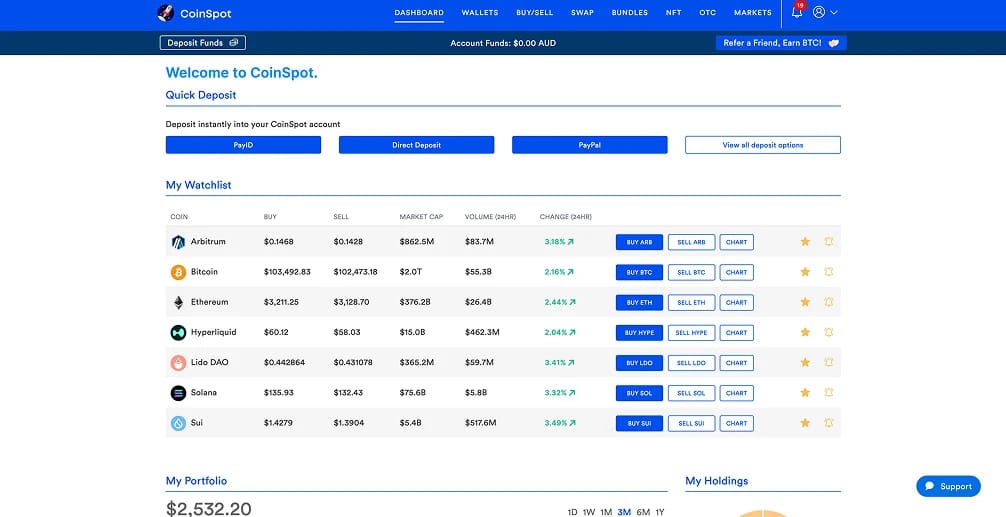
When I buy crypto from a Suncorp account, I use CoinSpot. It is a local exchange with AUSTRAC registration, 500+ assets, and accepts PayID from Suncorp without extra steps.
PayID is the fastest way in. I set it up in the Suncorp Bank App in under a minute using my mobile number, and the first transfer landed in CoinSpot almost immediately. Bank transfer works as a fallback, and BPAY is also an option.
Here is how to start:
- Account Setup: Create your CoinSpot account and finish the KYC identity check before sending money, so your deposit is not stuck waiting for verification.
- Fund Account: Open CoinSpot, tap Deposit Funds, and load the AUD deposit instructions for your chosen method.
- Select Payment Method: Use PayID first for speed. In the Suncorp Bank App, go to Transfer, tap Pay Someone, select PayID, and enter the details CoinSpot provides. Verify the registered payee name before confirming.
- Buy Crypto: Once the AUD arrives, open Buy/Sell and purchase Bitcoin, Ethereum, USDT, or any other listed asset.
Fees and Deposit Limits for Suncorp Customers
When we use Suncorp to buy crypto, the goal is simple: send AUD by PayID or bank transfer to an AUSTRAC-registered exchange. That route is cheaper than card deposits, which attract extra fees or risk being declined.
Deposits and limits
- Default daily limit: Suncorp defaults to $5,000 per day via Internet Banking or the Suncorp Bank App. This covers external transfers, BPAY, and Pay Anyone payments combined.
- Maximum daily limit: You can raise this to $50,000 by registering for the Suncorp Bank Secured App and generating a Security Token Code.
- Transaction limit trigger: Once payments total $3,000 in a day, Suncorp requires a Security Token Code for any further payments. This threshold cannot be changed, even if you raise your daily limit.
- Osko and PayID: Osko fast payments follow the same daily and transaction limits. PayID is available for personal accounts only and can be set up in the Suncorp Bank App. Transfers between your own Suncorp accounts via PayID still count toward your limits.
Trading and withdrawals
- Deposit fees: On CoinSpot, PayID and direct AUD deposits are free. Card deposits cost 1.88%, PayPal 0.5%, and cash 2.5%. Bank transfer is almost always the cheapest option for Suncorp users.
- Trading fees: CoinSpot charges 1% on instant buy/sell/swap orders, while market orders cost 0.1%. I check the fee at the order screen before confirming. The gap between 0.1% and 1% adds up fast on larger buys.
- Withdrawals back to Suncorp: CoinSpot says AUD withdrawals to Australian bank accounts are free. First withdrawals may take up to one business day; later ones are usually faster.
If a Suncorp payment fails or is held, I check three things: whether the transfer exceeds my daily or transaction limit, whether the payee name matches exactly, and whether the Osko 24-hour hold was triggered. Fixing one of those usually clears it.
Suncorp Cryptocurrency Policy
Suncorp does not publish a dedicated crypto policy page like some of the Big Four banks. The practical rules come from how the bank handles payments and its broader fraud protection measures.
Bank transfers and PayID payments to crypto exchanges are not blocked by default. If you are sending AUD to an AUSTRAC-registered exchange, the transfer should settle without issue. Suncorp monitors transactions for fraud, and payments to unregulated or suspicious platforms may be flagged, delayed, or declined.
On the card side, Suncorp no longer issues its own credit cards. The Clear Options cards moved to the MyCard brand (issued by NAB) in November 2025, and new customers are directed to ANZ credit cards. For crypto funding, this means bank transfer and PayID from a Suncorp transaction account are the primary rails.
Suncorp also introduced technology in 2024 that holds higher-risk Osko payments for 24 hours, giving customers time to reconsider if they have been caught in a scam. A first-time transfer to a new exchange payee is more likely to be paused than a repeat payment to a familiar one.
That is why I stick to exchanges registered with AUSTRAC when funding from Suncorp. It is the route with the least friction.
Best Crypto Exchanges for Suncorp Customers
When we fund crypto from Suncorp, we focus on AUSTRAC-registered exchanges that accept PayID and AUD bank transfer. Those methods work most reliably without triggering avoidable payment holds.
See the table below for the exchanges we rate most highly for Suncorp users.
I would start with CoinSpot if speed and simplicity matter most, or Kraken for lower order book fees and deeper markets.
About Suncorp Bank
Suncorp Bank traces its roots to 1902 as the Queensland Agricultural Bank. It now serves around 1.2 million customers across personal banking, business banking, home loans, and commercial lending.
In July 2024, ANZ completed its $4.9 billion acquisition of Suncorp Bank. The legal entity changed to Norfina Limited, but the bank continues under the Suncorp brand through the same app and Internet Banking. ANZ committed to maintaining regional branch numbers and no net job losses as deal conditions.
Core products include the Everyday Options Account (no monthly fee, up to nine sub-accounts), the Carbon Insights Account, home loans, and Feel Good Rewards cashback on eligible Visa Debit purchases. Suncorp also participates in Australia Post's Bank@Post network across 3,500+ locations.
.webp)
Final Thoughts
Suncorp works well for crypto funding when you use the right method: send AUD by PayID or bank transfer to an AUSTRAC-registered exchange, check your daily limit covers the size, and start with a small test deposit before going larger.
If your first Osko payment gets held for 24 hours, that is Suncorp's fraud protection, not a permanent block. Repeat payments to the same payee should go through faster.