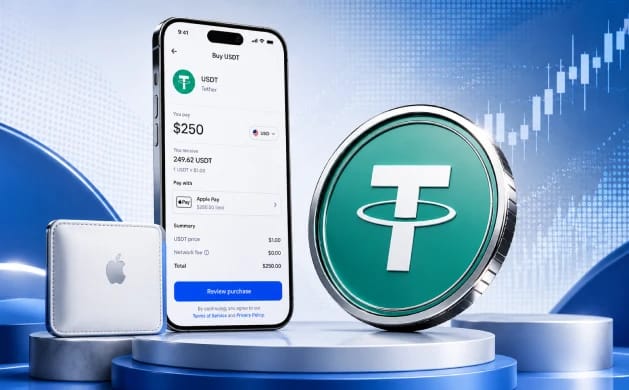
Can I Buy USDT with Apple Pay?
Yes, in most countries where Apple Pay operates, though two large markets sit outside that answer. On a crypto exchange, Apple Pay behaves as a tokenised card, so choosing it at checkout funds the order from your wallet while a payment partner delivers USDT to your balance. Apple lists more than 70 countries and regions where it runs, spanning the Middle East, Latin America, Australia, and most of Europe.
Europe is the exception. Apple Pay works across most of the region, yet no licensed EU exchange can sell USDT to European Economic Area residents. Under MiCA, USDT is a non-compliant stablecoin because Tether never sought e-money-token authorisation. The EEA section below has the detail.
Coverage still has gaps that matter for stablecoin buyers. India, the Philippines, Nigeria, Pakistan, and Egypt lack Apple Pay support, and several rank among the heaviest USDT markets globally, so residents there fund by bank transfer or local rails.
How to Buy USDT with Apple Pay
Our fastest path uses a verified Gate account and the Buy Crypto card screen, choosing Apple Pay at checkout through one of Gate's payment partners. Load a supported Visa or Mastercard in Apple Wallet first, since the processor reads that card rather than Apple Pay itself.
Steps to buy USDT on Gate with Apple Pay:
- Create and verify your account. Register at Gate and verify your identity with a passport or national ID plus a selfie. Higher limits and the full card menu open once Level 2 clears, usually the same day.
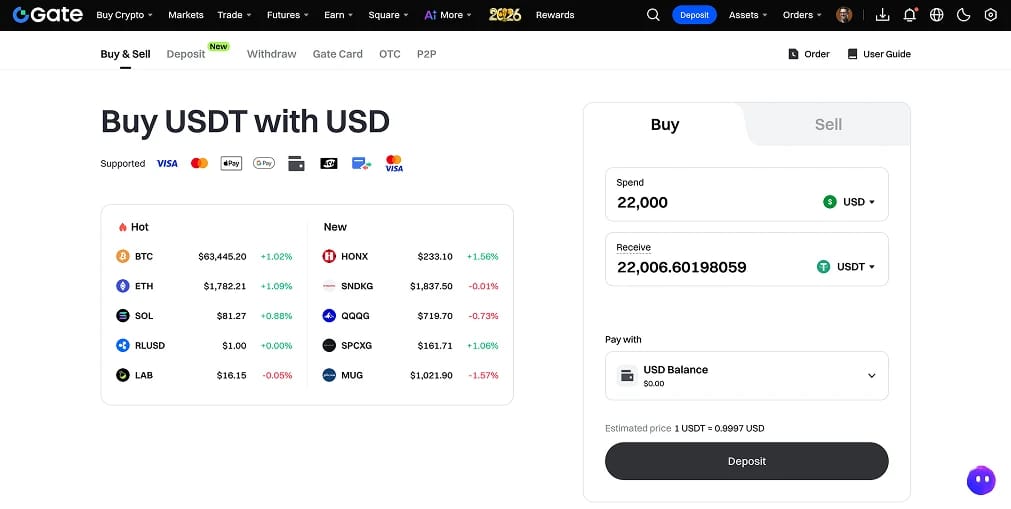
- Open the card purchase screen. From the top menu, open Buy Crypto and choose the card option. Enter your amount in USD, EUR, or GBP, then set the asset to USDT.
- Pick a payment partner. Gate shows several providers for the same order, including Banxa, Mercuryo, and MoonPay. Each quotes its own rate and fee, so compare two or three before committing, since the spread can be wider than the headline fee.
- Confirm with Apple Pay. Select Apple Pay on the provider's checkout page and approve with Face ID or Touch ID. First-time users complete a short processor verification, after which USDT lands in your Gate wallet within minutes.
- Move holdings to self-custody. For anything you plan to hold, withdraw USDT to a wallet you control. Tron (TRC-20) keeps transfers near a dollar, Solana costs cents, and Ethereum (ERC-20) suits DeFi when gas is reasonable. Our USDT wallet guide compares the options.
Because Tether tracks the US dollar, the local cost of one USDT follows your currency's exchange rate and shifts a little each day.
Apple Pay to USDT Fees
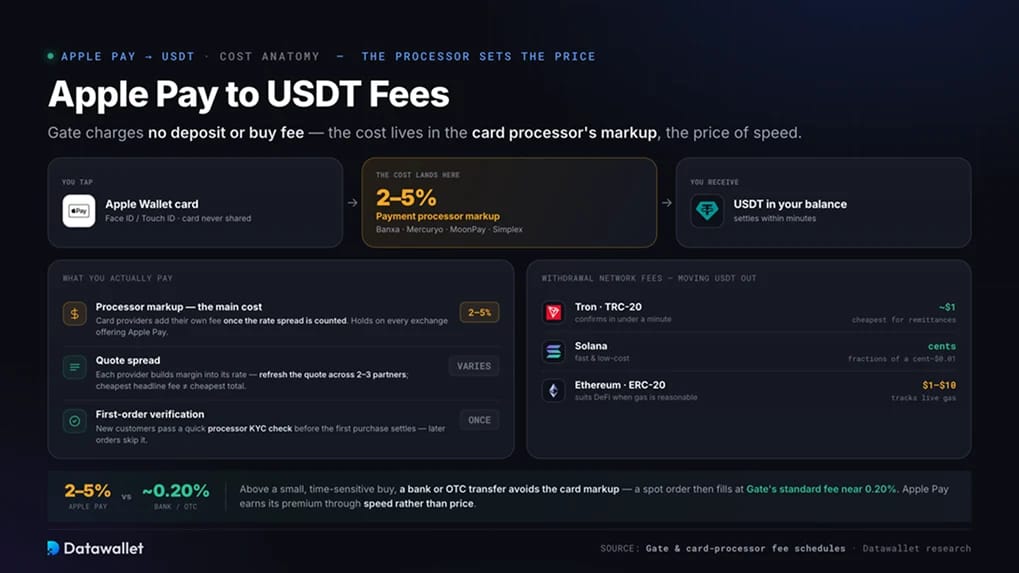
The payment processor sets the all-in cost of an Apple Pay purchase, so the same USDT order can price differently across partners.
Funding and processing
- Processor markup (the main cost): Gate charges no deposit or buy fee, but card providers add their own, commonly 2% to 5% once the rate spread is counted. This is the price of speed, and it holds on every exchange offering Apple Pay.
- Quote spread: Each provider builds a margin into the rate it shows, so refresh the quote across two or three partners on the same order. The cheapest headline fee is not always the cheapest total.
- First-order verification: New customers pass a quick processor KYC check before the first purchase settles. Later orders skip it.
Withdrawals
- Network fees: Sending USDT to self-custody costs about a dollar on TRC-20 and confirms in under a minute. Solana costs cents, while ERC-20 tracks Ethereum gas and can run from one dollar to ten. Our TRC-20 USDT explainer covers the cheapest network for remittances.
Above a small, time-sensitive buy, a bank or OTC transfer into the same exchange avoids the card markup, and a spot order then fills at Gate's standard fee near 0.20%. Apple Pay earns its premium through speed rather than price.
Our best USDT exchanges roundup compares fee structures across venues.
Best Exchanges to Buy USDT with Apple Pay
The table weighs how each venue handles Apple Pay, whether it can sell you USDT where you live, and the licensing behind it. Trading fees refer to spot orders once funded, since the Apple Pay cost is a separate processor charge everywhere here.
Gate leads for the widest reach across Apple Pay markets outside the West, with a broad licence footprint and the deepest catalogue of the group. Kraken is the cleaner choice in the UK or US, where its FCA registration and FinCEN standing back a native USDT market. Coinbase mirrors that Western coverage at higher fees, and OKX brings low costs at scale for buyers outside the EEA.
Apple Pay USDT Rules in the US, UK, and EEA
The licence covering you and your region's stablecoin rules decide whether an Apple Pay purchase of USDT is even possible. Gate serves these three markets through different arms, and in two a rival is the better call.
In the US, USDT is legal under the GENIUS Act, but Gate.com is blocked, so Coinbase or Kraken handle Apple Pay buys. Our USA guide has the state detail.
In the UK, USDT trades freely outside MiCA, but Gate has no FCA registration, so a verified Kraken account is the regulated option for Apple Pay buys. Our UK guide has more.
In the EEA, MiCA bars every licensed exchange from selling USDT, Gate's Malta entity included, so no compliant platform offers it via Apple Pay. Self-custody stays legal and USDC is the alternative, covered in our Europe guide and MiCA exchange list.
Apple Pay Versus Bank Transfer for USDT
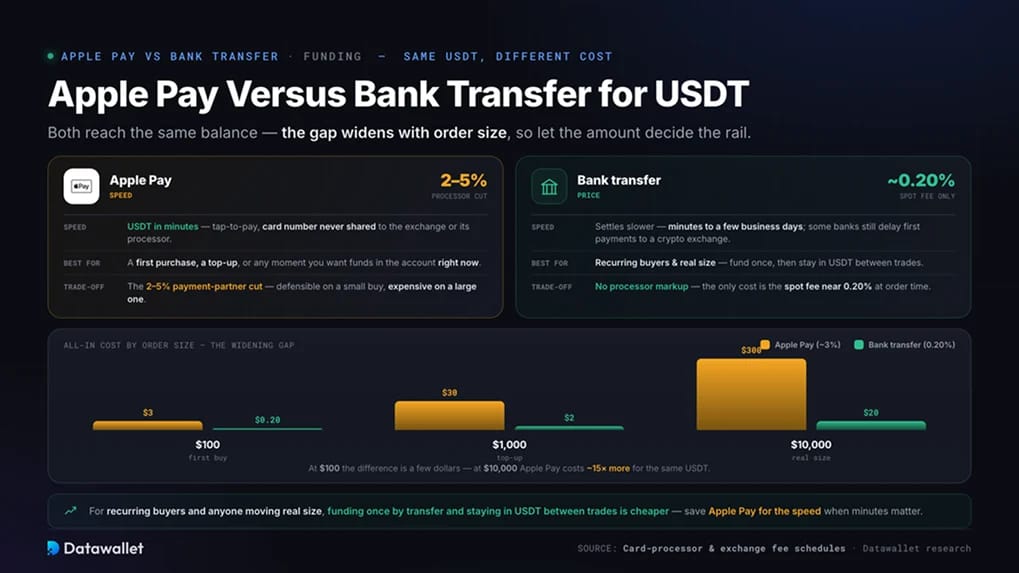
The funding method is where most of the real money is saved or spent. Apple Pay and a bank transfer reach the same USDT balance, and the gap widens with order size.
Apple Pay suits a first purchase, a top-up, or any moment you want USDT in your account within minutes. Tap-to-pay is fast and secure, with the card number never shared to the exchange or its processor. The trade-off is the 2% to 5% the payment partner takes, defensible on a small buy and expensive on a large one.
A bank transfer, or an OTC deposit where offered, carries no processor markup, so the only cost is the spot fee near 0.20% at order time. It settles slower, from minutes to a few business days, and some banks still delay first payments to a crypto exchange.
For recurring buyers and anyone moving real size, funding once by transfer and staying in USDT between trades is cheaper. To compare card options, see our Google Pay and credit card USDT guides.
Tax When You Buy USDT with Apple Pay
Paying with Apple Pay changes nothing about how a purchase is taxed. Buying USDT with your own currency is an acquisition, and tax arrives later when you dispose of it.
- The purchase itself is not taxed. Acquiring USDT with Apple Pay sits outside any capital gains event in the major markets, whether you fund in dollars, pounds, or euros.
- Disposals are the taxable moment. Selling USDT for currency, swapping it for another token, or spending it counts as a disposal. HMRC treats this under its cryptoassets rules in the UK, and the IRS treats crypto as property in the US, so gains are reportable even when the price barely moves.
- A pegged token still moves against your currency. One USDT is worth whatever the dollar is worth in your local terms that day, so a stablecoin balance quietly accrues small gains or losses as the exchange rate moves. Record each disposal in your home currency.
- Reporting is tightening. New international frameworks now push exchanges to share user and transaction data with tax authorities, so export your history regularly.
💡 For active users: keep records of every buy, sell, and swap in your home currency, since card purchases spread across several processors are harder to reconcile later. A tax adviser familiar with crypto is worth the cost once turnover climbs. This is general information rather than tax advice.
Final Thoughts
Gate is the platform we reach for when buying USDT with Apple Pay across most of the world. Its card channel takes Apple Pay in dollars, euros, and pounds through established partners.
Gate's licence footprint spans a MiCA CASP authorisation from Malta's MFSA, a VARA licence in Dubai, FSA registration in Japan, and AUSTRAC registration in Australia. Reserves sit on an audited proof-of-reserves dashboard above 120%. Our Gate review covers the platform in depth.
Region settles the final call. Buyers in most Apple Pay markets, from the UAE to Australia to Latin America, get the full Gate experience. US and UK residents are better served by Coinbase or Kraken, and anyone in the EEA should reach for USDC or a self-custody wallet while regulated USDT access stays shut.