







Can I Buy Bitcoin with ANZ Bank?
You can buy Bitcoin through an exchange using funds from ANZ, though payment limits differ by app. ANZ neither sells nor stores crypto for personal customers. To buy, transfer Australian dollars from your ANZ account to one of the best crypto exchanges in Australia.
Classic ANZ accounts treat the payment as an ordinary Pay Anyone transfer. ANZ publishes no crypto-specific allowance, leaving your daily Pay Anyone limit as the only ceiling. It starts at $1,000 and reaches $25,000 in the ANZ App with Voice ID. This puts ANZ closer to NAB than CommBank, which limits exchange payments to $10,000 a month.
On ANZ Plus, Crypto Protect blocks any payment ANZ identifies as going to a crypto exchange until you switch it off. A $10,000 calendar-month cap then applies across your accounts and card. Our Plus payment to Kraken failed twice before we found the toggle. After we disabled it, the payment arrived in about a minute.
How to Buy Crypto with ANZ Bank
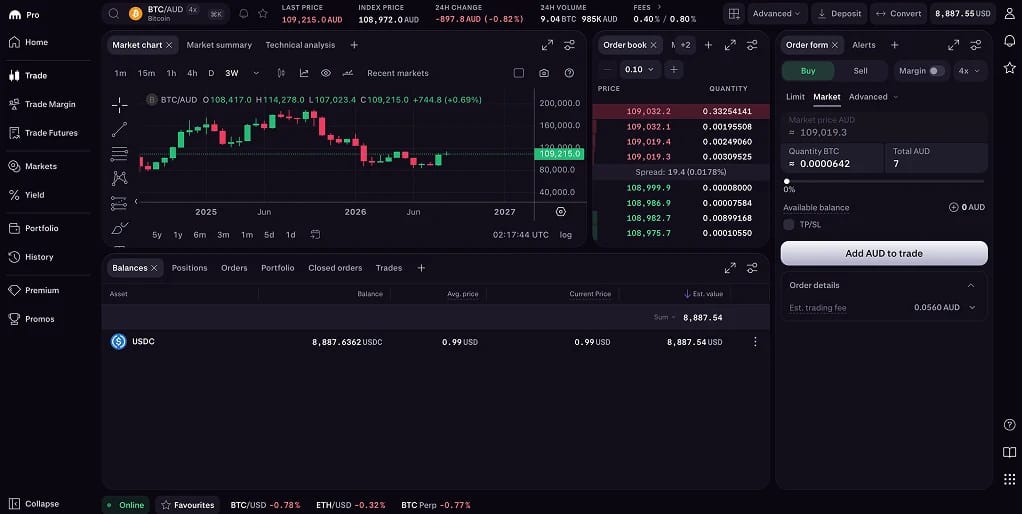
A PayID transfer from ANZ to Kraken is the cheapest way to buy crypto you can move to your own wallet. Each Kraken client receives a unique PayID email address to use instead of a BSB and account number. Deposits are free from $5. BTC/AUD trades on Kraken Pro's live order book, where buyers and sellers set prices rather than accepting an exchange-quoted spread.
Steps to buy crypto with ANZ Bank:
- Create and verify a Kraken account: Register on Kraken using a passport, driver licence or photo card, plus proof of address dated within the last three months. Australian residents register with Bit Trade Pty Ltd, Kraken's local entity. Verification must be complete before you can deposit.
- Copy your PayID deposit details: Open Funding in Kraken, select AUD and choose PayID. Your account has a unique address, with no BSB to mistype. Pay from a bank account in the same name as your Kraken account, or the deposit will go into review.
- Set the ANZ side up before you pay: The ANZ App's Pay Anyone limit starts at $1,000 a day and rises to $25,000 with Voice ID. Internet Banking allows $10,000, or $25,000 with ANZ Shield. For ANZ Plus, go to Profile, Security, Scam Safe and switch off Crypto Protect. Then open Payment Settings. Pay Anyone defaults to $5,000 a day, with crypto payments capped at $10,000 a month.
- Send the payment: Add Kraken's PayID as a new payee and transfer the funds. Payments usually arrive in about a minute, but ANZ's Falcon fraud system can pause your first payment to a new payee. Kraken also warns that some banks hold first transfers for one to two days. Answer plainly if ANZ asks about the payment, as staff are trained to treat scripted answers as a scam signal.
- Buy on Kraken Pro: Once your AUD balance appears, open BTC/AUD, ETH/AUD or another of Kraken's 13 AUD pairs in Kraken Pro and place a limit order. Entry-tier Pro fees are 0.40% maker and 0.80% taker. The Kraken app's Instant Buy screen instead adds a 1% fee plus a spread.
Kraken may hold a second deposit of an identical amount within 72 hours as a suspected duplicate. Change the cents to avoid this.
Fees, Tax and Transfer Limits for ANZ Bank Customers
ANZ charges nothing for the payment. Costs come from Kraken, while transfer limits depend on your ANZ platform.
ANZ Bank costs and limits
- Pay Anyone (ANZ App and Internet Banking): Free, with a default daily limit of $1,000. Voice ID raises the ANZ App limit to $25,000 a day. Internet Banking allows $10,000, or $25,000 with ANZ Shield, rising to $50,000 for Shield users from 10 October. The channels have separate limits, allowing you to move $50,000 a day across both.
- Pay Anyone (ANZ Plus): Defaults to $5,000 a day and can be adjusted under Profile, then Payment Settings. Limits above $30,000 expire at 11.59pm on the day you set them.
- Crypto Protect (ANZ Plus): Enabled by default, it blocks every payment ANZ identifies as exchange-bound. Switch it off under Security, then Scam Safe.
- Monthly crypto cap (ANZ Plus): Payments ANZ identifies as going to exchanges are limited to $10,000 per calendar month across your accounts and card. Unused allowance does not roll over. Joint account holders each receive their own $10,000 allowance, and incoming funds from exchanges are unrestricted.
- Osko and PayID speed: Most Australian banks use Osko for real-time payments. Transfers between Osko-enabled accounts can arrive in as little as 60 seconds. When you first pay a new BSB and account number, Confirmation of Payee automatically checks the account name.
- Cards: Kraken accepts ANZ cards but charges an additional 3.75% plus 25 cents for card purchases. ANZ also applies extra checks and delays to destinations it rates high-risk for scams. Use PayID instead.
- Scam liability: In 2024, ANZ stopped more than $140 million from reaching criminals. The Australian Financial Crimes Exchange estimates half of all scam funds reach accounts linked to crypto exchanges. There is no guaranteed refund for a payment you authorised to a fake investment platform.
- Financial Claims Scheme: ANZ deposits are protected up to $250,000 per account holder. That guarantee does not cover crypto held on Kraken or any other exchange.
Kraken fees
- AUD deposit: PayID and Osko bank transfers are free, with a $5 minimum. Verified accounts have deposit limits of $10,000 a day and $40,000 per rolling 30 days, adjusted according to account history. ANZ Plus customers reach the bank's cap first.
- Trading: Entry-tier fees on Kraken Pro are 0.40% maker and 0.80% taker. Once 30-day volume exceeds US$2,500, they fall to 0.30% and 0.60%. Further reductions depend on volume or assets held on the platform. Our maker and taker fees guide explains the distinction.
- Instant Buy: Charges a 1% trading fee, with a spread included in the quoted price. Kraken+ members pay no trading fee on their first US$10,000 of monthly Instant Buy volume, though the spread still applies.
- Cards and Apple or Google Pay: Add 3.75% plus 25 cents to the standard fee.
- AUD withdrawal: Free through PayID or Osko to an ANZ account in your name, usually arriving within minutes.
- Crypto withdrawal: A network-based fee applies and varies by asset. Dash, Monero and Zcash are not available to Australian clients.
Australian tax on crypto
- Capital gains tax: Crypto is a capital gains tax asset under ATO rules. Selling, swapping or spending it creates a taxable event. Individuals can currently discount gains by 50% after holding for at least 12 months. Capital losses can offset gains only.
- Proposed change: The 12 May federal budget proposed replacing the 50% discount with inflation indexation of the purchase price and a 30% minimum tax on gains from 1 July 2027. This is not yet law. Gains accumulated before that date would retain the discount.
- Income: Staking rewards and airdrops are ordinary income, valued in AUD on the day you receive them.
- Reporting: Since 2019, the ATO has matched exchange data against tax returns. Legislation implementing the OECD's Crypto Asset Reporting Framework is due to begin on 1 January 2027. The first international data exchanges follow in 2028.
Buying $5,000 of Bitcoin incurs no ANZ payment fee and about $40 in Kraken Pro taker fees. It also uses half an ANZ Plus customer's monthly crypto allowance.
Best Exchanges for ANZ Bank Customers
Changing exchanges does not increase the ANZ Plus cap because ANZ identifies payments by destination. Each platform below accepts ANZ payments, with differences in AUSTRAC registration, PayID support and trading costs.
ANZ Bank Cryptocurrency Policy
ANZ offers no crypto product to individuals, and its digital asset projects do not extend to personal accounts. It has, however, done more than any other Australian bank with tokenised money, meaning deposits and assets recorded on a blockchain. In 2022, ANZ minted A$DC, an Australian dollar stablecoin backed by funds in a reserve account. It used the stablecoin to settle a $30 million transfer and later a purchase of tokenised carbon credits.
That work contributed to Project Acacia, the Reserve Bank's tokenised settlement pilot. ANZ led corporate bond and trade payable use cases ahead of the final report this May. Its executives have said for years that their focus is market infrastructure rather than speculative coins.
For individuals, Crypto Protect reflects the bank's concern about scam money reaching exchanges. ANZ's scams lead has described customers coached by scammers to lie to branch staff about who is helping them invest. This explains why even a legitimate exchange payment can prompt questions.
The exchanges themselves face new rules. Since 31 March, AUSTRAC has regulated them as virtual asset service providers, extending anti-money-laundering requirements beyond AUD conversion to crypto-to-crypto trading and custody. The travel rule, in force since 1 July, requires exchanges to attach sender and receiver details to every transfer.
On 1 April, Parliament passed the Corporations Amendment (Digital Assets Framework) Act 2026. From its commencement on 9 April 2027, exchanges holding customer assets must obtain an Australian financial services licence from ASIC. Brokers and fund managers hold the same licence.
Kraken's Australian entity, Bit Trade Pty Ltd, is AUSTRAC-registered for spot trading and will need its own licence when the Act takes effect. Derivatives are available only to wholesale clients under a related company's licence. The Federal Court fined Bit Trade $8 million in December 2024 over an earlier margin product.
About ANZ Bank
Australia and New Zealand Banking Group traces its origins to the Bank of Australasia, which opened in Sydney in 1835. Now headquartered in Melbourne's Docklands, the group operates in 29 markets and serves around 8 million retail customers in Australia.
Chief executive Nuno Matos took the role in 2025 and has committed to moving every Australian retail customer onto the ANZ Plus front end by September 2027. The programme also absorbs Suncorp Bank, acquired by ANZ in 2024. Its 1.2 million customers began receiving migration notices this week, with completion scheduled for June 2027. ANZ has not confirmed whether migrated customers will face Crypto Protect and the monthly cap, although both are built into their destination platform.
As an authorised deposit-taking institution, ANZ is supervised by APRA. It also holds an Australian financial services licence overseen by ASIC. Customers use the ANZ App, ANZ Internet Banking and ANZ Plus, with payment safeguards including Voice ID, ANZ Shield, Confirmation of Payee and the Falcon fraud engine.
Bottom Line
ANZ treats crypto primarily as a scam channel. Classic account holders can pay exchanges under ordinary transfer limits, which they can raise themselves to $25,000 a day. ANZ Plus blocks exchange payments initially and caps them at $10,000 a month once unblocked. Every customer is heading to Plus.
Kraken remains our choice for ANZ customers. It combines AUSTRAC registration through Bit Trade with free PayID deposits and AUD order book trading, plus withdrawals to a wallet you control. If you use Plus, disable Crypto Protect before paying from an account in your own name. Trade through Kraken Pro rather than Instant Buy and keep every statement.
.webp)