


Can I Buy Bitcoin with Google Pay?
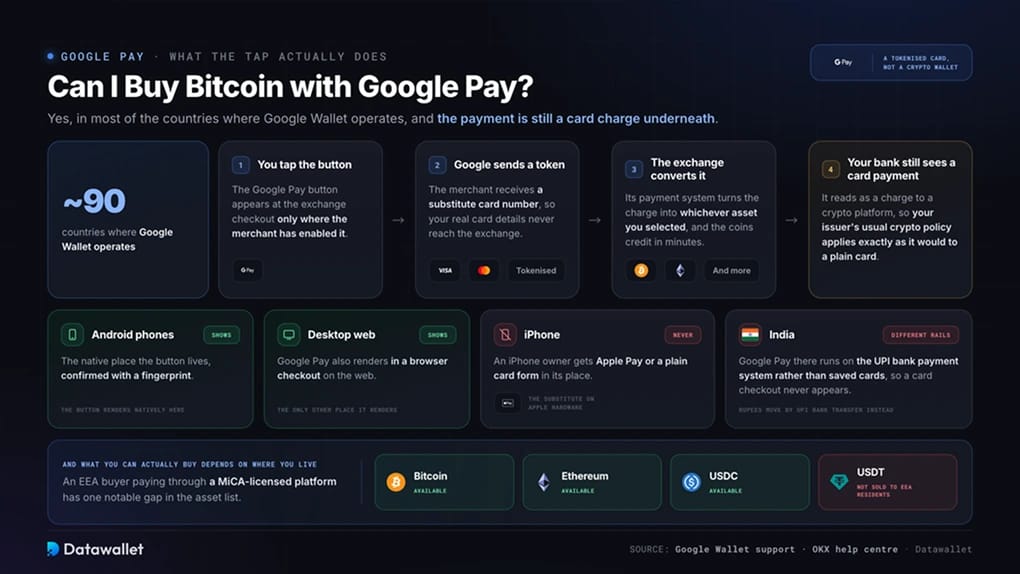
Yes, in most of the roughly 90 countries where Google Wallet operates. When you tap the Google Pay button at an exchange checkout, Google hands the merchant a tokenised card, a substitute number that keeps your real card details hidden, and the exchange's payment system converts the charge into Bitcoin, Ethereum, or whichever asset you selected. Your bank still sees a card payment to a crypto platform and applies its usual crypto policy.
Google shows its button on Android devices and the web only, so an iPhone owner gets Apple Pay or a plain card form instead, and our Apple Pay guide covers that side. India works differently, since Google Pay there runs on the UPI bank payment system instead of saved cards, so a card-based crypto checkout never appears and Indian buyers follow our UPI guide instead.
Which assets you can buy also depends on where you live. A German or French buyer can pay for Bitcoin, Ethereum, or USDC with Google Pay through a MiCA-licensed platform, but Tether's USDT cannot be sold to EEA residents, a restriction we unpack in our USDT with Google Pay guide.
How to Buy Crypto with Google Pay
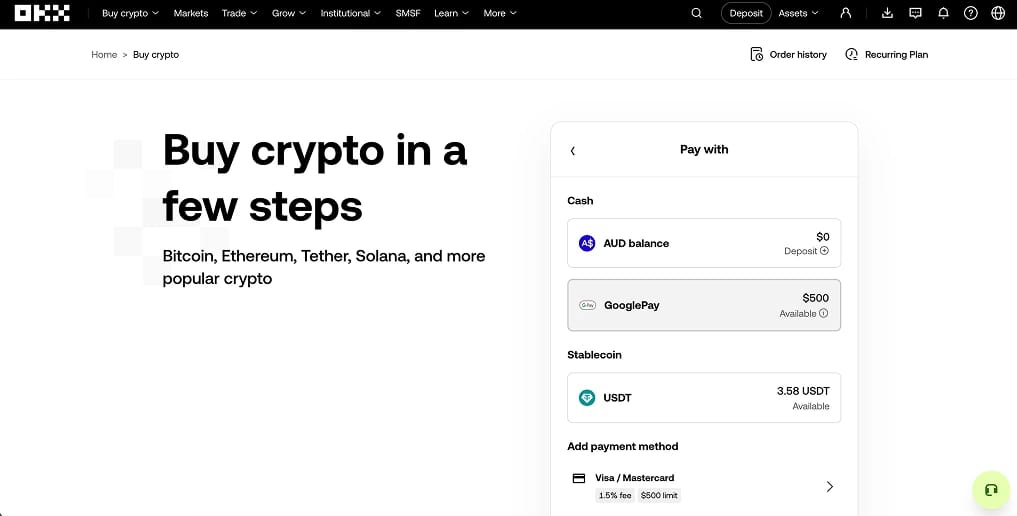
We buy through OKX because its native checkout skips the partner markup in four major markets, and the account you fund then trades at some of the lowest spot fees of any large exchange. When we ran a test purchase on a Pixel, the crypto credited in under two minutes, and the only friction was a one-time card check on the first order.
Steps to buy crypto with Google Pay:
- Create and verify an OKX account: Register at OKX and complete identity verification (KYC) with a passport or national ID and a selfie. Card payments stay hidden until verification clears, which usually takes minutes.
- Save a card in Google Wallet: Add a Visa or Mastercard held in your own legal name. US accounts require a US-issued debit card, while Australian, EU, and UAE accounts can save credit or debit. A name mismatch between the card and the exchange account is the most common reason a payment declines.
- Open Buy Crypto and pick your asset: Choose Bitcoin, Ethereum, or another listed token, enter the amount in local currency, and select Google Pay from the payment methods. If the native button is missing in your country, OKX quotes the order through partners such as Banxa or MoonPay, and comparing two quotes on the same order routinely saves a percentage point.
- Approve with your fingerprint: Confirm the payment with biometrics or your screen lock. The crypto lands in your account within minutes, though a short withdrawal hold after a first card purchase is standard fraud control and clears on its own.
- Move long-term holdings to your own wallet: Coins left on any exchange sit outside your control, so withdraw larger balances. Our best crypto wallets guide compares hardware and software options.
OKX does not pay withdrawals back out to Google Pay, so cashing out later means selling to your fiat balance and withdrawing to a linked bank account.
Google Pay Crypto Fees
Google charges nothing for the tap. Every cost sits with the exchange, the processor behind the checkout, or your own card issuer.
- Native checkout fee: Where OKX processes the card itself, the charge appears on the quote screen before you approve, typically in the low single digits.
- Credit card cash advance risk: Some issuers classify crypto purchases as cash advances, adding an upfront fee and immediate interest. A debit card avoids the question, and several banks refuse crypto on credit outright, a block that follows the card into Google Wallet. Our credit card guide covers issuer policies.
- Partner checkout markup: Orders passed to Banxa, MoonPay, or Simplex usually cost 2% to 5% once the exchange rate margin is counted, and the provider with the lowest headline fee is not always cheapest on the full quote.
- First-order card check: New customers clear a quick verification before the first purchase settles. Later orders skip it.
- Withdrawal costs: Moving coins to a wallet you control costs only the network fee, from cents on Solana to about a dollar for USDT on Tron (TRC-20).
For anything beyond a small or time-sensitive buy, a bank transfer into the same OKX account carries no card cost, and a spot order then fills at 0.08% maker and 0.10% taker.
Best Exchanges That Accept Google Pay
The table weighs how directly each platform takes Google Pay, the licensing behind the checkout, and trading costs once the account is funded.
OKX wins on the breadth of its native integration and the fees waiting after the deposit. Kraken suits British buyers who want the checkout backed by an FCA registration, at a card cost of 3.75% plus a small fixed fee. Bybit brings the largest token catalogue for buyers happy with a card checkout, and Coinbase trades higher costs for a US-listed counterparty.
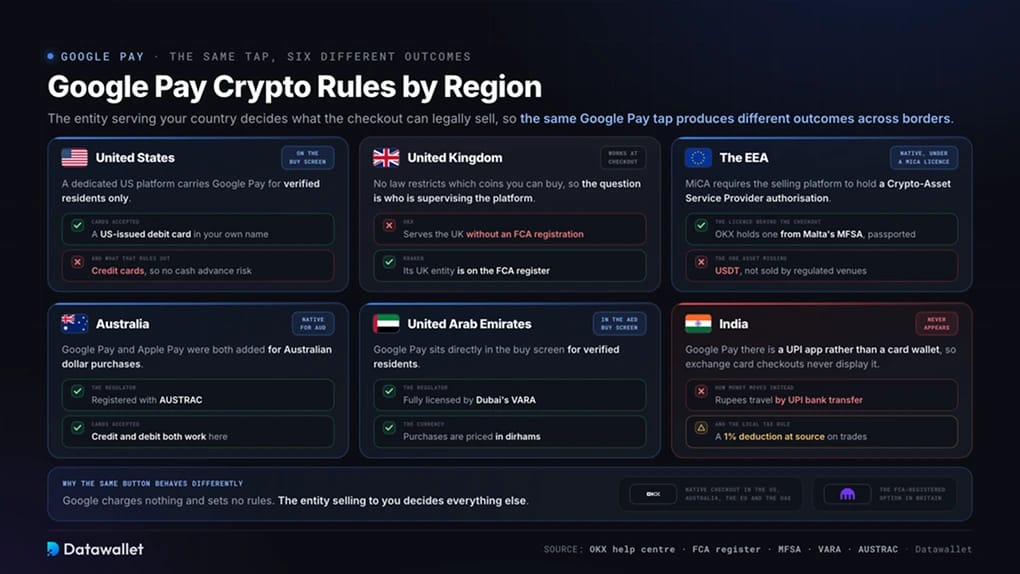
Google Pay Crypto Rules by Region
The entity serving your country decides what the checkout can legally sell, so the same Google Pay tap produces different outcomes across borders.
- United States: OKX runs a dedicated US platform with Google Pay on the buy screen, restricted to verified residents paying with a US-issued Visa or Mastercard debit card in their own name. Credit cards are excluded, which removes the cash advance problem for American buyers.
- United Kingdom: Google Pay works at exchange checkouts and no law restricts which coins you can buy, but OKX serves the UK without a registration from the FCA, Britain's financial regulator. Buyers who want a locally supervised platform can pay through Kraken, whose UK entity appears on the FCA register.
- European Economic Area: MiCA, the EU's crypto framework, requires the platform selling to you to hold a Crypto-Asset Service Provider authorisation. OKX's Maltese entity holds one from the MFSA, passported across the bloc, so Google Pay purchases of Bitcoin, Ethereum, and USDC proceed normally. USDT is the exception, unavailable through regulated venues since the transition period for unlicensed platforms closed on 1 July 2026. Our MiCA-licensed exchange list tracks the compliant field.
- Australia: OKX added Google Pay and Apple Pay for AUD purchases, is registered with AUSTRAC, Australia's anti-money-laundering regulator, and both credit and debit cards work.
- United Arab Emirates: OKX's local entity is fully licensed by VARA, Dubai's virtual asset regulator, and Google Pay sits directly in the AED buy screen for verified residents.
- India: Google Pay is a UPI app rather than a card wallet, so exchange card checkouts never display it. Indian buyers move rupees by UPI transfer instead, and local tax rules apply a 1% deduction at source on trades.
Full country coverage for the exchange sits in our OKX supported countries guide.
About Google Pay
Google's payment service launched as Android Pay in 2015, took the Google Pay name in 2018, and now splits across two products. Google Wallet is the app that stores cards, transit passes, and IDs, while Google Pay is the button that appears at checkout when a merchant supports it. The service reaches around 90 countries, and hundreds of millions of people use it for daily contactless payments.
The security model explains why exchanges accept it so readily. When a card enters Google Wallet, the network issues a device-specific token in place of the real number, so a merchant breach never exposes the underlying card. Every payment then requires the phone's biometric or screen lock, which shifts fraud risk away from stolen card details toward stolen unlocked phones, a much rarer event.
India is the outlier by design. Google Pay there was built on the Unified Payments Interface, the national instant bank transfer system, and moves money directly between bank accounts with no card involved.
Bottom Line
Google Pay is the quickest way we know to turn a saved card into crypto. The tap costs a card processing fee that a bank transfer avoids, so we fund small or urgent purchases through Google Pay and everything larger by transfer into the same account.
OKX earns the recommendation by putting Google Pay inside its own checkout across the US, Australia, the EU, and the UAE, backed by licences from Malta's MFSA, Dubai's VARA, and Singapore's MAS, then charging 0.08% and 0.10% on the spot market once funds arrive. Match the card name to your account name, compare partner quotes wherever the native button is missing, and move anything you plan to hold into your own wallet.