
Can I Buy Bitcoin with UBank?
Not inside the UBank app. There is no crypto trading feature, no Bitcoin buy button, and no digital asset product anywhere in the UBank ecosystem. The bank is your AUD funding rail, not the place you execute a trade.
We use UBank to move AUD into an AUSTRAC-registered Australian crypto exchange, then buy Bitcoin after the deposit lands. The cleanest path is a PayID transfer or a standard bank transfer using the BSB and account number the exchange gives you.
The UBank Visa debit card should be a last resort. Card payments to exchanges attract higher fees on the exchange side, and card transactions are more likely to be flagged or declined by the bank's fraud systems. Stick to PayID or direct transfer if you can.
How to Buy Crypto with UBank
When buying crypto from a UBank account, we recommend using CoinSpot. It is Australia's largest local exchange with over 3 million registered users, it is AUSTRAC-registered, ISO 27001 certified, and lists 530+ coins.
For UBank customers, PayID or a direct AUD bank transfer is the most reliable deposit method. However, CoinSpot also accepts credit/debit cards, PayPal and even cash deposits via BlueShyft.
Start trading crypto with UBank by following this guide:
- Account Setup: Create a CoinSpot account and complete the KYC identity verification. You will need a valid Australian ID (passport or driver's licence) and proof of address.
- Fund Account: Open CoinSpot, go to Deposit Funds, and select AUD. Pull up the deposit instructions for your chosen method.
- Select Payment Method: Use PayID first (instant and free). If PayID fails, try a direct bank transfer using the BSB and account number CoinSpot provides. Use BPAY or card only as a fallback.
- Buy Crypto: Once the AUD arrives in your CoinSpot wallet, go to Buy/Sell, search for Bitcoin or whichever asset you want, enter the AUD amount, and confirm the trade.
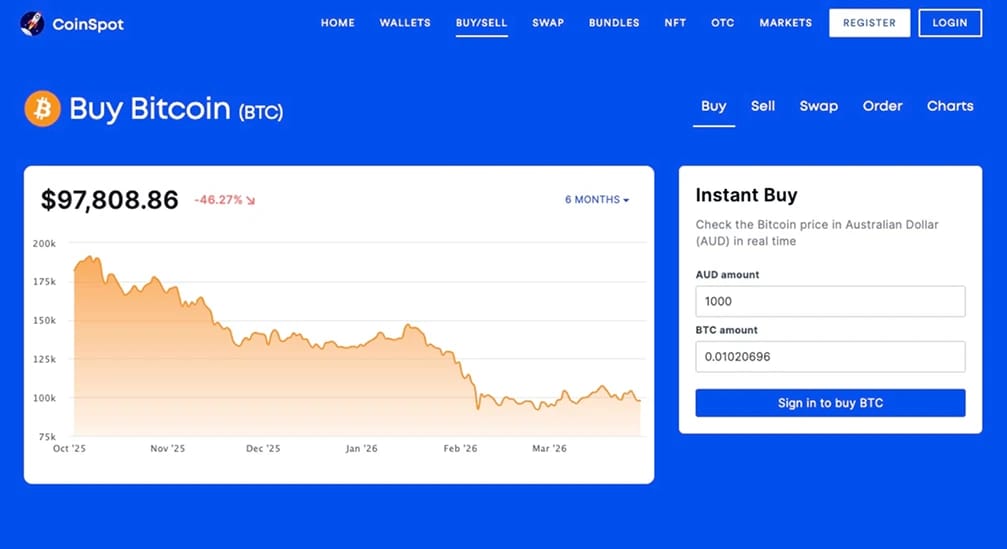
Fees and Deposit Limits for UBank Customers
When using UBank to fund an exchange, the goal is to get AUD in without a delay. PayID or a standard BSB transfer is free from UBank's side. Keep cards as a backup because they cost more once the exchange adds its card processing fee.
- ubank daily limit (PayID, BSB, BPAY): $20,000 per day by default. You can temporarily increase it up to $100,000. Unlike CommBank or Westpac, UBank does not enforce a $10,000 monthly cap on crypto payments.
- First deposit note: UBank may hold your first transfer to a new payee for 1 to 2 business days. After that, PayID deposits are typically instant.
- Deposit fees on CoinSpot: AUD deposits via PayID, bank transfer, and BPAY are free. Card deposits are 0.9%.
- Trading fees on CoinSpot: Instant buy/sell trades carry a 1% flat fee, while market orders on major coins (BTC, ETH, and a few others) are just 0.1%.
UBank Cryptocurrency Policy
We went through UBank's crypto policy and cross-checked with what users report on forums like Reddit. The bank allows transfers to AUSTRAC-registered cryptocurrency exchanges. The bank does not publish a blocklist, but it does restrict transactions to exchanges it considers high-risk.
UBank's crypto help page states if you try to make a PayID payment to a restricted exchange, the transaction will decline, and you will see an error message saying "Couldn't find the PayID." This is the bank blocking the payment, not a genuine PayID lookup failure.
NAB’s restricted exchange list applies to UBank too as the bank operates under NAB’s banking licence, and NAB has blocked certain exchanges since mid-2023. Binance, for example, has been problematic across most of NAB’s products.
Call 13 30 80 if you get stuck. UBank's customer service team is generally responsive to crypto-related queries. If a transfer is blocked and you believe it is legitimate, call the support line and explain the situation. Some users have had blocks lifted after a brief verification call.
Best Crypto Exchanges for UBank Customers
For UBank users, we focus on AUSTRAC-registered exchanges that accept PayID and bank transfers, because those are the deposit methods least likely to be blocked or delayed from a UBank account. Here are the platforms we recommend:
About UBank
UBank is a digital-only banking division of National Australia Bank (NAB), established in 2008 to serve self-directed customers who prefer managing their finances entirely through an app. It operates under NAB’s banking licence, which means customer deposits up to $250,000 are protected.
The product range is streamlined compared to a full-service bank. Its core offerings include the Spend account, the Save account, and home loans. There are no branches, no cheque books, and no in-person services. Everything runs through the UBank app.
%25201%2520(1).webp)
Final Thoughts
UBank will not let you buy Bitcoin inside its app, so treat it as the AUD on-ramp and execute trades on an AUSTRAC-registered exchange. The smoothest funding path is PayID to CoinSpot.
Run a small test deposit first, especially if it is your first transfer, because UBank may hold it for a day or two while their systems verify the payee.
The lack of a formal monthly cap is a huge advantage over CommBank and Westpac for users who want to move larger amounts. But UBank's blocking behaviour is less predictable than the Big Four, so always keep a backup bank account linked to your exchange in case a transfer gets declined.