



Can I Track Solana Wallets?
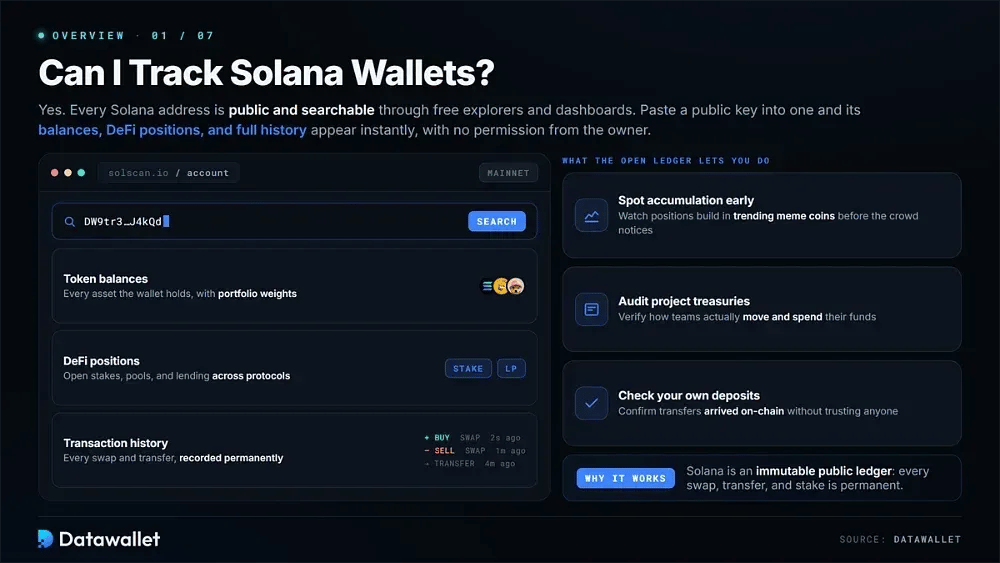
Yes. Anyone can track Solana wallets because every network address is public and searchable through free explorers and portfolio dashboards. Entering a public key into one of these tools reveals token balances, DeFi positions, and the wallet's complete transaction history. That visibility is why traders often monitor Solana wallets linked to profitable market participants.
Solana is an immutable public ledger, so every swap, transfer, and stake is recorded permanently. That open record can be used to spot accumulation in trending meme coins, audit project treasuries, or check whether your own deposits arrived. None of these actions requires permission from the wallet owner.
Solana Explorers vs. Portfolio Trackers
Explorers such as Solscan and SolanaFM act as raw network ledgers. They let you inspect transaction signatures, program interactions, and account states directly. This makes them especially useful for verification, whether you need to confirm that a transfer finalized or investigate a failed swap, although the data is presented in a technical format.
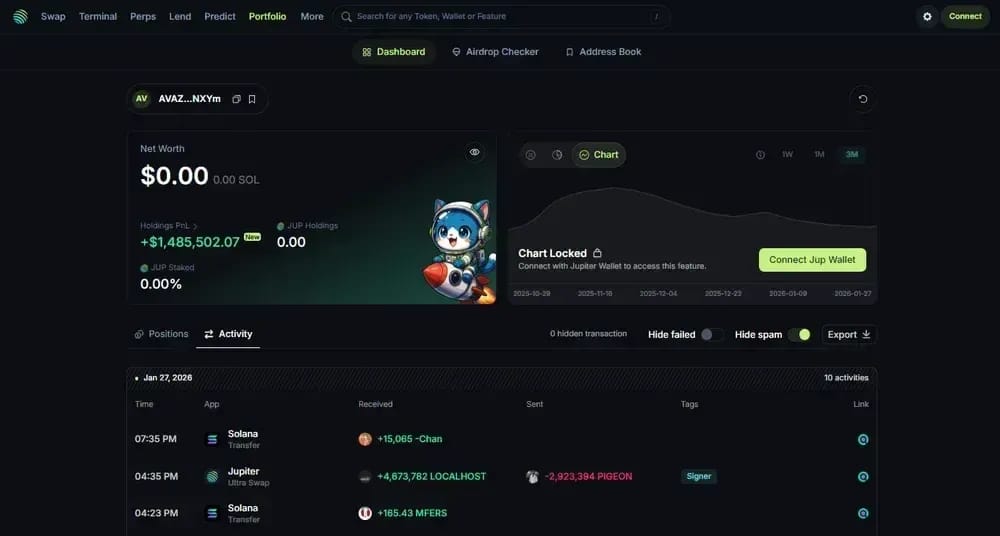
Portfolio trackers such as Jupiter Portfolio organize that raw activity into financial information. Balances, staking positions, and liquidity pools are aggregated into a single valuation rather than displayed as individual hashes. Investors can instead review profit and loss, allocation percentages, and claimable rewards, which is more practical when managing capital across dozens of decentralized protocols.
The table below shows how the two categories serve different tracking needs:
Best Solana Wallet Trackers
The best tracker depends on what matters most to you. Some users need broad DeFi coverage, while others care more about whale surveillance or straightforward daily balance checks. We tested the leading options and chose three platforms that provide reliable data for those use cases.
1. Jupiter Portfolio (Best Solana Wallet Tracker Overall)
Jupiter Portfolio absorbed the Sonar Watch engine and has developed into the most complete dashboard on Solana, automatically reading positions from more than 190 protocols. Paste in any public address to see token balances, staking accounts, lending collateral, and liquidity pools. No wallet connection or signup is required.
Its wallet groups feature allows several addresses to be saved and viewed as one consolidated portfolio. That is particularly useful when funds are split between hot and cold storage. Jupiter also includes an airdrop checker that reviews wallet history for unclaimed distributions, sometimes identifying free value that standalone explorers would not flag.
Pricing remains accurate even for newly launched tokens because the dashboard is built into the network's dominant swap aggregator. Rebalancing can also be done from the same screen. Profit and loss tracking now includes both daily and all-time performance, addressing the largest gap found in earlier versions of the platform.
Pros
- Automatically reads positions across more than 190 Solana protocols.
- Several addresses can be consolidated into one tracked portfolio with wallet groups.
- The airdrop checker identifies unclaimed distributions connected to your activity.
Cons
- Solana is the only supported chain, so multichain holdings require separate tools.
- Active traders will not find the sniping and signal features they may expect.
- Historical analytics still lack the depth of dedicated research platforms.
2. GMGN (Great for Tracking Whales)
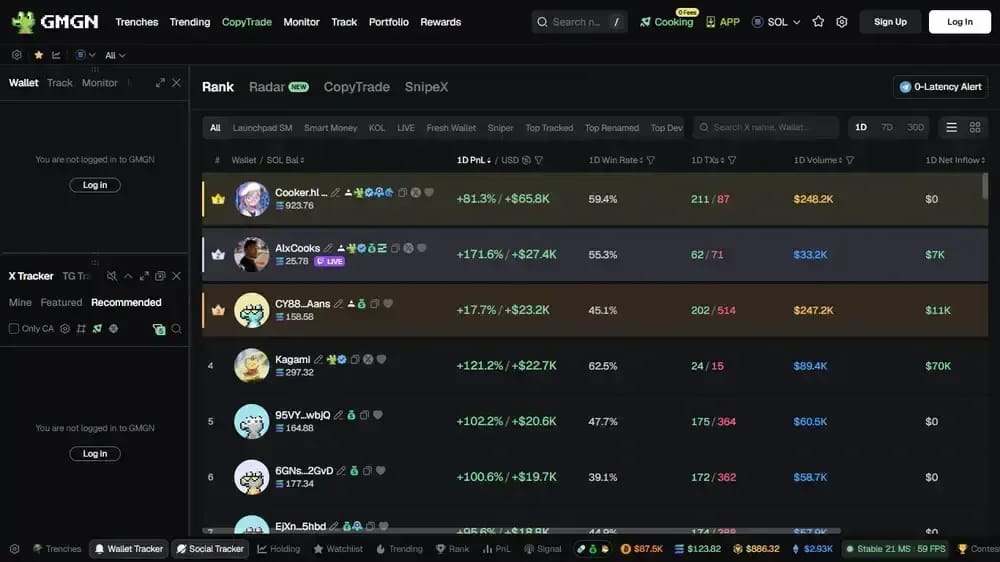
GMGN remains a leading choice for following profitable wallets. It combines live smart money feeds with rug checks and one-tap execution across ten chains. Wallet labels identify snipers, insiders, and consistent winners, helping you decide whether an address buying a new token is actually worth watching.
Automated copy trading can mirror the buys and sells of a selected wallet in real time, turning wallet monitoring into an executable strategy. Position sizes can be capped, suspicious tokens blacklisted, and trades filtered by size to remove bot noise. These controls help keep the automation within your own risk limits.
GMGN has also introduced an Agent API that allows AI assistants to query wallet data or execute trades programmatically, offering an early indication of where onchain tracking is moving. Its interface remains dense enough to overwhelm newcomers, however. The platform is also much more focused on fast meme coin trading than the slower portfolio management preferred by long-term investors.
Pros
- Smart money, snipers, and insiders are labeled directly on every token chart.
- Automated copy trading can execute alongside wallets you choose to follow.
- Built-in security checks immediately flag honeypots and suspicious contracts.
Cons
- Beginners may need significant time to understand the information-dense interface.
- The platform is designed around short-term meme trading rather than portfolio management.
- Signal quality improves only after advanced filters have been configured.
3. Phantom Wallet (Great for Personal Wallet Tracking)
Phantom has expanded beyond its original role as a simple wallet and now functions as a personal tracking hub. On mobile and browser, it displays token balances, collectibles, and open perpetual positions natively. Viewing holdings inside the app also avoids the phishing risk of repeatedly pasting addresses into unfamiliar third-party sites.
Known scam tokens and spam NFTs are filtered automatically, which keeps the balance view uncluttered. Multi-account support brings several addresses together under one valuation. Incoming transfers and completed swaps trigger push notifications within seconds, giving casual holders a basic alert system without requiring any configuration.
The main limitation is analytical depth. Phantom cannot break down complex yield farming positions or provide the detailed transaction histories accountants may need at tax time. It is best suited to quick daily checks of your own funds, with a dedicated dashboard added when deeper performance analysis or research is required.
Pros
- Common phishing vectors are reduced because no external site is needed.
- Automatic spam filtering removes scam tokens from the balance view.
- Push notifications arrive instantly for transfers, swaps, and price moves.
Cons
- Complex DeFi and yield farming positions cannot be fully broken down.
- Historical performance data is limited compared with dedicated dashboards.
- Transaction exports are unavailable for tax reporting or deeper analysis.
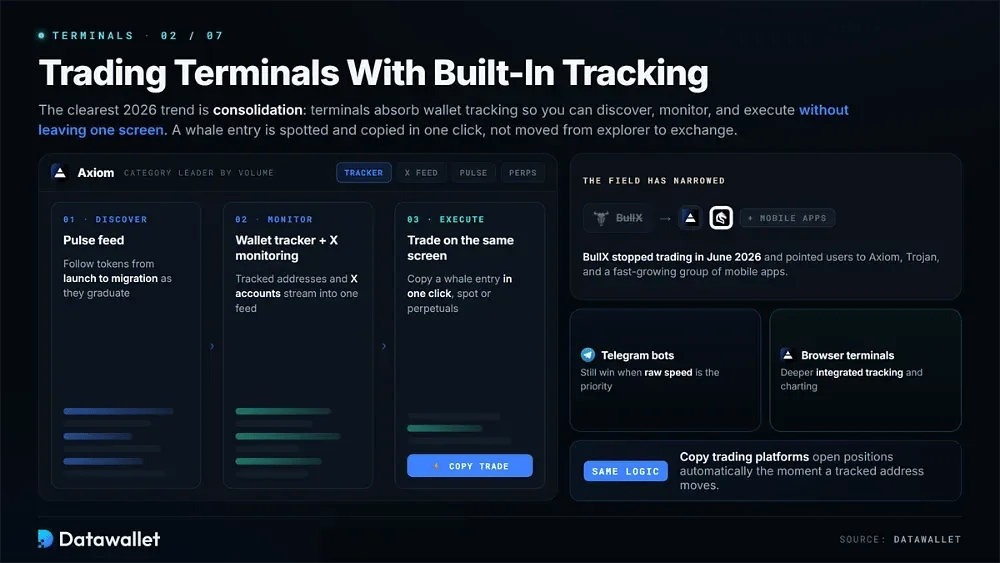
Solana Trading Terminals With Built-In Tracking
One of the clearest trends in 2026 is consolidation. Trading terminals are absorbing wallet-tracking features so users can discover opportunities, monitor activity, and execute trades without leaving one screen. Axiom leads the category by volume and includes a wallet tracker, X account monitoring, perpetuals access, and the Pulse feed for following tokens from launch to migration.
The competitive field has narrowed significantly. BullX stopped trading in June 2026 and directed users toward Axiom, Trojan, and a rapidly expanding group of mobile apps. Telegram trading bots still have an advantage when speed is the priority, while browser terminals provide deeper integrated tracking and charting.
For anyone monitoring wallets, the main advantage is lower latency. A whale entry can now be spotted and copied with one click instead of requiring a move from an explorer to an exchange. Copy trading platforms use the same approach by opening positions automatically as soon as a tracked address moves.
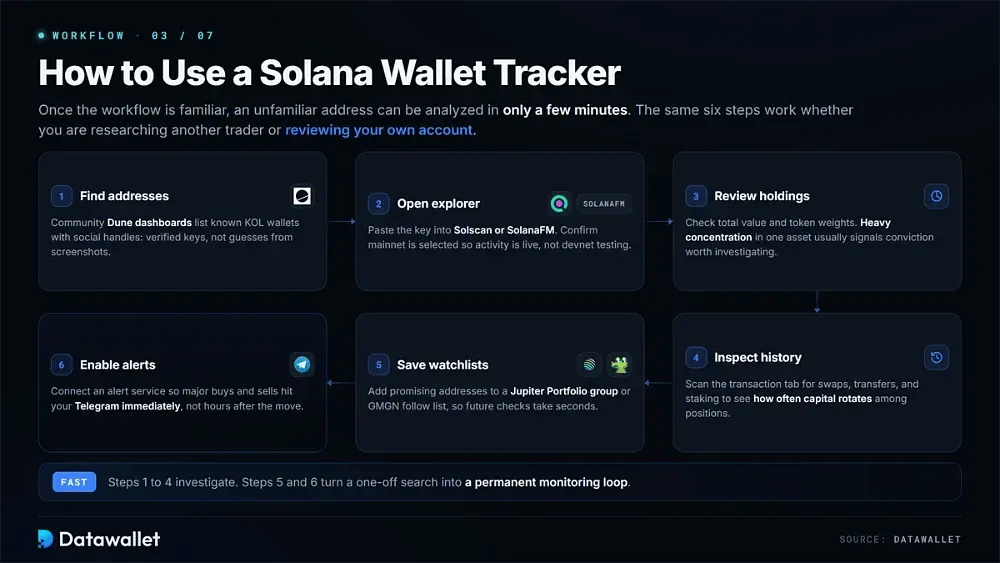
How to Use a Solana Wallet Tracker
Once the basic workflow is familiar, an unfamiliar address can be analyzed in only a few minutes. The process is largely the same whether you are researching another trader or reviewing your own account.
Follow these six steps to investigate any Solana wallet from scratch:
- Find Addresses: Community-maintained Dune dashboards list known Solana KOL wallet addresses alongside their social handles. This gives you verified public keys to research instead of relying on guesses from screenshots.
- Open Explorer: Paste the copied key into Solscan or SolanaFM. Confirm that mainnet is selected so the activity you see is live rather than devnet testing.
- Review Holdings: Check the portfolio summary for total value and individual token weights. Heavy concentration in a single asset usually indicates conviction that may deserve further investigation before you act.
- Inspect History: Review the transaction tab for recent swaps, transfers, and staking activity. This shows how often the trader rotates capital among active positions.
- Save Watchlists: Put promising addresses into a Jupiter Portfolio wallet group or GMGN follow list. Future checks will then take seconds instead of requiring the entire search process again.
- Enable Alerts: Connect the wallet to an alert service so major buys, sells, or transfers are sent to your Telegram immediately rather than appearing hours after the move.
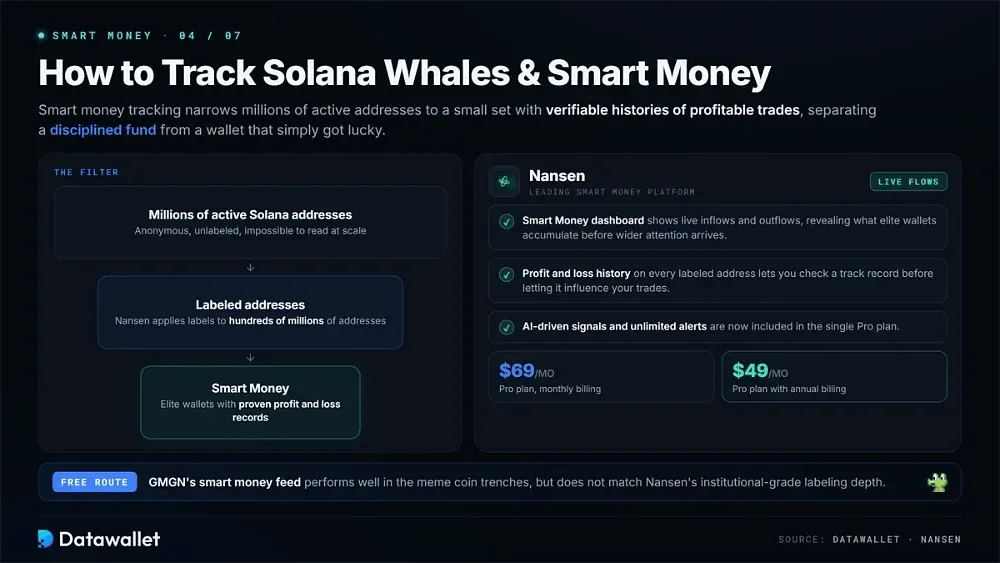
How to Track Solana Whales and Smart Money
Smart money tracking is the process of narrowing millions of active Solana addresses to a much smaller set with verifiable histories of profitable trades. Nansen remains the leading platform for this purpose. It applies labels to hundreds of millions of addresses, making it easier to distinguish a disciplined fund from a wallet that simply benefited from luck.
Nansen's Smart Money dashboard displays live inflows and outflows for Solana tokens, showing which assets elite wallets are accumulating before they attract wider market attention. Each labeled address also comes with profit and loss history, allowing you to check its track record before deciding whether its activity should influence your own.
Pricing has been simplified to one Pro plan at $69 per month, or $49 monthly with annual billing. The plan now includes AI-driven signals and unlimited alerts. Free tools such as GMGN's smart money feed perform well in the meme coin trenches, but they do not match the institutional-grade labeling depth offered by Nansen.
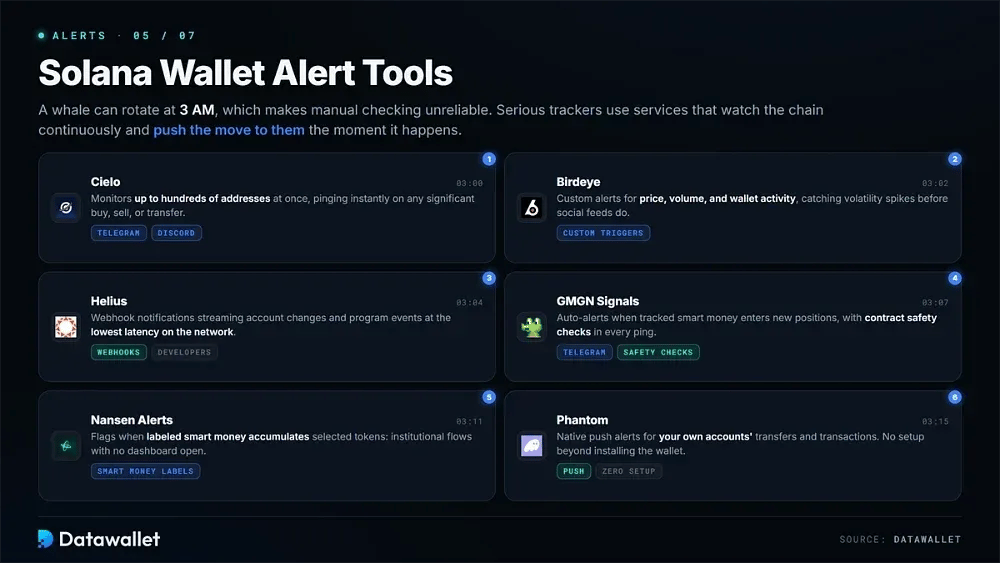
Solana Wallet Alert Tools
A whale can rotate at 3 AM, which makes manual checking unreliable. Serious trackers therefore use notification services that monitor blockchain activity continuously.
These six platforms deliver the most dependable Solana wallet alerts today:
- Cielo: Monitors up to hundreds of addresses at the same time, sending immediate Telegram or Discord notifications when a followed wallet buys, sells, or transfers significant size.
- Birdeye: Offers customizable alerts for price, volume, and wallet activity across Solana tokens, helping users detect volatility spikes before they reach social feeds.
- Helius: Provides webhook-based notifications for developers and power users. It streams detailed account changes and program events with the lowest latency available anywhere on the network.
- GMGN Signals: Automatically sends Telegram alerts when tracked smart money wallets enter new positions, with contract safety checks included in every notification.
- Nansen Alerts: Alerts subscribers when labeled smart money addresses accumulate selected tokens, providing access to institutional flows without requiring the dashboard to remain open all day.
- Phantom Notifications: Sends native push alerts for incoming transfers and completed transactions on your own accounts. No setup is needed beyond installing the wallet app.
Can Solana Wallets Hide Their Activity?
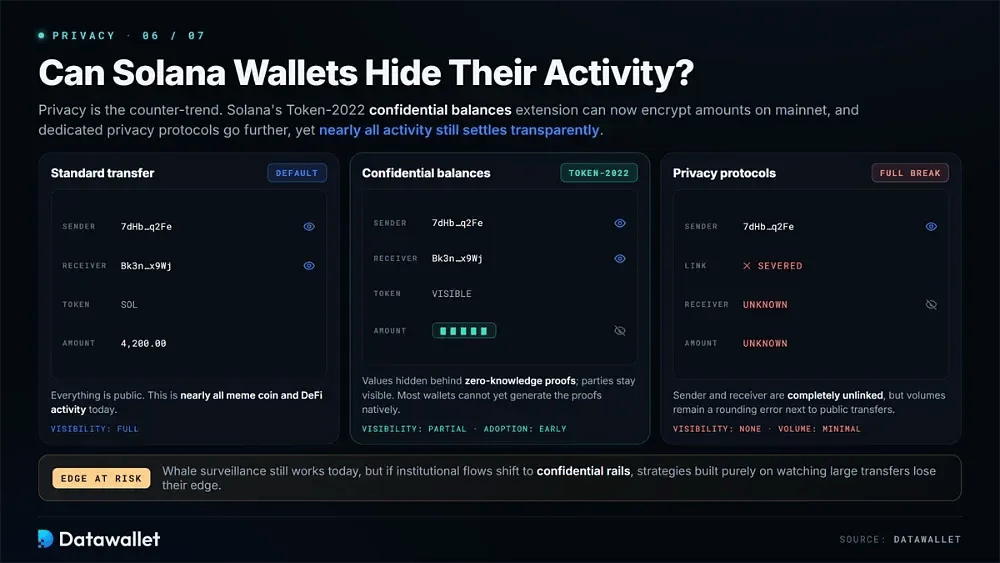
Privacy is an important counter-trend. Solana's Token-2022 confidential balances extension can now encrypt transfer amounts and account balances on mainnet. The sender, receiver, and token addresses remain visible, while the values are concealed behind zero-knowledge proofs. For assets using the standard, this limits the information available to trackers.
Adoption is still at an early stage because most wallets cannot yet generate the necessary proofs natively. Nearly all meme coin and DeFi activity also continues to settle transparently. Dedicated privacy protocols on Solana go further by completely breaking the link between sender and receiver, although their volumes remain a rounding error compared with public transfers.
Whale surveillance therefore remains effective today, but institutional flows could gradually move toward confidential rails as compliance-friendly encryption develops. Traders whose strategies rely entirely on observing large transfers should consider increasing confidentiality adoption a genuine long-term risk to that edge.
Are Solana Wallet Trackers Safe?
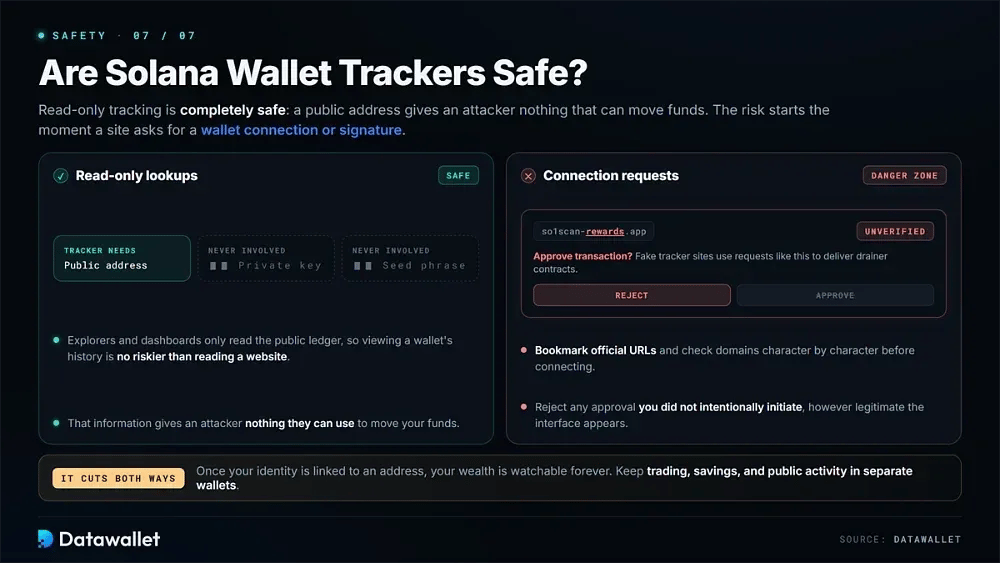
Read-only wallet tracking is completely safe because explorers and dashboards require only a public address. That information gives an attacker nothing they can use to move your funds. Private keys and seed phrases are never involved, so viewing a wallet's history is no riskier than reading a website.
The risk changes when a platform asks for a wallet connection or transaction signature. Fake tracker websites are commonly used to distribute drainer contracts. Bookmark official URLs and check domains character by character before connecting. Any approval request you did not intentionally initiate should be rejected, regardless of how legitimate the interface appears.
Tracking also works in both directions. Once someone connects your identity to an address, they can monitor your wealth and behavior indefinitely. Keeping trading, savings, and public activity in separate wallets makes it harder for observers to reconstruct your entire financial picture from a single leaked connection.
Final Thoughts
Tracking Solana wallets in 2026 works best when a verification explorer, a portfolio dashboard, and automated alerts are combined into a workflow suited to your trading style.
Execution terminals have made tracking faster by consolidating more functions into one place. The underlying principles have not changed: verify addresses, check track records, and avoid chasing signals that have not been vetted.
Transparent tracking may become somewhat more limited as confidential transfers mature. Building your monitoring stack now is therefore worthwhile while the ledger remains fully open.