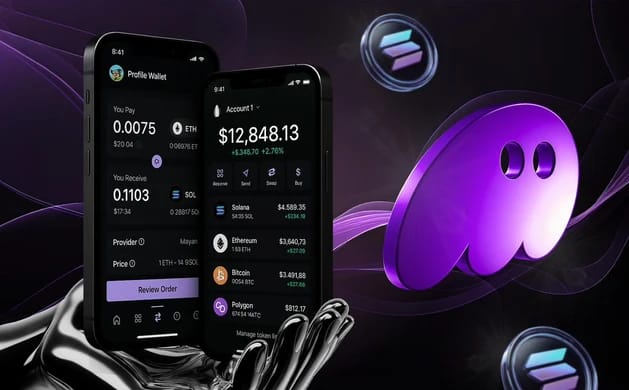



%203.svg)
About Phantom
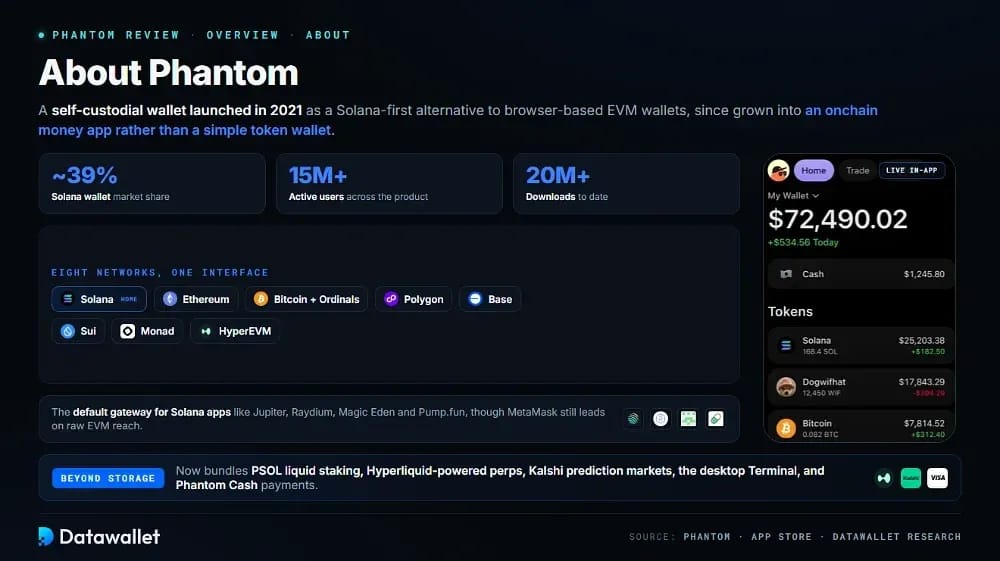
Phantom is a self-custodial wallet launched in 2021 as a Solana-first alternative to browser-based EVM wallets. It lets users hold SOL and SPL tokens, swap assets, stake for yield, manage NFTs, and connect to decentralized apps through a browser extension or mobile app.
The wallet has since grown into a multi-chain hub. Beyond Solana, Phantom now supports Ethereum, Bitcoin with Ordinals, Polygon, Base, Sui, Monad, and HyperEVM, letting users manage assets across ecosystems from one interface while keeping Solana as the core home network for daily activity.
Phantom holds a dominant position on its home chain, with roughly 39% of Solana wallet market share and more than 15 million active users across over 20 million downloads. That scale makes it the default gateway for Solana apps like Jupiter, Raydium, Magic Eden, and Pump.fun, though MetaMask still leads on raw EVM reach.
The product has also expanded well past storage. Phantom now bundles PSOL liquid staking, Hyperliquid-powered perpetual futures, Kalshi-powered prediction markets, a desktop Phantom Terminal, and the Phantom Cash payments account, positioning it as an onchain money app rather than a simple token wallet.
Phantom Features & Products
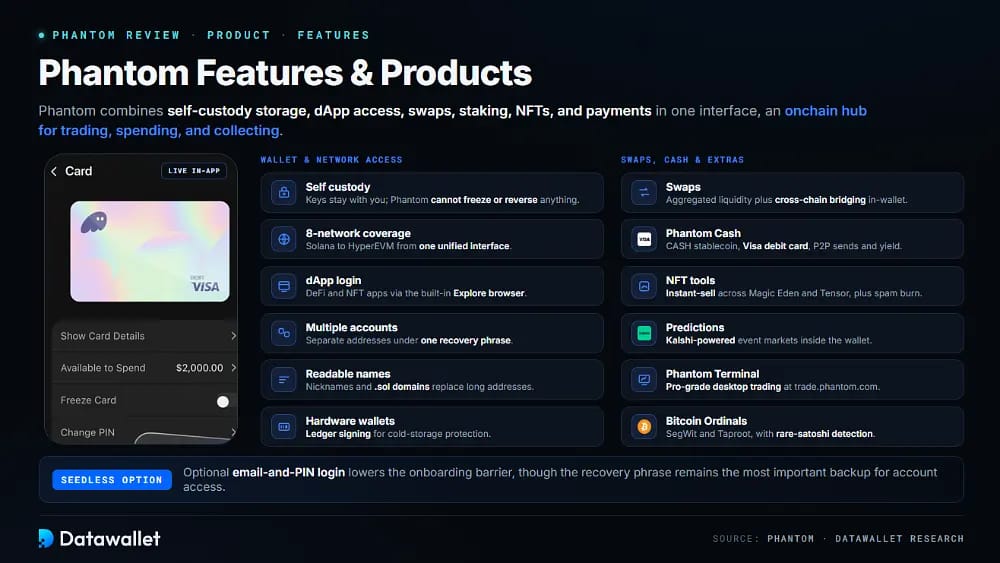
Phantom combines self-custody storage, dApp access, swaps, staking, NFTs, and payments in one interface. The most useful products depend on whether you mainly hold assets, trade actively, stake SOL, collect NFTs, or spend onchain balances day to day.
Wallet & Network Access
Phantom's core wallet stores keys locally, connects to dApps, and manages eight networks from a single extension or app, switching context automatically based on the chain or application a user connects to.
Key wallet capabilities include the following everyday functions:
- Self custody: Private keys and recovery phrases stay with the user, so Phantom cannot reverse transfers, freeze assets, or recover wallets after backup loss.
- Network coverage: Supported chains include Solana, Ethereum, Bitcoin with Ordinals, Polygon, Base, Sui, Monad, and HyperEVM, all managed from one unified interface.
- dApp login: Users connect directly to DeFi protocols, NFT marketplaces, and Solana apps like Raydium and Magic Eden through the built-in Explore browser.
- Multiple accounts: Users can generate separate addresses under one recovery phrase to isolate trading, NFTs, or airdrops and reduce risk if one is compromised.
- Readable names: Custom nicknames and .sol domains from Solana Name Service replace long addresses, making frequent sends clearer and less error-prone for users.
- Hardware wallets: Phantom connects Ledger devices for offline signing, adding cold-storage protection to a flexible browser or mobile hot-wallet setup for larger holdings.
- Cross-device sync: Entering the recovery phrase restores the same accounts across mobile and desktop, keeping balances and history aligned without manual configuration steps.
Swaps, Cash & Extra Products
Beyond basic storage, Phantom adds swaps, a stablecoin payments account, prediction markets, and NFT tools that expand the wallet into an onchain hub for trading, spending, and collecting across supported chains.
Additional products worth reviewing include these practical options:
- Swaps: The built-in swapper aggregates liquidity and supports cross-chain bridging, letting users trade across Solana, Ethereum, and Bitcoin without leaving the wallet.
- Phantom Cash: A payments account using the USD-pegged CASH stablecoin, paired with a Visa debit card, bank transfers, peer-to-peer sends, and yield on idle balances.
- NFT tools: An instant-sell button accepts the best live bid across Magic Eden and Tensor, while a burn function clears spam airdrops for small SOL rent refunds.
- Predictions: Kalshi-powered prediction markets let users trade real-world event outcomes directly inside the wallet, adding another speculative product beyond spot swaps.
- Phantom Terminal: An advanced desktop platform at trade.phantom.com combines pro-grade charts, onchain trading, and native wallet integration for more serious traders.
- Bitcoin Ordinals: Native support handles Native SegWit and Taproot addresses, letting users hold BTC, view Ordinals, and detect rare satoshis in the collectibles tab.
- Seedless login: Optional email-and-PIN setup lowers the onboarding barrier, though the traditional recovery phrase remains the most important backup for account access.
Phantom Perpetuals Explained
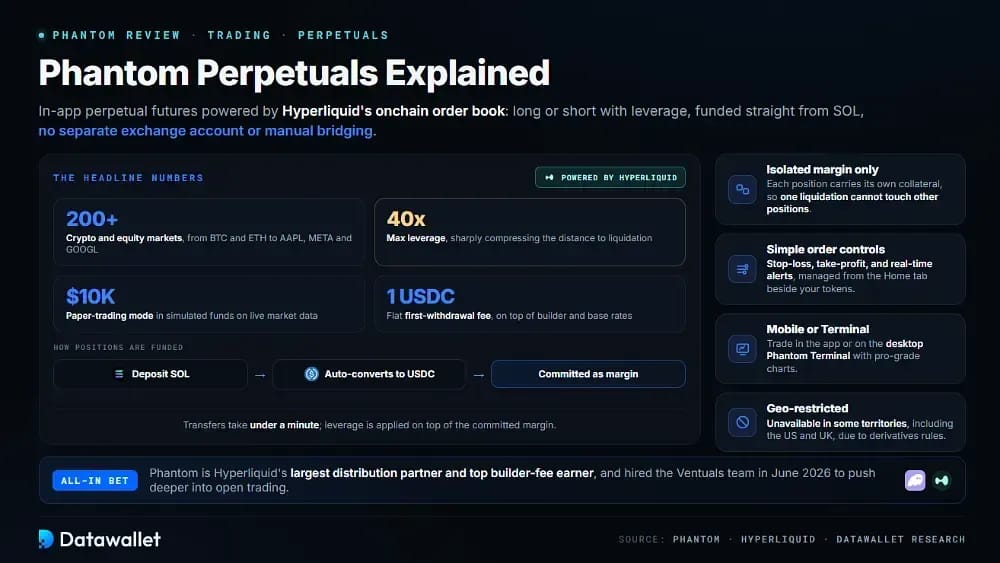
Phantom Perps is the wallet's in-app perpetual futures product, powered by Hyperliquid's onchain order book. It lets eligible users go long or short on crypto and equity markets with leverage, funded straight from SOL, without opening a separate exchange account or bridging assets manually across chains.
Phantom has leaned hard into this area, becoming the largest distribution partner in Hyperliquid's ecosystem and its top builder-fee earner. In June 2026, it hired the Ventuals team behind high-profile private-company perp markets, signaling a deeper push into open trading as wallets increasingly evolve into full trading platforms.
Phantom Perps Features
Phantom Perps centers on fast SOL funding, isolated margin, simple order controls, and native position management inside the mobile app or the desktop Phantom Terminal, making leveraged trading accessible without a complex professional interface.
The key trading features to understand are summarized below:
- Markets: Users can trade 200+ crypto and equity perp markets, including majors like BTC and ETH plus tokenized stocks such as AAPL, META, and GOOGL.
- Leverage: Phantom Perps supports up to 40x leverage, which amplifies both gains and losses while sharply compressing the distance to liquidation.
- Funding: Positions are funded with SOL that auto-converts to USDC on Hyperliquid, committing the balance as margin before leverage is applied on top.
- Margin: Perps use isolated margin only, so each position carries its own dedicated collateral and one liquidation cannot affect your other open positions.
- Fees: Trades carry a small Phantom builder fee layered on Hyperliquid's base maker-taker rates, plus a flat 1 USDC first-withdrawal fee.
- Controls: Users can set stop-loss and take-profit levels, receive real-time alerts, and manage positions from the Home tab beside their tokens.
- Practice: A paper-trading mode with $10,000 in simulated funds lets new users test strategies on live market data without risking real collateral.
How to Trade Perps on Phantom
Perps trading is simple to start, but users should test small sizes first because leverage, funding, slippage, and liquidation can all change outcomes quickly during volatile market conditions.
Follow this practical order to place a perps trade on Phantom:
- Update: Install the latest Phantom mobile app or extension and confirm Perps appears for your region, since it is geo-restricted in some territories.
- Open: Tap the Perps tab, review the risk warning, and read Phantom's trading guide before committing any real collateral to a position.
- Fund: Deposit SOL, which auto-converts to USDC on Hyperliquid; the transfer takes under a minute and becomes your available margin.
- Select: Browse crypto and equity markets by category, news, or trending lists, then review liquidity, funding, and volume before choosing a market.
- Configure: Choose long or short, set margin and leverage, and add stop-loss or take-profit levels to define your exit plan clearly.
- Confirm: Review liquidation price, fees, slippage, and position size, then sign only when every field matches your intended risk and plan exactly.
- Monitor: Track PnL, funding payments, and margin health through live charts and alerts, reducing or closing positions early if volatility spikes against you.
- Withdraw: Close positions and withdraw the balance back to your wallet as SOL, USDC, or another token, remembering the minimum withdrawal is $5.
How to Use Phantom Wallet
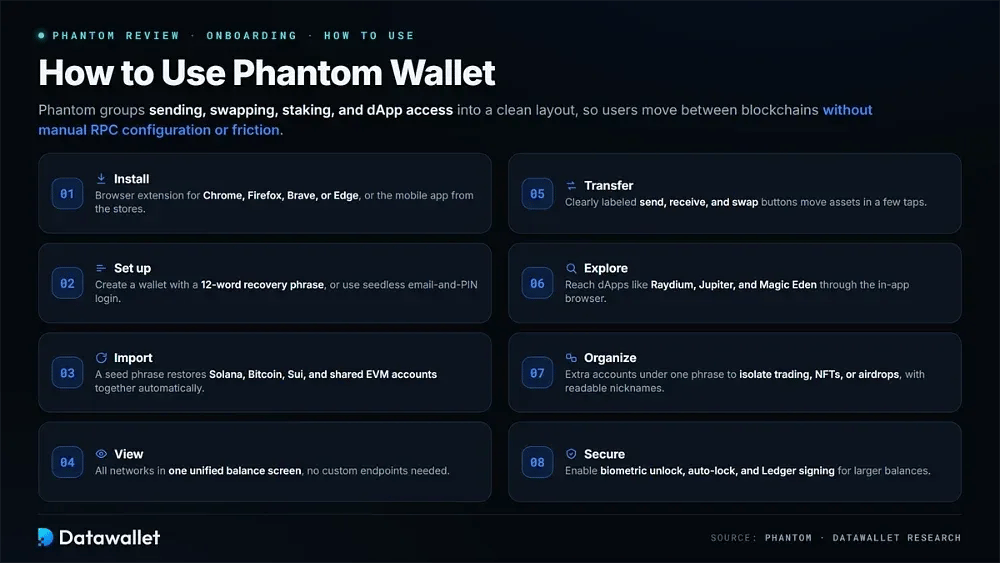
Phantom groups core actions like sending, swapping, staking, and dApp access into a clean layout, keeping labels clear across the extension and mobile app so users can move between multiple blockchains without manual RPC configuration or friction.
Follow these steps to get started with Phantom quickly and safely:
- Install: Download the browser extension for Chrome, Firefox, Brave, or Edge, or grab the mobile app from the App Store or Google Play.
- Set up: Create a new wallet with a 12-word recovery phrase, or use seedless login with an email and PIN for easier onboarding.
- Import: Restore an existing wallet by entering your seed phrase, which recovers Solana, Bitcoin, Sui, and shared EVM accounts together automatically.
- View: See Solana, Ethereum, Bitcoin, and other networks in one unified balance screen without switching apps or adding custom endpoints manually.
- Transfer: Use clearly labeled send, receive, and swap buttons to move or trade assets in a few taps or clicks.
- Explore: Open the built-in Explore tab to reach dApps like Raydium, Jupiter, and Magic Eden through the in-app browser directly.
- Organize: Create additional accounts under one recovery phrase to isolate trading, NFTs, or airdrops, and save addresses with readable nicknames.
- Secure: Enable biometric unlock, set an auto-lock timeout, and connect a Ledger device for hardware-level signing on larger balances.
Staking SOL on Phantom
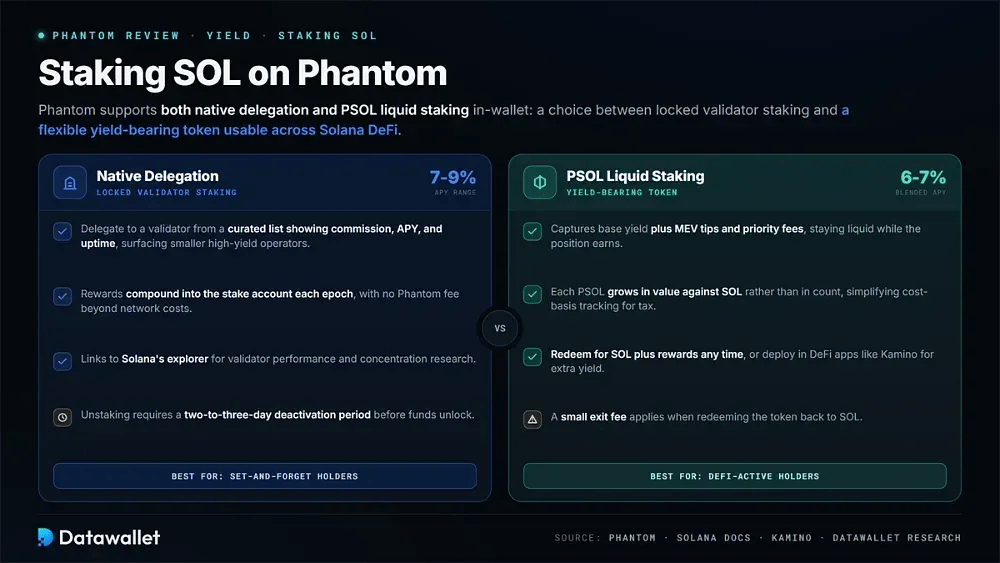
Phantom supports both native SOL delegation and PSOL liquid staking directly inside the wallet, giving holders a choice between locked validator staking and a flexible yield-bearing token they can use across Solana DeFi protocols.
Native Delegation
Native staking lets users delegate SOL to a validator chosen from a curated list showing commission, estimated APY, and uptime. Phantom surfaces smaller high-yield validators, with rewards compounding into the stake account each epoch, currently landing in a roughly 7-9% APY range depending on the validator.
Unstaking runs through the same interface, though Solana requires a brief deactivation period of two to three days before funds unlock. For validator research, Phantom links to Solana's explorer so users can review performance and concentration risk before committing any SOL to a specific operator.
PSOL Liquid Staking
PSOL is Phantom's liquid staking token, minted when users stake SOL and designed to stay liquid while the underlying position earns rewards. It captures base staking yield plus MEV tips and priority fees, pushing its blended return slightly above standard delegation, generally around 6-7% APY.
Rather than increasing in token count, each PSOL grows in value against SOL over time, which simplifies cost-basis tracking for tax. Holders can redeem PSOL for SOL plus rewards at any time, or deploy it in DeFi apps like Kamino Finance for lending and additional yield.
How is Phantom Regulated?
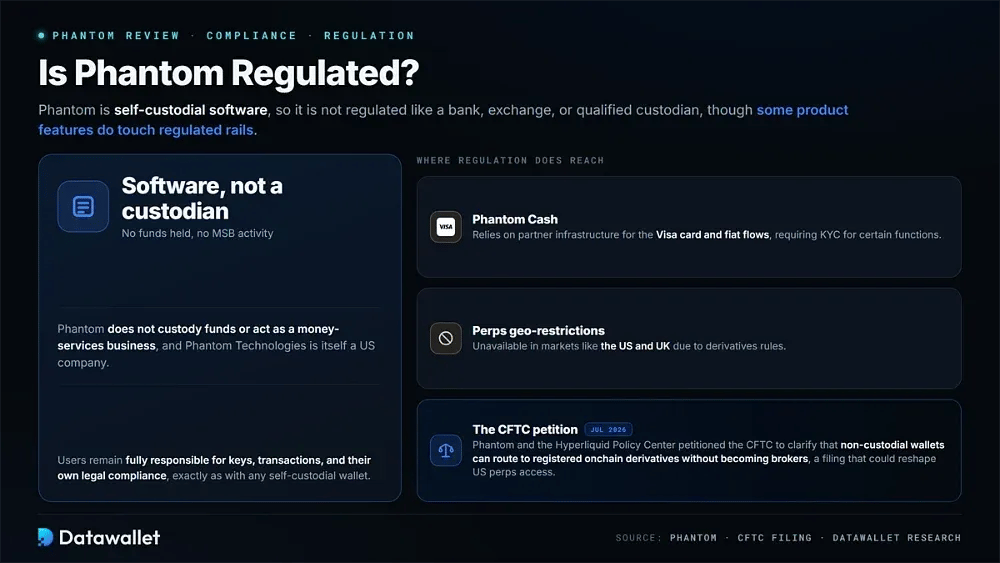
Phantom is self-custodial software, so it is not regulated like a bank, exchange, or qualified custodian. It does not custody funds or act as a money-services business, and Phantom Technologies is itself a US company, meaning users remain fully responsible for keys, transactions, and their own legal compliance.
Some product features do touch regulated rails. Phantom Cash relies on partner infrastructure for its Visa card and fiat flows, requiring KYC for certain functions, while perps access is geo-restricted and unavailable in markets like the US and UK due to derivatives rules.
The regulatory picture is actively shifting. In July 2026, Phantom and the Hyperliquid Policy Center petitioned the CFTC to clarify that non-custodial wallets can route to registered onchain derivatives without becoming brokers, a filing that could eventually reshape how US users reach regulated perps.
Is Phantom Wallet Safe?
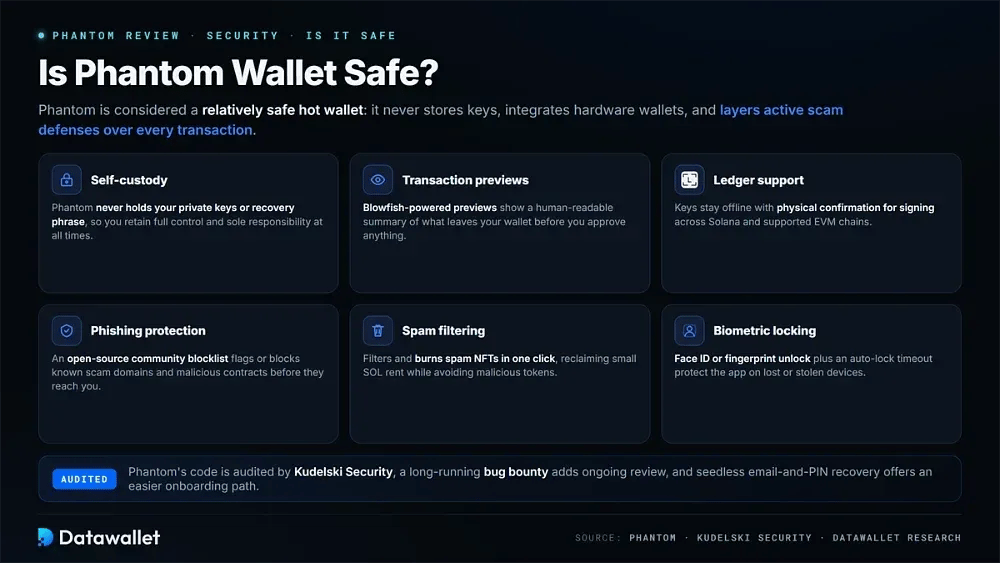
Phantom is considered a relatively safe hot wallet because it never stores private keys or recovery phrases, integrates hardware wallets, and layers active scam defenses over every transaction.
Below are the main security features built directly into Phantom:
- Self-custody: Phantom never holds your private keys or recovery phrase, so you retain full control and sole responsibility over wallet access at all times.
- Transaction previews: Blowfish-powered previews show a clear, human-readable summary of what leaves your wallet before you approve any onchain action.
- Ledger support: Connecting a Ledger device keeps keys offline and requires physical confirmation for signing across Solana and supported EVM chains.
- Phishing protection: An open-source community blocklist automatically flags or blocks known scam domains and malicious contract addresses before they reach you.
- Spam filtering: The wallet filters and burns unwanted spam NFTs in one click, reclaiming small amounts of SOL rent while avoiding malicious tokens.
- Biometric locking: Users can enable Face ID or fingerprint unlock plus an auto-lock timeout to protect the app on lost or stolen devices.
- Flexible recovery: Seedless login via email and PIN offers easier onboarding, though the recovery phrase remains the most important backup to secure.
Phantom's code is audited by Kudelski Security, and a long-running bug bounty adds an extra layer of ongoing review.
Phantom Risks
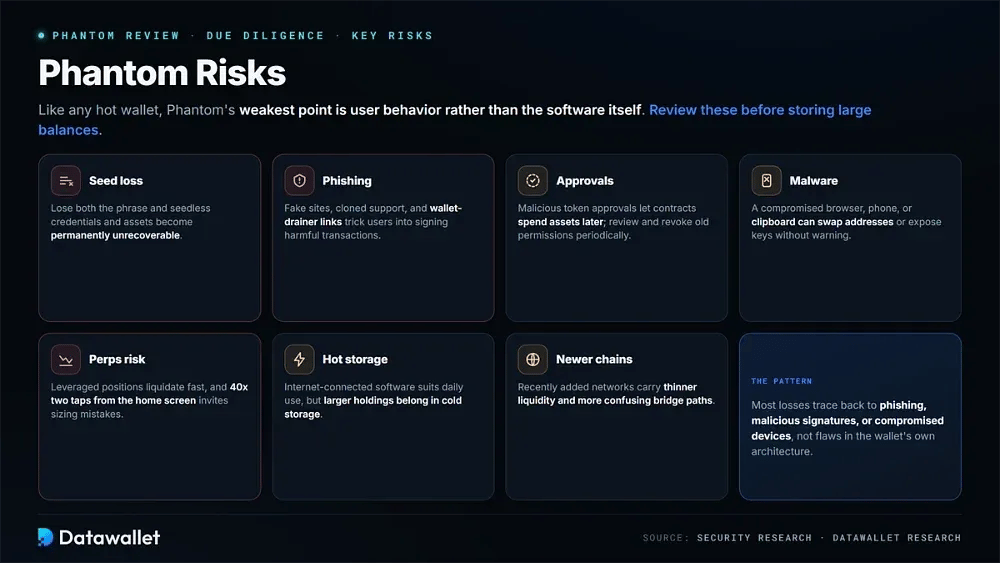
Like any hot wallet, Phantom's weakest point is user behavior rather than the software itself. Most losses trace back to phishing, malicious signatures, or compromised devices rather than flaws in the wallet's own security architecture.
Review these key risks carefully before storing large balances in Phantom:
- Seed loss: If you lose both your recovery phrase and seedless login credentials, Phantom cannot restore access and your assets become permanently unrecoverable.
- Phishing: Fake websites, cloned support accounts, and wallet-drainer links can trick users into signing harmful transactions or revealing their recovery phrase.
- Approvals: Malicious token approvals let contracts spend assets later, so old permissions should be reviewed and revoked periodically to limit exposure.
- Malware: A compromised browser, phone, or clipboard can swap addresses, expose keys, or redirect users to fraudulent dApp interfaces without warning.
- Perps risk: Leveraged positions can be liquidated fast, and 40x leverage two taps from the home screen invites costly position-sizing mistakes.
- Hot storage: As internet-connected software, Phantom suits daily activity but leaves larger holdings better protected in dedicated cold storage instead.
- Newer chains: Recently added networks can carry thinner liquidity, less mature infrastructure, and more confusing bridge paths than established ecosystems.
Phantom Fees Schedule
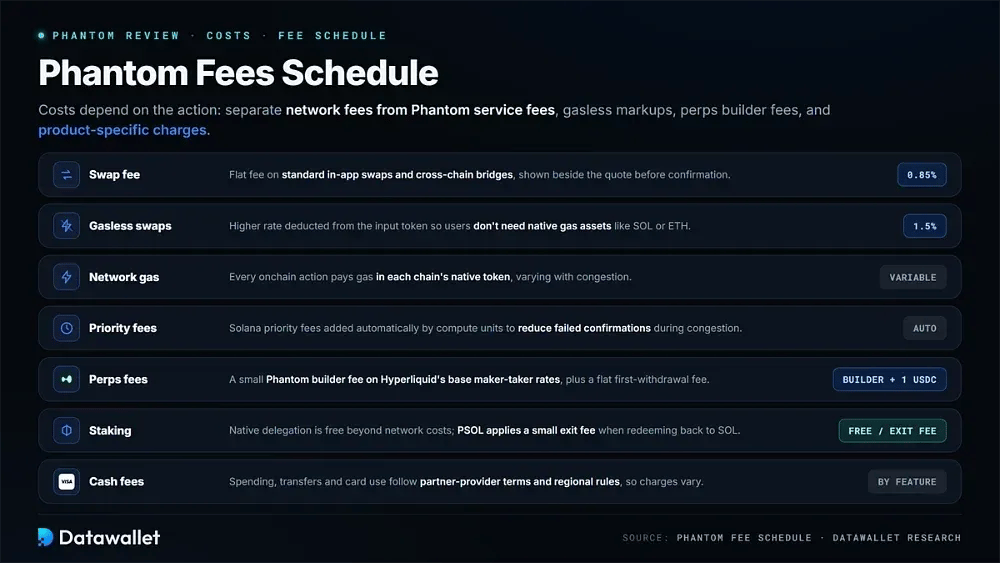
Phantom's costs depend on the action. Users should separate wallet network fees from Phantom service fees, gasless-swap markups, perps builder fees, and product-specific charges before estimating the true cost of any transaction or trade.
The main fee categories are listed below for users:
- Swap fee: Phantom charges a flat 0.85% fee on standard in-app swaps and cross-chain bridges, shown alongside the quote and network gas before confirmation.
- Gasless swaps: Gasless swaps raise the fee to 1.5%, deducted from the input token so users don't need native gas assets like SOL or ETH.
- Network gas: Every onchain transfer, swap, stake, or approval requires network gas, paid in each chain's native token and varying with congestion.
- Priority fees: Phantom automatically adds Solana priority fees based on compute units to reduce failed or delayed confirmations during periods of network congestion.
- Perps fees: Perps trades carry a small Phantom builder fee on top of Hyperliquid's base rates, plus a flat 1 USDC first-withdrawal fee.
- Staking: Native delegation has no Phantom fee beyond network costs, while PSOL applies a small exit fee when redeeming the token back to SOL.
- Cash fees: Phantom Cash spending, transfers, and card use follow partner-provider terms and regional rules, so specific charges vary by feature and location.
Phantom Pros & Cons
Phantom is best for active Solana and multi-chain users who value control, dApp access, and integrated trading tools. It is less suited to those who want maximum cold-storage security, full chain coverage, or exchange-style account recovery and support.
The table below summarizes the main trade-offs:
Phantom vs Other Crypto Wallets
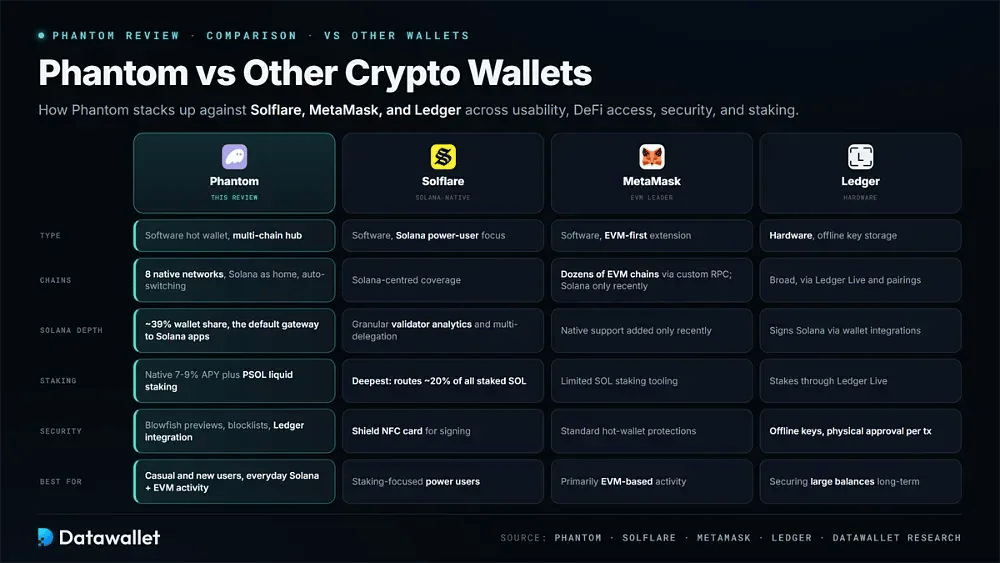
Phantom competes with other leading wallets on multi-chain support, interface quality, and Solana depth. Below is a comparison against top Solana wallets like Solflare, MetaMask, and Ledger across usability, DeFi access, security, and staking.
Phantom vs Solflare
Both Phantom and Solflare are Solana-native wallets sharing core features like SOL staking, NFT support, and Ledger integration. Phantom offers a cleaner, more beginner-friendly interface, while Solflare targets power users with granular validator analytics, multi-delegation, and its Solflare Shield NFC signing card.
Phantom wins on onboarding speed and everyday simplicity, making it the better fit for casual or new users. Solflare wins on staking depth, routing around 20% of all staked SOL and offering more detailed delegation controls for holders who treat SOL staking as a primary use case.
Phantom vs MetaMask
MetaMask dominates Ethereum and EVM activity, supporting dozens of chains through custom RPCs and offering deeper protocol compatibility. Phantom now covers Ethereum, Base, and Polygon natively but doesn't match MetaMask's extensibility, though MetaMask only recently added native Solana support.
Phantom wins on Solana-first onboarding, automatic network handling, and a smoother experience across Solana and EVM chains together. MetaMask wins on Ethereum dApp coverage and the ability to add any custom EVM network, making it stronger for users whose activity is primarily EVM-based.
Phantom vs Ledger
Ledger is a hardware wallet built for maximum security, storing keys offline and requiring physical approval for every transaction. Phantom is software built for convenience, but it integrates with Ledger to combine cold-storage protection with everyday usability across Solana and EVM apps.
Phantom wins on daily speed, intuitive design, and built-in DeFi access for active onchain users. Ledger wins on offline key storage and physical transaction approval, making it the better choice for securing large balances or minimizing exposure to malware and phishing over time.
Final Thoughts
Phantom remains the strongest all-round wallet for Solana users who want swaps, staking, NFTs, perps, and payments in one clean, mobile-first app. Its biggest advantage is deep Solana integration paired with a widening set of onchain trading and money tools.
The trade-offs are familiar to any hot wallet. Self-custody puts recovery, approvals, and security squarely on the user, while perps leverage and regional feature limits add complexity that beginners should approach carefully with small sizes and strong wallet hygiene.
Overall, Phantom suits active Solana and multi-chain users who value convenience and control. For larger long-term holdings, pairing it with a Ledger, clean backups, and cautious dApp habits gives the best balance of usability and safety.