Can I Buy Bitcoin with Pix?
Yes. For anyone with a Brazilian bank account, Pix is the only funding method worth using. Pix launched under the Banco Central do Brasil in November 2020. Individuals can send money free of charge, around the clock. Once the exchange displays a QR code or copia e cola string, paste or scan it in your banking app and approve the payment. The reais usually arrive within seconds.
The exchange sells you the crypto, not Pix, so your choice of bank matters less than the platform receiving the deposit. Nubank and Mercado Pago offer Bitcoin inside their apps. Both use a spread within the quoted price and carry fewer coins than a dedicated exchange.
All platforms serving Brazilians have operated under the Central Bank's licensing regime for crypto service providers since 2 February. Firms active before that date must apply for authorisation by 30 October or wind down. Bybit responded by moving residents onto a Brazilian entity. It now requires proof of address, so you must complete Level 2 verification before making your first Pix deposit.
How to Buy Crypto with Pix
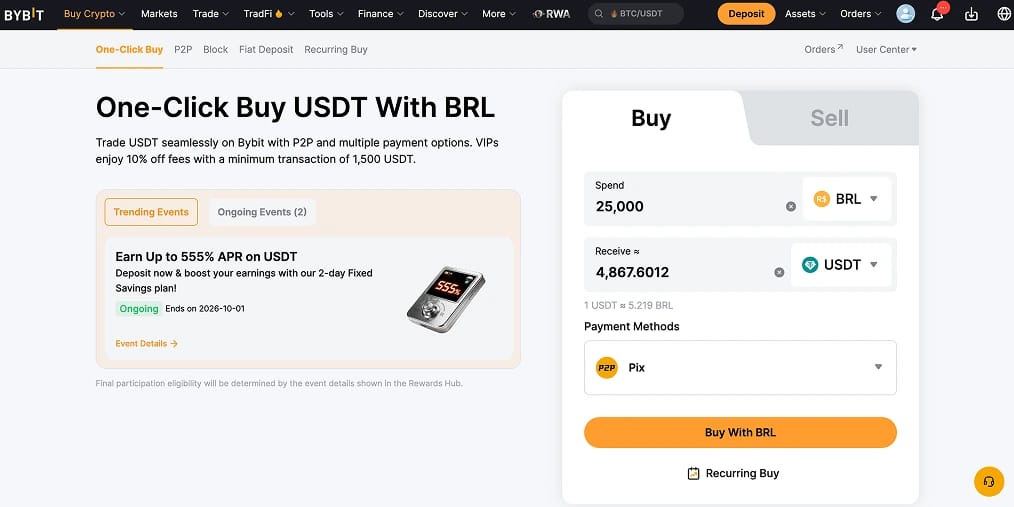
For Bitcoin you intend to move into your own wallet, the best approach is a Pix deposit to Bybit followed by a limit order on the BTC/BRL market. Pix is free, while Bybit's 0.10% spot fee is lower than the spread included in Brazilian banking apps' crypto prices.
Steps to buy crypto with Pix:
- Create and verify a Bybit account: Register through Bybit using your CPF (personal tax number) and either an RG identity card or CNH driving licence. Passports are no longer accepted for Brazilian residents. Level 2 verification, including proof of address, is mandatory before migration to the local entity.
- Open the BRL deposit screen: Select Deposit, choose Fiat, then BRL and Pix. Bybit displays the provider fee and estimated credit time beside the payment method. Review both before transferring any money.
- Confirm the recipient before paying: The QR code directs payment to a company CNPJ (business registration number). Your banking app will show the recipient's legal name before confirmation. Stop and contact support if it differs from the payment processor listed on Bybit's deposit page.
- Pay from an account in your own name: Pix payments from a CPF that does not match your verified profile may fail or enter a manual review lasting 7 to 14 working days. Always use your own account, not one belonging to a spouse or business.
- Buy your asset: After the BRL balance arrives, open Spot, select BTC/BRL or USDT/BRL and submit a limit order. One-Click Buy draws from the same balance but includes a spread in the price instead of charging the 0.10% spot fee.
Generate a new QR code if the original expires before payment. Most Pix deposits appear within one minute. If yours is still missing after three working days, submit Bybit's appeal form.
Fees, Tax and Transfer Limits for Pix Users
Individuals pay nothing to send Pix, so the main costs come from the exchange and Brazilian tax rules. Your bank's transfer limit is usually the practical constraint.
Pix costs and limits
- Sending a Pix: Free for individuals, available at any hour and usually completed within seconds. Companies may pay to receive Pix, which is why some smaller exchanges deduct a few reais from BRL withdrawals.
- Daytime limit: The Central Bank sets no daytime ceiling. Your bank determines the limit based on your profile. Most banking apps allow increases through Meus Limites (My Limits), but changes take 24 to 48 hours to apply.
- Night-time limit: A default R$1,000 cap between 8pm and 6am covers payments to individuals and MEIs (sole traders). Exchange deposits go to a CNPJ, so this cap should not block an evening payment unless your bank imposes a stricter limit.
- New device cap: Any phone or computer not previously used for Pix is limited to R$200 per transfer and R$1,000 a day until registered with your bank. Complete registration before the day you plan to deposit.
- Precautionary hold: A receiving bank may freeze a suspicious Pix for up to 72 hours while checking for fraud. First-time transfers of large amounts to a new exchange are the most likely to trigger this review.
- Refunds: The Mecanismo Especial de Devolução allows your bank to pursue funds sent to a scammer. Since May, its second version has traced money beyond the initial receiving account. Only 9.3% of contested value was recovered in 2025, making the recipient check in step three your strongest protection.
- Card deposits: Bybit's card providers charge percentage-based fees that Pix avoids. Cards only make sense when Pix is unavailable.
Bybit fees
- Pix deposit: Bybit does not add its own fee. Under its fee schedule, any provider charge is displayed on the deposit screen before confirmation.
- Spot trading: Standard-tier fees are 0.10% for makers and 0.10% for takers across BTC/BRL, USDT/BRL and more than 700 other assets.
- BRL withdrawal: Withdrawals are paid by Pix to a key registered under the same CPF as your account. Bybit will not send funds to another CPF or a CNPJ.
- Crypto withdrawal: Bybit passes on only the blockchain fee. A USDT withdrawal on Tron generally costs less than one dollar.
Brazilian tax on crypto
- National platforms: Crypto sales of up to R$35,000 within a calendar month are exempt. Above this amount, gains are taxed at 15% up to R$5 million, with rates rising by band to 22.5% beyond R$30 million. Payment is made through a DARF (federal tax payment slip) using code 4600 by the final business day of the following month.
- Foreign platforms: Since 1 January 2024, gains on crypto held through an overseas provider have fallen under Lei 14.754/2023. The rate is a flat 15%, with no monthly exemption, as the Receita Federal confirmed in August. Once the 24 September migration is complete, ask your accountant which regime applies to your Bybit account.
- DeCripto reporting: The Receita's DeCripto declaration replaced the former IN 1888 monthly report in July. It follows the OECD's Crypto-Asset Reporting Framework for data sharing between tax authorities. Local exchanges report on your behalf. You must report monthly activity above R$35,000 involving foreign platforms, peer-to-peer transactions or self-custody.
A R$5,000 Pix transfer costs nothing, while the Bybit spot trade costs about R$5. For Brazilian buyers, the tax reporting burden is considerably greater than the transfer cost.
Best Exchanges for Pix Users
All four platforms accept BRL deposits through Pix. The main differences are their Central Bank status, spot fees and the products that remain available under the new rules. Our best crypto exchanges in Brazil guide tracks authorisation filings as they become public.
Pix Cryptocurrency Policy
Pix has no crypto policy of its own. The Central Bank treats transfers to exchanges like other company payments. Only your bank's fraud controls examine the transaction, looking for patterns such as an unusually large payment or a first transfer to a new recipient.
Regulatory obligations apply to the exchange. Law 14,478 of 2022 established a legal category for exchanges and custodians known as virtual asset service providers. It also placed them under Banco Central supervision. Resolutions 519, 520 and 521 were published in November 2025 and have been in force since 2 February. They require exchanges, custodians and brokers to obtain authorisation, separate client assets from company funds and maintain bank-grade anti-money-laundering controls.
For existing customers, 30 October is the key deadline. Exchanges operating on 2 February have until that date to submit their applications. From then, banks and payment institutions may no longer settle payments for providers that are neither authorised nor awaiting a decision. Missing the filing would cost a platform its Pix access, so check its terms of use for confirmation that an application has been lodged.
Industry associations requested a 120-day extension from the Central Bank in August. No public response had been issued when we published.
Some large withdrawals will take longer from next year. Resolution 584, published in August, introduces a precautionary hold of up to 24 hours from 1 January 2027. It applies when daily crypto withdrawals above US$10,000 go to self-custody wallets or foreign platforms. Crypto derivatives remain under the CVM, Brazil's markets regulator, which is why Bybit and other exchanges have removed futures and options for residents.
About Pix
Pix is the instant payment network created and operated by the Banco Central do Brasil. It launched fully on 16 November 2020. Unlike card networks or the older TED and DOC transfer systems, Pix settles directly between bank accounts at any hour and is free for individuals. By the end of 2025, more than 170 million people had used the system. Nearly 80 billion transactions were processed that year.
Payments are sent to a chave Pix (Pix key). This may be a CPF or CNPJ, a phone number, an email address or a randomly generated key. Users can also pay through a QR code containing the recipient and transaction amount. Every Pix key belongs to a verified account holder, so the recipient's legal name appears before confirmation. That check prevents most exchange deposit mistakes.
Over the past two years, the Central Bank has strengthened Pix against fraud through night-time caps and registered-device limits. It also introduced 72-hour precautionary holds and rebuilt the refund mechanism. The network now supports Pix Automático for recurring payments and Pix por Aproximação for contactless purchases in shops.
Bottom Line
Pix is one of the few payment systems that can fund a crypto exchange instantly and free of charge, even at three in the morning on a Sunday. It cannot protect you after money reaches a fraudulent exchange, as recovery rates remain low. Always verify the recipient's legal name and CNPJ on your banking screen before confirming payment.
Bybit remains our recommendation for Pix users. It moves to a Brazilian entity on 24 September, matches every BRL deposit against your CPF and charges 0.10% for spot trades on BTC/BRL and USDT/BRL. Register your device before depositing and use the order book instead of One-Click Buy. Keep every receipt because the Receita now receives exchange data through DeCripto and compares it with your tax return.