







Can I Bridge to Sui?
Yes, you can move assets to Sui from Ethereum, Solana, and most major Layer 2 networks. Sui sits outside the Ethereum Virtual Machine, using the Move language and its own address format, so only a handful of cross-chain bridges connect to it.
The official list is broader than on most non-EVM chains. The Sui documentation names Sui Bridge, Wormhole Connect, Wormhole's Portal Bridge, and ZetaChain as supported ways in. Circle also issues native USDC directly on Sui, which means stablecoin transfers can arrive as the canonical token rather than a bridged copy.
How to Bridge to Sui
We recommend Sui Bridge for transfers from Ethereum. Every transfer must be signed by a threshold of Sui validators before funds move, and the contracts have been audited by OtterSec and Zellic. ETH arrives in its native Sui representation, ready for DeFi, and USDC moves through Circle's CCTP integration, which burns the token on Ethereum and mints native USDC on Sui.
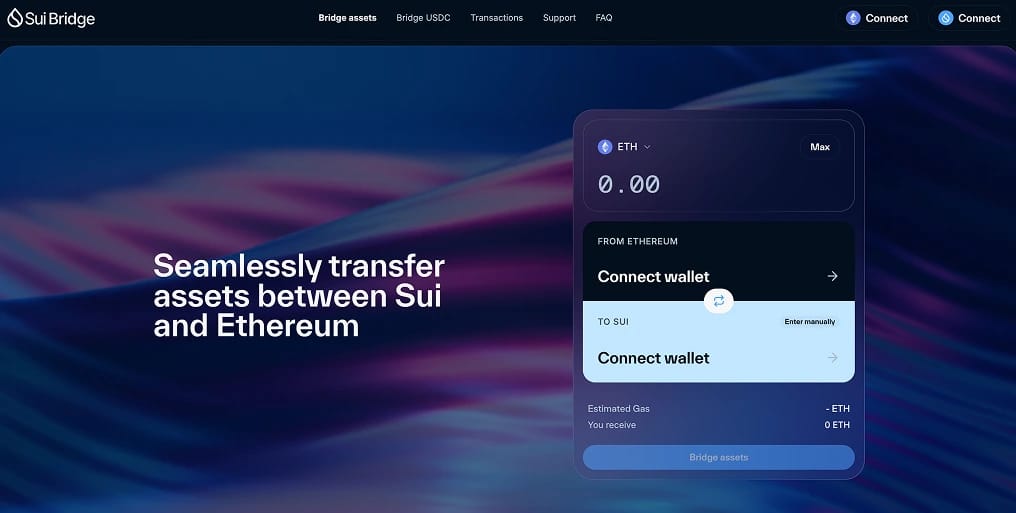
Follow these steps to bridge to Sui with Sui Bridge:
- Connect Both Wallets: Open bridge.sui.io and link an Ethereum wallet such as MetaMask alongside a Sui wallet like Slush, Suiet, or Phantom.
- Set the Transfer: Choose Ethereum as the source, Sui as the destination, and pick your asset from ETH, WETH, WBTC, LBTC, USDT, or USDC.
- Approve and Deposit: Enter the amount, approve the token if prompted, and confirm the deposit transaction in your Ethereum wallet.
- Receive on Sui: The bridge waits for Ethereum to confirm the deposit, then validators release your tokens to the connected Sui address.
Test with a small amount first. Bridge transactions cannot be reversed once confirmed, and a test costs only a few dollars in gas.
What are the Fees?
Sui Bridge does not publish a protocol fee in its documentation, so plan around gas on each side of the transfer. Ethereum gas is the larger expense, so check live gas prices before a big deposit, while the Sui side usually costs only a few cents.
A validator-governed limiter caps transfers at $16 million from Ethereum to Sui and $7 million in the opposite direction per 24 hours, which protects the bridge from drain attacks but can delay very large transfers during busy periods.
Getting SUI for Gas
Every transaction on Sui pays gas in SUI, including the ones that move your bridged tokens onward. Fees are tiny by Ethereum standards, usually fractions of a cent, but a wallet holding zero SUI cannot transact at all.
Wormhole Connect offers a gas drop-off feature, documented in the Sui bridging guide, which adds a small amount of SUI to your transfer for an extra fee paid on the source chain. Otherwise, withdraw a few SUI tokens from an exchange before bridging, since even one token covers hundreds of ordinary transactions.
Bridging from Solana and Layer 2 Networks
Transfers from outside Ethereum run through the Wormhole ecosystem, which has been Sui's main interoperability partner since launch. The Portal Bridge connects Sui with more than 20 networks, and its fastest quotes are filled by Mayan, an auction protocol that has processed over $18 billion in cross-chain volume across Solana, Base, Arbitrum, and other major chains.
USDC holders on Solana get the cleanest path. Circle's CCTP burns the token on Solana and mints native USDC on Sui, and our Solana to Sui bridging guide walks through the process step by step.
Sui Bridging Risks
Most transfers land without trouble, but a handful of mistakes catch newcomers:
- Duplicate token versions: Several representations of ETH and USDC circulate on Sui, including legacy Wormhole-wrapped copies. Verify the coin type against the official token list before swapping, and prefer native USDC over the older wUSDC.
- Fake frontends: Clone sites imitating popular bridges rank in search ads. Type bridge.sui.io or portalbridge.com into your browser directly rather than clicking sponsored results.
- Address confusion: Sui addresses start with 0x like Ethereum addresses but are longer and belong to a different system. MetaMask cannot hold Sui assets natively, and our guide to adding Sui to MetaMask explains what an EVM-first setup can and cannot do.
- Irreversible transfers: Sui confirms in under a second and offers no recovery process. A small test transfer before any large move removes most of the risk.
Alternative Sui Bridges
Several other platforms also move assets into Sui.
Exchange withdrawals suit anyone starting from a trading platform, since you deposit on whichever network you like and withdraw straight to a Sui address for a flat fee.
About Sui
Sui is a Layer 1 blockchain launched in May 2023 by Mysten Labs, built on the Move language with an object-centric data model that lets unrelated transactions execute in parallel. Its Mysticeti consensus finalises transactions in well under a second.
The DeFi ecosystem gives bridged assets somewhere to go. Deposits across Suilend, Navi, Cetus, and Momentum place Sui's total value locked near $2 billion. Bitcoin-backed tokens such as tBTC account for roughly a tenth of that figure, and Stripe's Bridge platform issues USDsui, a stablecoin native to the ecosystem.
Bottom Line
Bridging to Sui takes a few minutes through the native Sui Bridge, and validator custody means your ETH or USDC arrives in the form the rest of the network already uses. Portal Bridge, Mayan, ZetaChain, and exchange withdrawals cover transfers from everywhere else.
Verify every coin type on arrival, keep a little SUI on hand for gas, and start with a test transfer so the larger amount follows a path you have already proven.
.webp)