




Can You Add StableChain to MetaMask?
Yes. StableChain, officially named Stable Mainnet, is a fully EVM-compatible Layer 1 built for stablecoin payments, so MetaMask treats it as a standard custom network with no Snap or plugin required. The docs even ship a one-click button that calls MetaMask's add-network function directly.
What sets it apart from every other network in your wallet is the gas token. Fees on StableChain are paid in USDT0, the LayerZero-based omnichain version of Tether backed one-to-one by USDT on Ethereum. There is no volatile coin to buy before you can transact, and simple wallet-to-wallet USDT0 transfers carry no gas charge at all at the protocol level.
One correction matters if you set the network up before February. StableChain launched with a separate gas unit called gUSDT, then retired it in the v1.2.0 upgrade and made USDT0 the native gas asset outright. An old MetaMask entry still connects on Chain ID 988, but the currency symbol should now read USDT0.
How to Add StableChain to MetaMask
ChainList remains the safest shortcut because its entries are pulled from the community-audited ethereum-lists registry, and Stable's own documentation points users there. We verify the values against the official docs before approving any prompt, since a wrong RPC or Chain ID is how most wallet mishaps start.
Follow these steps to add StableChain to MetaMask:
- Open ChainList: Visit the Stable Mainnet page, confirm the address bar reads chainlist.org, and click 'Connect Wallet' to link MetaMask.
- Check the parameters: The listing should show Chain ID 988 with USDT0 as the currency. A search for 'Stable' also returns similarly named networks, so match the Chain ID rather than the name.
- Add and approve: Click 'Add to MetaMask', then compare the pop-up values against the official connection guide before accepting.
- Switch networks: Select Stable Mainnet from MetaMask's network menu. Any USDT0 you hold on the chain displays as your main balance immediately, since the gas token needs no separate import.
Once connected, dApps on StableChain can prompt MetaMask to switch to Chain ID 988 automatically. We inspect those prompts field by field, because malicious sites can request lookalike networks with hostile endpoints.
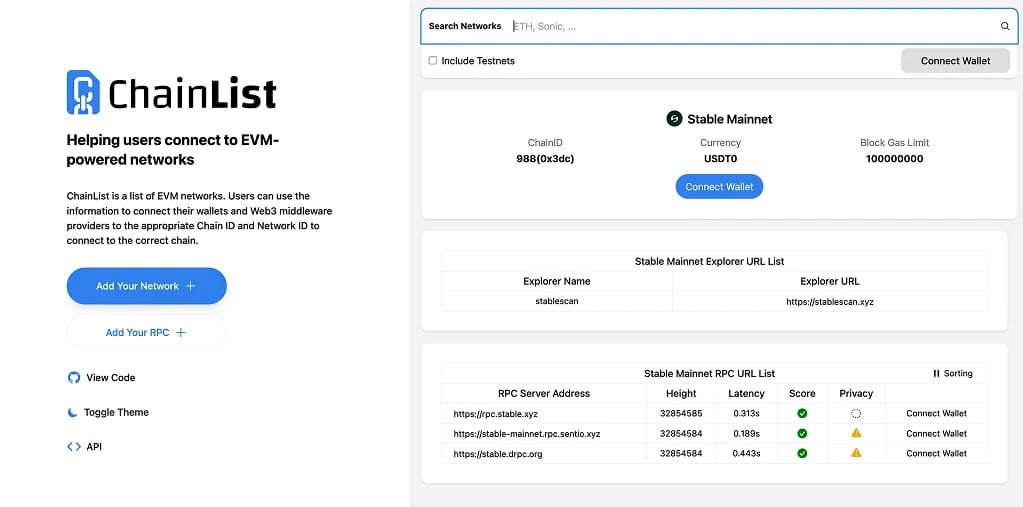
StableChain RPC and Chain ID
Prefer manual setup? Open 'Add a custom network' in MetaMask settings and enter the configuration below, published in Stable's official documentation:
- Network Name: Stable Mainnet
- RPC URL: https://rpc.stable.xyz
- Chain ID: 988
- Currency Symbol: USDT0
- Block Explorer URL: https://stablescan.xyz
The public endpoint is rate limited to 1,000 requests per 10 seconds per IP, generous for wallet use and only a constraint for bots or indexers, which Stable directs to third-party providers such as Dwellir and dRPC.
One display detail can look alarming at first. USDT0 uses 18 decimals as the native gas token and 6 decimals as an ERC-20 contract, and both read from the same underlying balance. MetaMask shows the native figure, so the number you see is correct even when a dApp built against the token contract reports it differently.
StableChain Testnet RPC Details
Developers and anyone rehearsing a transfer before committing real dollars can add Stable Testnet with these settings:
- Network Name: Stable Testnet
- RPC URL: https://rpc.testnet.stable.xyz
- Chain ID: 2201
- Currency Symbol: USDT0
- Block Explorer URL: https://testnet.stablescan.xyz
Free test USDT0 comes from the official faucet, and testnet balances carry no real-world value. Both environments share the USDT0 symbol, so the Chain ID is the only reliable check that you are on mainnet.
How to Get USDT0 on StableChain
A freshly added network starts empty, and although peer-to-peer USDT0 transfers are free, contract interactions still consume small USDT0 fees, so the wallet needs funding either way.
The canonical path is LayerZero's OFT transfer system, which burns USDT0 on the source chain and mints it on Stable rather than locking funds with a wrapped intermediary. Stable's bridge documentation covers two variants. Holders of USDT0 on chains such as Arbitrum move it across directly, while holders of plain USDT on Ethereum or Arbitrum convert through the Legacy Mesh in the same transaction. Front ends such as Stargate and Jumper expose both paths, and our best crypto bridges guide compares the underlying designs on security and cost.
Since the amounts involved are dollars rather than a gas coin, even a small transfer leaves plenty in reserve for contract fees.
About StableChain
Stable is a Layer 1 purpose-built for USDT settlement, closely tied to the Tether ecosystem through backing from Bitfinex and USDT0, and funded by a $28 million seed round co-led by Bitfinex and Hack VC that also drew Franklin Templeton and PayPal Ventures. The mainnet went live on December 8, 2025 alongside the STABLE governance token and an independent Stable Foundation, following a pre-deposit campaign that attracted more than $2 billion from over 24,000 wallets. Our StableChain explained guide breaks down the architecture and tokenomics in depth.
STABLE never touches the transaction path. The 100 billion supply exists for staking and governance, while all fees stay denominated in USDT0, which keeps costs predictable in dollar terms and gives the chain its pitch against general-purpose networks. Block times run at roughly 0.7 seconds.
Development has moved quickly since launch. The v1.2.0 upgrade this February unified gas around USDT0, a mandatory v1.3.0 release this May hardened validation and execution ahead of production workloads, and June brought Stable SDK v0 plus network activity passing 7 million total transactions across more than 46,000 addresses. The team's next consumer milestone is StablePay, a no-cost USDT payments product now in preview.
The competitive backdrop is the defining story of 2026. Plasma took a similar zero-fee USDT approach to mainnet first, Stripe's Tempo and Circle's Arc are moving through testnets, and Tether keeps expanding USDT's footprint across new networks. StableChain's wager is that the deepest alignment with Tether itself wins the settlement layer.
Final Thoughts
Adding StableChain to MetaMask takes under a minute through ChainList or a manual entry on Chain ID 988, and the parameters above match Stable's documentation as of this July.
Two details deserve a second look. Older guides and pre-February wallet entries name gUSDT as the currency, which the network has since replaced with USDT0, and the shared symbol across mainnet and testnet means the Chain ID is your only dependable environment check.
Beyond setup, the appeal is simplicity. Your gas, your balance, and your payments are all the same digital dollar, which is precisely the experience Stable was built to deliver.