





Can You Add Arc to MetaMask?
Arc is an EVM-compatible Layer 1 that executes the same smart contract code as Ethereum and responds to the same wallet requests. You can add it to MetaMask as a custom network and use your existing 0x address. Balances remain separate because each chain maintains its own ledger.
Unlike most chains, Arc has no separate gas coin. Every transaction costs USDC, Circle's dollar stablecoin, which is also the currency symbol you enter in MetaMask. The wallet may warn that this symbol differs from its records for the chain. That warning is expected on a network that uses a stablecoin for gas.
Even if your Arc wallet holds other tokens, it cannot transact without USDC. For a field-by-field explanation of the settings screen, see our MetaMask network guide.
How to Add Arc to MetaMask
The two methods below create the same network entry. Choose according to how much you want to verify yourself.
Method 1: Arc's Official Documentation
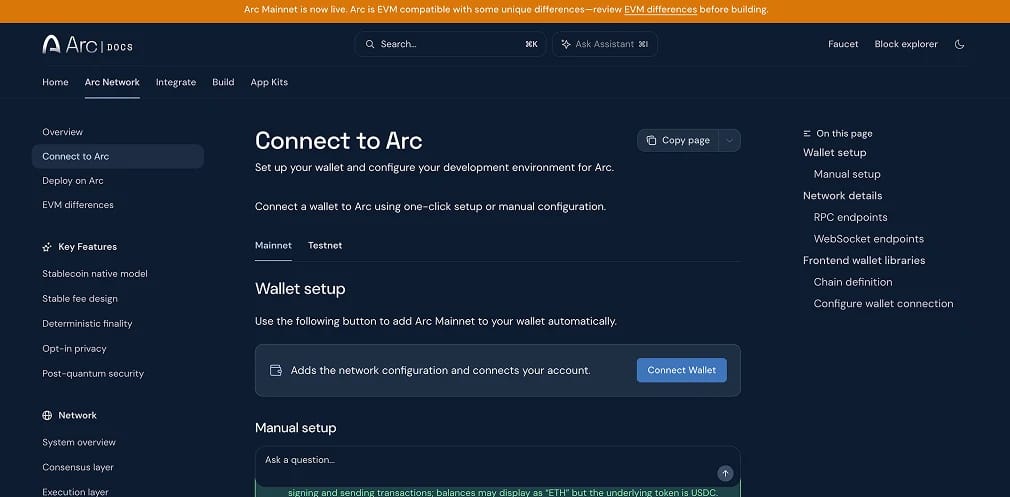
Circle's documentation has a Connect Wallet button under both the Mainnet and Testnet tabs. Each sends the network parameters directly to MetaMask, avoiding RPC typing errors.
- Open the docs: Visit the Connect to Arc page. Check that the browser domain is docs.arc.io, as lookalike documentation sites exist.
- Trigger the prompt: Press "Connect Wallet". MetaMask asks permission for the site to see your account before proposing the network.
- Read the proposal: Check the network name, RPC URL, chain ID and currency symbol against the values further down this guide.
- Save and select: Accept the proposal to add Arc, then select it from the network picker in the wallet's top corner.
Method 2: ChainList
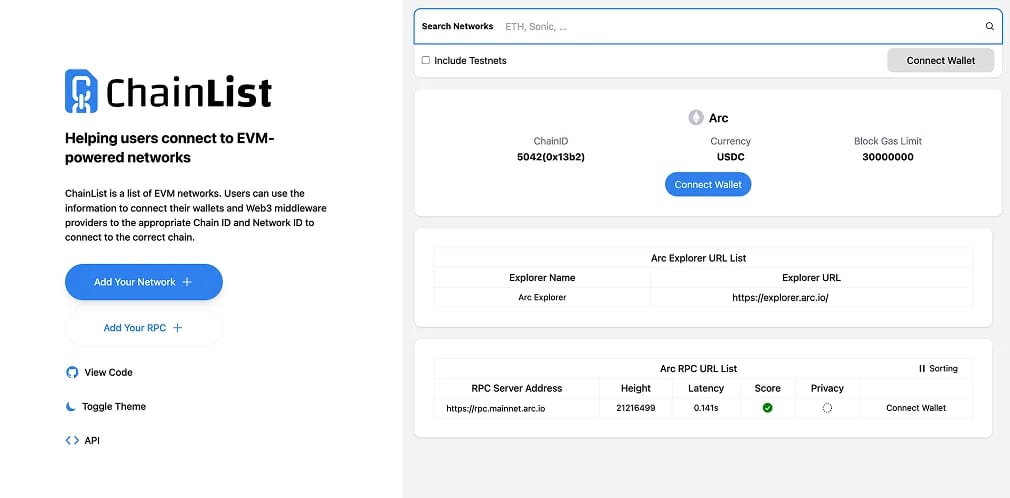
ChainList draws its entries from the ethereum-lists registry, the public database of chain parameters that wallets and developer tools read from, which makes it a safer source than a screenshot in a group chat. The registry entry for Chain ID 5042 carries Circle's official mainnet RPC and explorer.
- Load the Arc page: Open the Arc mainnet entry on ChainList by typing the address yourself rather than following a message link, then connect your wallet.
- Confirm the listing: The page should show Chain ID 5042, USDC as the currency and rpc.mainnet.arc.io among the endpoints. The testnet entry sits under Chain ID 5042002 and only appears with "Include Testnets" switched on.
- Pick the right chain: If you search "Arc" instead of opening the page directly, several unrelated networks appear. Circle's network lists USDC as its currency, so ignore any result with ARC as the gas symbol.
- Send it to MetaMask: Click "Add to MetaMask", review the details the wallet will store, and accept.
Arc Mainnet RPC and Chain ID
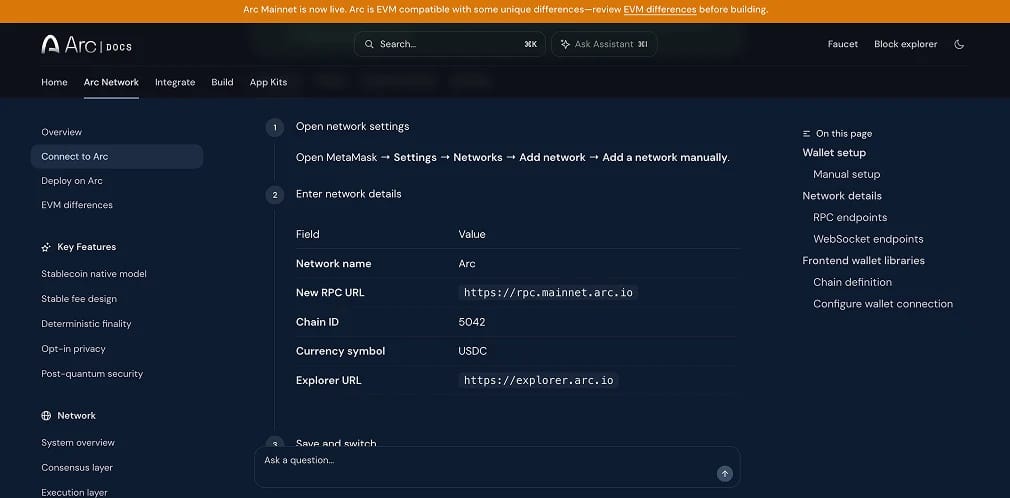
These production settings come from Circle's Connect to Arc documentation. They match the Chain ID 5042 entry in the ethereum-lists registry, which lists USDC as the native currency. Copy each value exactly:
- Network Name: Arc
- RPC URL: https://rpc.mainnet.arc.io
- Chain ID: 5042
- Currency Symbol: USDC
- Block Explorer URL: https://explorer.arc.io
Provider-run mainnet endpoints are also available at rpc.blockdaemon.mainnet.arc.io, rpc.drpc.mainnet.arc.io and rpc.quicknode.mainnet.arc.io. Circle lists Alchemy access with an API key as well. Use one of these services for bots and indexers, as the shared primary endpoint throttles heavy callers.
Arc Testnet RPC and Chain ID
Arc's public testnet continues to run alongside mainnet. Use it to rehearse contract deployments or try unfamiliar applications without risking real money. The official network documentation lists these settings:
- Network Name: Arc Testnet
- RPC URL: https://rpc.testnet.arc.io
- Chain ID: 5042002
- Currency Symbol: USDC
- Block Explorer URL: https://explorer.testnet.arc.io
The Circle faucet provides test USDC and EURC for this network only. Faucet tokens have no value and cannot move onto mainnet. Some older guides incorrectly list 1516 as the testnet chain ID. MetaMask rejects that entry when the RPC returns a different ID.
How to Get USDC on Arc for Gas
A newly added Arc network starts with an empty balance. You need USDC before making even a simple transfer. If the network is configured correctly but will not send, a missing USDC balance is the likeliest cause.
USDC reaches an Arc wallet in one of these ways:
- CCTP transfers: Circle's Cross-Chain Transfer Protocol burns USDC on the source chain and mints native USDC on Arc. Arc's CCTP domain is 26. With finality in under a second, transfers leaving Arc clear faster than those from chains that require several confirmations.
- Exchange withdrawals: Circle's launch announcement names Binance, Bybit, Coinbase, Kraken, KuCoin, MEXC, OKX and Upbit among the exchanges providing access to Arc. Each enables USDC withdrawals on its own schedule. Explicitly select Arc on the withdrawal screen, as USDC sent over the wrong network can be difficult to recover. Check the supported network list on Kraken before withdrawing there.
- Third-party bridges: Aggregators supporting Arc can move funds from chains without native CCTP support, then swap them into USDC on arrival. Our best crypto bridges guide compares their fees and security models.
- Hold a reserve: Keep enough USDC for more than your first transaction. Token approvals, swaps and claims each incur a small fee.
Under normal load, Arc targets fees of roughly one cent per transaction. Its smoothing formula limits sharp fee increases during brief traffic spikes. The gas and fees reference specifies a protocol floor of 20 gwei, so a few dollars of USDC covers hundreds of ordinary transfers.
Is Adding Arc to MetaMask Safe?
Adding a network carries no risk in itself. MetaMask stores the entry locally, and funds do not move until you sign something. A compromised RPC URL creates risk by displaying invented balances or misrepresenting a transaction. Impostor sites around high-profile launches pose another threat.
During Arc's private mainnet phase, sites claiming to be an official "Arc Bridge" asked visitors to connect a wallet and send at least 1,000 USDC to the unopened network. CCTP uses a burn-and-mint process, so USDC sent through a fake bridge is burned on the source chain but never minted elsewhere. Treat bridge, faucet or airdrop pages as hostile unless arc.io or circle.com links to them.
Arc uses a permissioned validator set, with a named group of institutions producing blocks rather than anyone who stakes. This arrangement provides fast, deterministic finality but requires users to trust those operators to act in good faith. Circle has published a post-quantum security whitepaper. Opt-in privacy features are still in development, and Arc has far less production history than Ethereum. Approach new Arc applications with the caution you would apply to any early chain.
About Arc
Arc is Circle's Layer 1 and uses USDC for gas. It opened publicly on 16 September 2026, following a testnet that processed more than 700 million transactions, according to Circle's launch announcement. Aave, Morpho and Uniswap were live on day one.
A permissioned validator cohort handles block production. Circle's press release last month named BlackRock, DTCC, Galaxy, Global Payments, ICE, Mastercard, MoneyGram, SBI Group, Standard Chartered, Sumitomo Corporation and Visa. Our Arc chain explainer covers the consensus design, validator model and full roadmap.
Arc also has a separate ARC token that does not pay gas. Its whitepaper allocates a 10 billion supply across the ecosystem at 60%, Circle at 25% and a reserve at 15%. Circle disclosed a pre-sale of 740 million tokens at $0.30 in an 8-K filing. The entire supply was minted during launch week, with no commitment to a public release. Any "ARC" trading today is therefore unrelated to Circle.
For settlement volume, Arc competes with Stripe-backed Tempo and USDT-based Stablechain. Our stablecoin statistics roundup tracks that market.
Common Arc Setup Mistakes
Most failed Arc setups we have seen since launch come down to the avoidable errors below.
Run through this list before you sign:
- Wrong Arc: Chain ID 1243 identifies an unrelated "ARC Mainnet" that uses ARC for gas. Chain ID 4217 belongs to Tempo's mainnet. Circle's Arc uses 5042 and the gas symbol USDC.
- Testnet instead of mainnet: Chain ID 5042002 is the test network. Production applications will not connect to it, and its balances have no monetary value. The two entries can be hard to distinguish inside the wallet.
- No USDC for gas: Other tokens cannot cover Arc's fees. Without USDC, every transaction fails with an insufficient funds error.
- Two USDC balances: Arc exposes USDC as both a native balance and a standard ERC-20 token contract, the format most Ethereum tokens use. These are one balance seen two ways, not separate holdings. A tool displaying them differently is no cause for alarm.
- Copied RPC: An endpoint copied from a reply on X may connect to a node someone else controls. Trust only Circle's documentation and ChainList for these details.
- Airdrop and bridge phishing: Fake claim pages and bridge sites appear within hours of a launch. Only follow links from arc.io or circle.com. No legitimate site asks for a seed phrase. Our top crypto airdrops tracker explains how genuine distributions work.
Final Thoughts
Any of these methods adds Arc to MetaMask within a minute using Chain ID 5042. It behaves like other EVM chains in the wallet, except that gas costs USDC. Once you save the network, fund it with a small stablecoin balance.
Before approving anything, check the RPC URL and explorer against Circle's documentation. Be sceptical of Arc-branded sites shared through chats or search ads. Mainnet and testnet share the same name and gas symbol, so check the chain ID to confirm which network will receive your signature.
Arc's validator list and launch partners suggest institutional volume will be the measure of its success rather than speculative activity. Everyday users will get a clearer picture as exchanges enable withdrawals and more applications move from testnet into production.
.webp)