


What Is the Internal JSON-RPC Error on MetaMask?
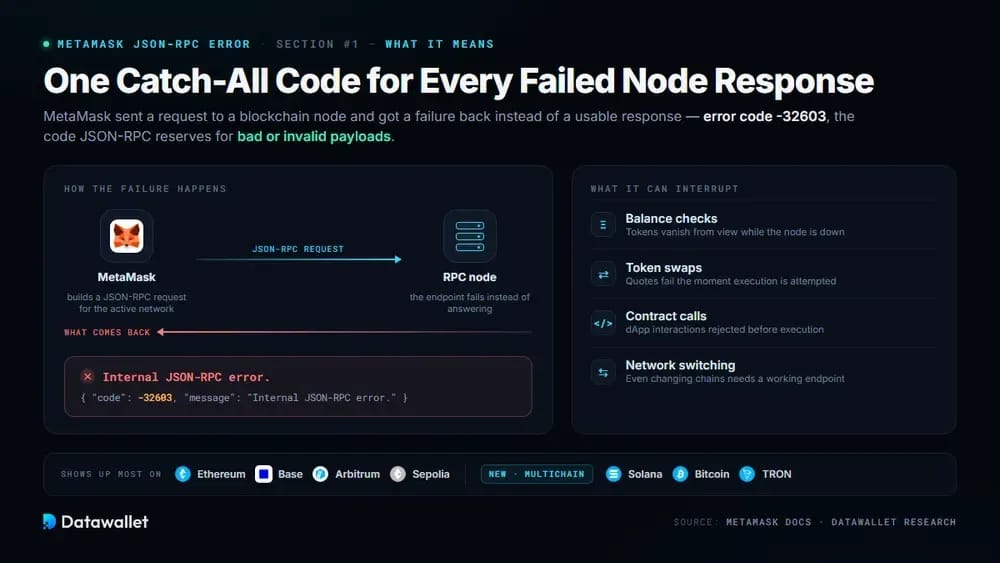
The Internal JSON-RPC error signals that MetaMask sent a request to a blockchain node and received a failure instead of a usable response. Under the hood it maps to error code -32603 in MetaMask's JSON-RPC reference, a catch-all the protocol reserves for bad or invalid payloads.
Because MetaMask relies on JSON-RPC for everything, the message can interrupt balance checks, token swaps, contract calls, and even network switching. It shows up most often on Ethereum, Layer 2 networks such as Base and Arbitrum, and the Sepolia testnet, where individual endpoints go down without warning.
Since MetaMask became a multichain wallet spanning Ethereum, Solana, Bitcoin, and TRON, the error has also started appearing on non-EVM requests that the older, Ethereum-only builds never made. The fixes below cover both the classic causes and the newer ones introduced by that redesign.
How to Fix Internal JSON-RPC Error
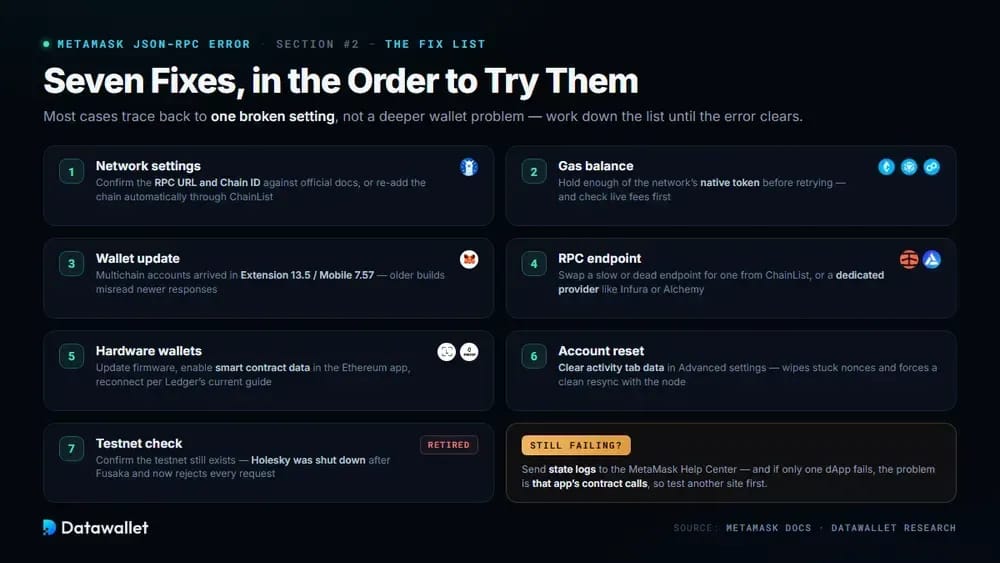
Most cases trace back to one broken setting rather than a deeper wallet problem, so working through the checks below in order resolves the error quickly.
Work through these seven fixes in order until the error clears:
- Network settings: Open the network menu, edit the failing chain, and confirm its RPC URL and Chain ID against official documentation, or re-add it automatically through ChainList.
- Gas balance: Hold enough of the network's native token, like ETH, BNB, or POL, before retrying, and check live fees with our Ethereum gas tracker first.
- Wallet update: Install the latest extension or mobile release, since MetaMask's multichain account architecture arrived in Extension 13.5 and Mobile 7.57, and older builds misread newer responses.
- RPC endpoint: Swap a slow or dead endpoint for an alternative from ChainList or a dedicated provider such as Infura or Alchemy, then retry the failed transaction.
- Hardware wallets: Update Ledger or Trezor firmware, enable smart contract data in the device's Ethereum app, and reconnect through the connection method Ledger's troubleshooting guide currently recommends.
- Account reset: Use Clear activity tab data in Advanced settings to wipe cached transaction history and stuck nonces, which forces MetaMask to resync cleanly with the node.
- Testnet check: Confirm the testnet you are targeting still exists, because Holesky was shut down after the Fusaka upgrade and its old endpoints now reject every request.
If every step fails, the MetaMask Help Center offers deeper diagnostics, including state logs that its support team can review directly. Persistent failures on a single dApp usually mean the problem sits with that application's contract calls rather than with your wallet, so test another site before escalating.
How to Properly Add an RPC Using ChainList
Manually typed RPC details remain the single most common trigger for this error, since one wrong character in a URL or Chain ID breaks every request the wallet sends afterward. ChainList removes that risk by maintaining verified endpoints for hundreds of networks and pushing them into MetaMask with one click.
We use the identical flow in our guide to adding HyperEVM to MetaMask, so the steps below apply to almost any EVM chain, from major Layer 2 networks to brand-new mainnets. Four steps take you from an empty network list to a verified connection.
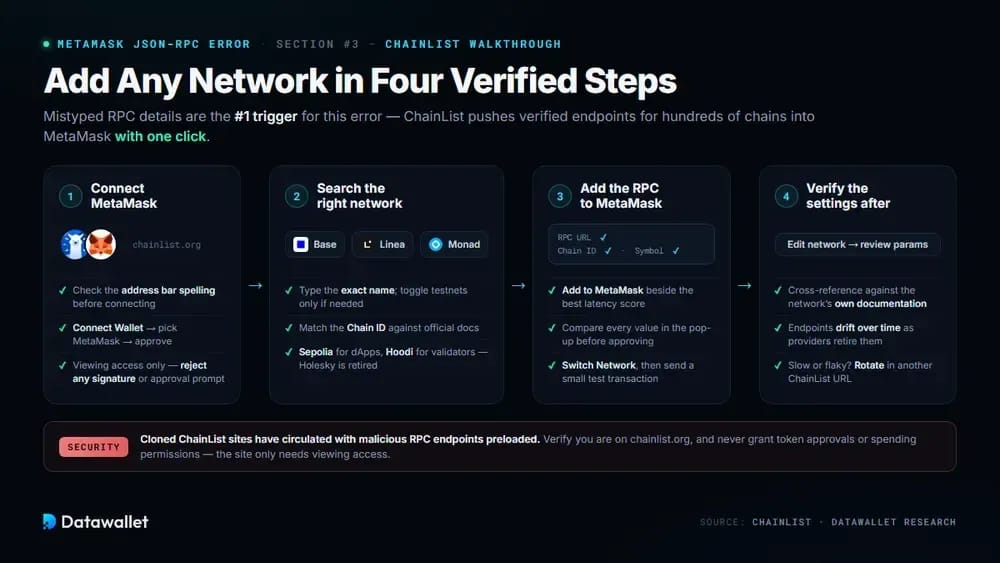
1. Connect MetaMask to ChainList
ChainList reads network parameters from a community-maintained registry, so connecting your wallet lets it write those verified details straight into MetaMask without any manual copying.
Here is how to link your wallet to the site:
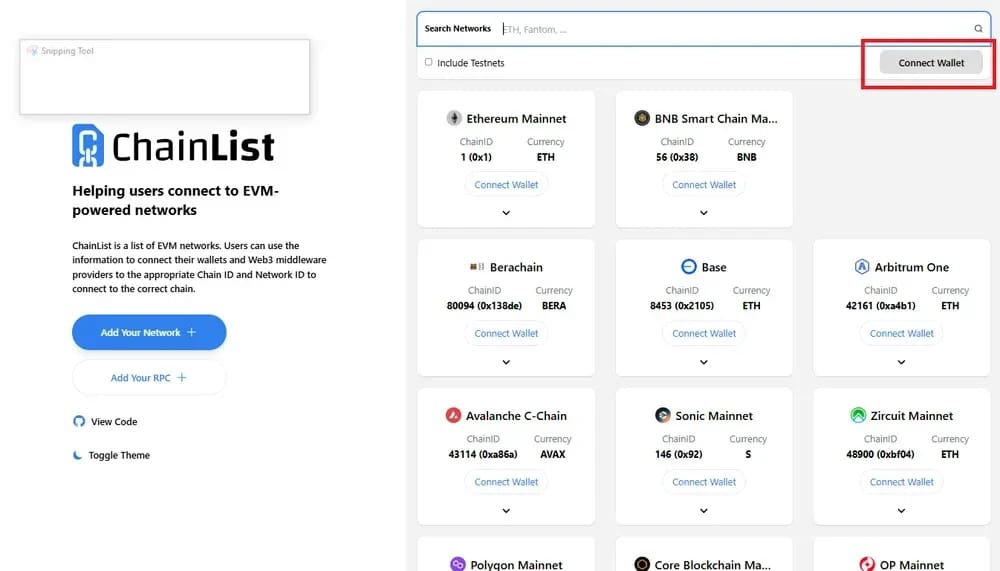
- Open ChainList: Go to chainlist.org and check the address bar spelling carefully before connecting, because cloned versions of the site have circulated with malicious RPC endpoints preloaded.
- Connect wallet: Click the Connect Wallet button in the top-right corner, pick MetaMask from the options, and approve the connection request that appears in the extension pop-up.
- Check permissions: The site only needs viewing access to push network details, so reject any prompt that requests signatures, token approvals, or spending permissions of any kind.
2. Search for the Correct Network
Most chains ship multiple versions, and mixing up a mainnet with its testnet leads to failed transactions, invisible balances, and fresh JSON-RPC errors within minutes.
Follow these checks to land on the right entry:
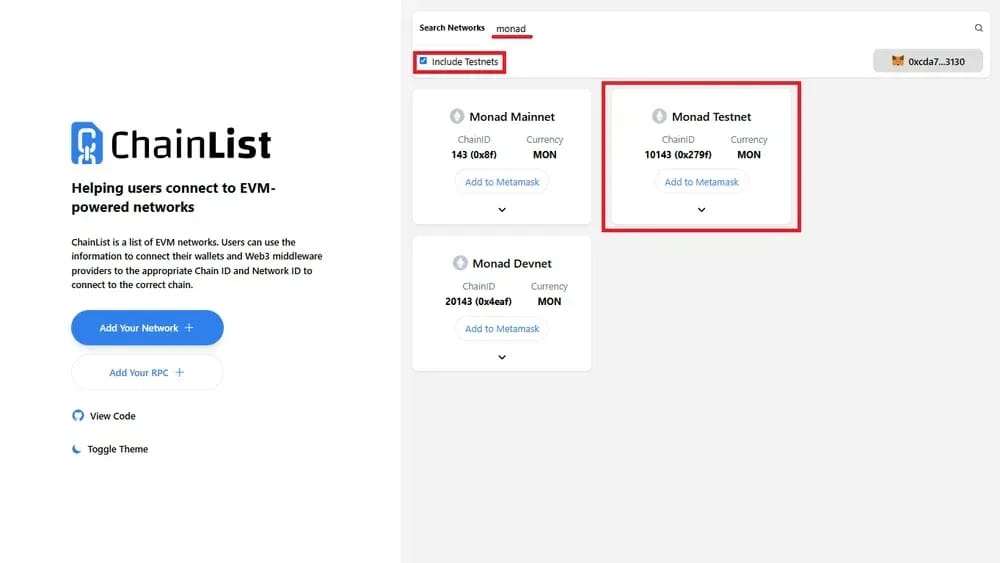
- Search precisely: Type the exact network name, whether that is Base, Linea, or a newer chain like Monad, and enable the testnets toggle only when you need one.
- Verify identifiers: Match the Chain ID shown against the project's official documentation, since scam networks sometimes reuse familiar names while pointing at completely different chains underneath.
- Mind testnets: For Ethereum testing, use Sepolia for dApps and Hoodi for validator work, because the Ethereum Foundation retired Holesky and its listings no longer function.
3. Add the RPC to MetaMask
Once the right network appears, ChainList hands the full configuration to MetaMask in a single prompt, which eliminates the typos that manual entry invites.
Complete the handoff with these three quick actions:
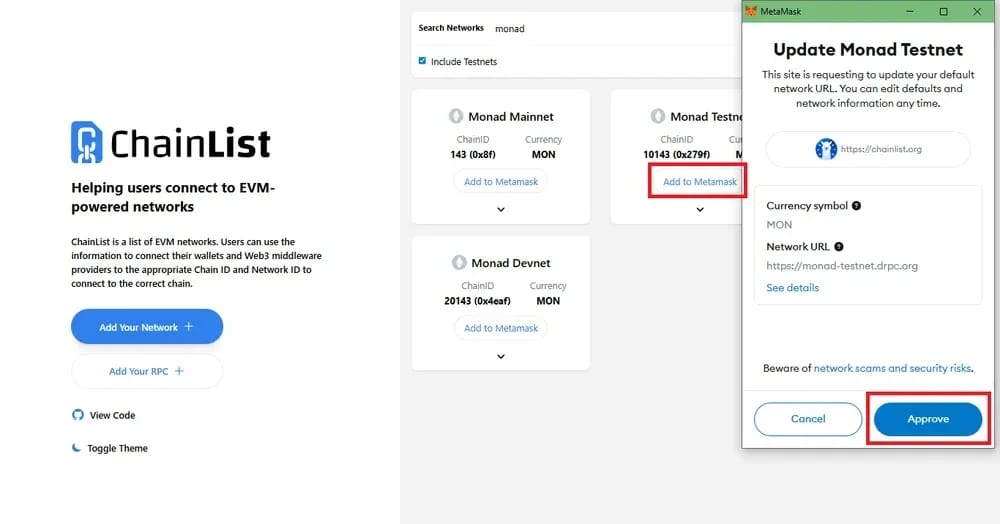
- Add network: Press Add to MetaMask beside the entry with the best latency score, since ChainList ranks each public endpoint by live measured speed and reliability.
- Review pop-up: Read the MetaMask window showing the RPC URL, Chain ID, currency symbol, and block explorer, then compare each value before granting your final approval.
- Switch over: Approve the addition and select Switch Network when prompted, which makes the new chain active immediately and ready for a small test transaction.
4. Verify the Settings Afterward
Even verified entries drift over time as providers retire endpoints, so a quick review inside MetaMask confirms everything landed correctly and still responds today.
Run this final check before moving real funds across:
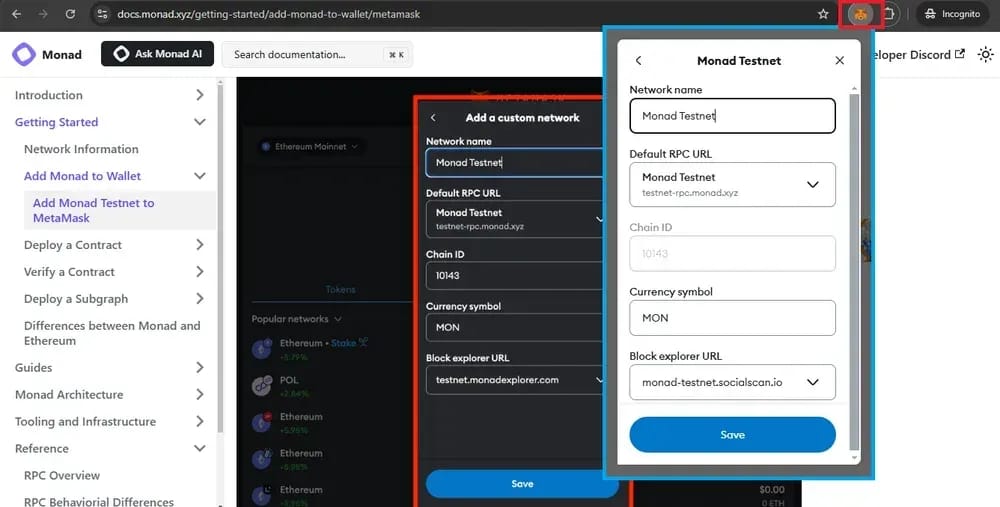
- Open settings: Head to the network selector, choose the newly added chain, and click Edit to display every stored parameter MetaMask will use for its requests.
- Cross-reference: Compare the RPC URL, Chain ID, and currency symbol against the network's own documentation rather than a third-party blog, screenshot, or unofficial Discord message.
- Rotate endpoints: If requests feel slow or fail intermittently, replace the URL with another ChainList option, since MetaMask supports multiple stored RPC URLs per network now.
Why Does the JSON-RPC Error Occur?
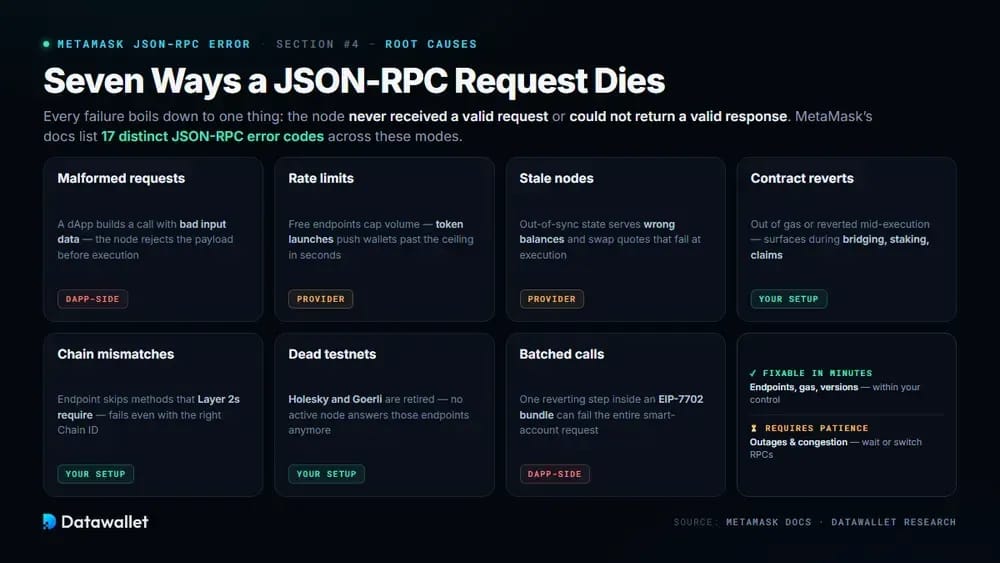
JSON-RPC failures boil down to one thing: the node either never received a valid request or could not return a valid response. MetaMask's developer documentation lists 17 distinct JSON-RPC error codes, and the internal variety sits alongside rate limits, parse errors, and rejected transactions in that table.
Understanding which failure mode you are hitting saves time, because each one points toward a different fix, from swapping endpoints to simply waiting out congestion.
These are the most common reasons JSON-RPC requests fail:
- Malformed requests: A dApp builds a contract call with bad input data or wrong parameters, so the node rejects the payload before it ever reaches execution.
- Rate limits: Free public endpoints and Infura's credit-based tiers cap request volume, and busy periods like token launches push wallets past those ceilings within a few seconds.
- Stale nodes: An out-of-sync node serves outdated chain state, producing wrong balances, stuck transactions, and swap quotes that fail the moment MetaMask tries to execute them.
- Contract reverts: A smart contract runs out of gas or reverts mid-execution, which MetaMask surfaces as an RPC failure during bridging, staking, or token airdrop claims.
- Chain mismatches: Some endpoints skip methods that Layer 2 networks require, so swaps or deployments fail on those chains even when the Chain ID is correct.
- Dead testnets: Requests aimed at retired test networks like Holesky or the older Goerli fail instantly, because no active nodes answer requests on those deprecated endpoints anymore.
- Batched calls: EIP-7702 smart account features bundle several actions into one transaction, and a single reverting step inside the batch can fail the entire bundled request.
Some of these sit within your control and some do not. Endpoint choice, gas balances, and software versions are fixable in minutes, while provider outages and network congestion simply require patience or a temporary switch to a different RPC until conditions recover.
How Recent MetaMask Updates Changed RPC Troubleshooting
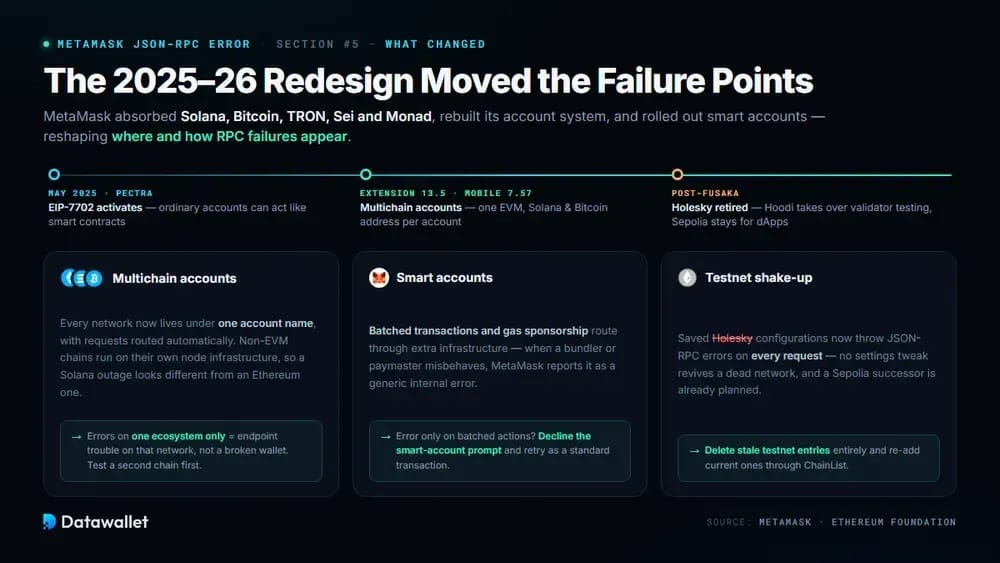
MetaMask looks very different from the wallet this error first plagued. Between 2025 and 2026 it absorbed Solana, Bitcoin, TRON, Sei, and Monad support, rebuilt its account system, and rolled out smart account upgrades, all of which reshaped where and how RPC failures appear.
Multichain Accounts Merge Every Network Into One
Since Extension 13.5, each MetaMask account bundles one EVM address, one Solana address, and one Bitcoin address under a single name, with the wallet routing requests automatically. A failure on one network no longer means your whole wallet is broken, so always test a second chain before assuming corruption.
Non-EVM chains use their own node infrastructure, so a Solana outage produces different symptoms from an Ethereum one even inside the same interface. When errors hit only one ecosystem, endpoint trouble on that specific network is the likely cause rather than anything wrong with your installation.
Smart Accounts Add a New Failure Surface
Ethereum's Pectra upgrade activated EIP-7702 in May 2025, letting ordinary MetaMask accounts temporarily behave like smart contracts for batched transactions and gas sponsorship. These bundled operations route through additional infrastructure, and when a bundler or paymaster misbehaves, the wallet often reports it as a generic internal error.
If the error only appears when a dApp requests a batched action or account upgrade, decline the smart account prompt and retry as a standard transaction. That isolates whether the problem lives in the delegation flow or in the underlying RPC connection you would troubleshoot normally.
Ethereum's Testnet Shake-Up Broke Old Configurations
The Ethereum Foundation retired Holesky after the Fusaka upgrade finalized, replacing it with Hoodi for validator testing while recommending Sepolia for smart contract work. Any Holesky configuration still saved in MetaMask now throws JSON-RPC errors on every request, and no settings tweak will revive it.
Developers should delete stale testnet entries entirely and re-add current ones through ChainList. Sepolia remains the default choice for dApp testing, while a Sepolia successor is already planned, so expect this cycle of testnet deprecations to keep producing phantom RPC errors every few years.
How to Read the Error Code Behind the Message
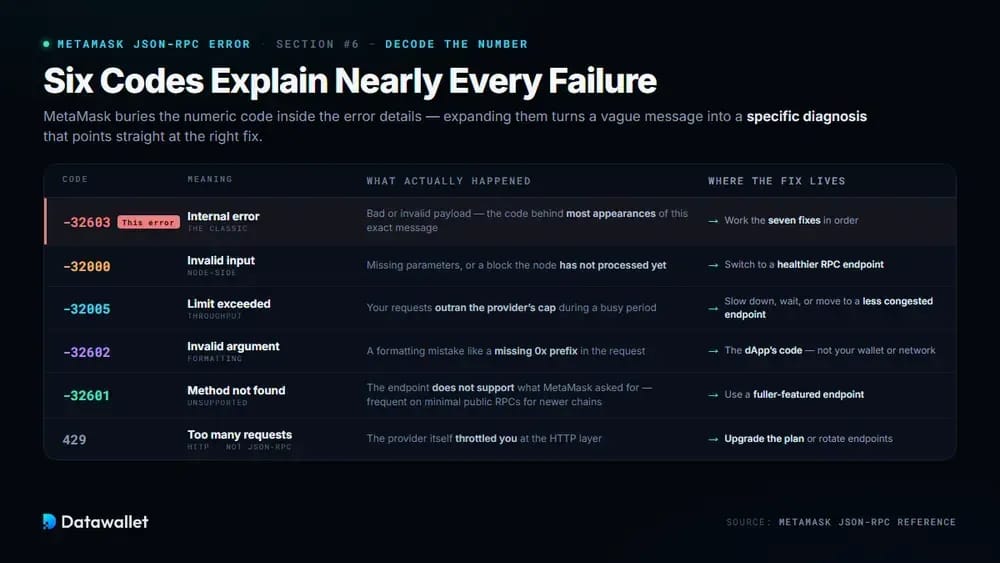
MetaMask often buries the numeric code inside the error details, but expanding them tells you exactly which category of failure occurred. Checking the code against MetaMask's reference table turns a vague message into a specific diagnosis and usually points straight at the right fix.
A handful of codes account for nearly every failure users report, so recognizing them on sight makes troubleshooting dramatically faster than guessing blindly each time.
Here are the codes worth memorizing and their meanings:
- Code -32603: The classic internal error, triggered by a bad or invalid payload, and the code sitting behind most appearances of this exact MetaMask error message.
- Code -32000: Invalid input, usually missing parameters or a block the node has not processed yet, which often clears after switching to a healthier RPC endpoint.
- Code -32005: Limit exceeded, meaning your requests outran the provider's cap, so slow down, wait a minute, or simply move to a less congested public endpoint.
- Code -32602: Invalid argument, typically a formatting mistake like a missing 0x prefix, which points at the dApp's code rather than your own wallet or network configuration.
- Code -32601: Method not found, meaning the endpoint does not support what MetaMask asked for, a frequent problem on minimal public RPC endpoints serving newer chains.
- Code 429: An HTTP throughput error rather than a JSON-RPC one, showing the provider itself throttled you, which upgraded plans or endpoint rotation both readily solve.
How to Avoid RPC Issues in MetaMask
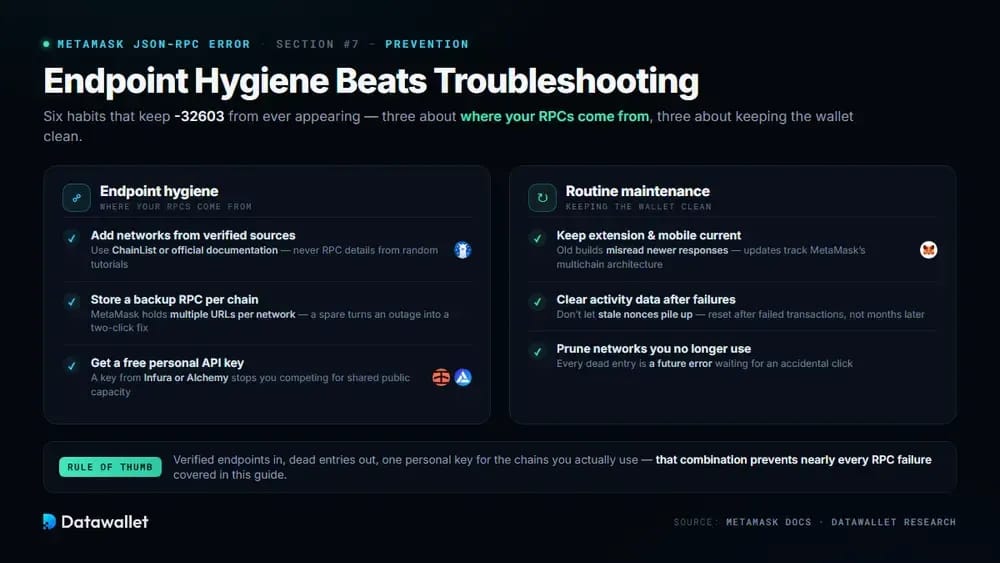
Prevention mostly comes down to endpoint hygiene. Add networks through ChainList or official documentation instead of random tutorials, store a backup RPC URL for every chain you use regularly, and consider a free personal key from a provider like Infura or Alchemy so you stop competing for shared public capacity.
Routine maintenance matters just as much. Keep the extension and mobile app current, clear activity data after failed transactions rather than letting stale errors pile up, and prune networks you no longer touch, since every dead entry is a future error waiting for an accidental click.
Final Thoughts
The Internal JSON-RPC error looks alarming but almost never signals lost funds, just a broken conversation between your wallet and a node. Verifying network details, swapping endpoints, funding gas, and updating software resolves the overwhelming majority of cases without ever needing support intervention.
As MetaMask keeps expanding across chains, knowing how to manage RPC connections yourself is becoming a core wallet skill. Bookmark ChainList, learn the error codes above, and if you are weighing alternatives, our guide to the best crypto wallets compares how competing options handle the same problems.